
Last updated on
Nov 9, 2026

Donovan Catholic Table Seating Form Junior Prom 2012-2026 free printable template
We are not affiliated with any brand or entity on this form

Fill out
Complete the form online in a simple drag-and-drop editor.

eSign
Add your legally binding signature or send the form for signing.

Share
Share the form via a link, letting anyone fill it out from any device.

Export
Download, print, email, or move the form to your cloud storage.
Why pdfFiller is the best tool for your documents and forms


End-to-end document management
From editing and signing to collaboration and tracking, pdfFiller has everything you need to get your documents done quickly and efficiently.
Accessible from anywhere
pdfFiller is fully cloud-based. This means you can edit, sign, and share documents from anywhere using your computer, smartphone, or tablet.
Secure and compliant
pdfFiller lets you securely manage documents following global laws like ESIGN, CCPA, and GDPR. It's also HIPAA and SOC 2 compliant.
What is Donovan Catholic Table Seating Form Junior Prom
The Junior Prom 2012 Table Seating Form is an educational document used by high school students to request their preferred seating arrangements for the prom.
pdfFiller scores top ratings on review platforms




Who needs Donovan Catholic Table Seating Form Junior Prom?
Explore how professionals across industries use pdfFiller.

Donovan Catholic Table Seating Form Junior Prom is needed by:
-
High school students attending the prom
-
Prom committee members organizing the event
-
Parents helping students with seating preferences
-
School administrators managing event logistics
-
Teachers who need to approve seating arrangements
-
Event coordinators overseeing the prom planning
Comprehensive Guide to Donovan Catholic Table Seating Form Junior Prom
What is the Junior Prom 2012 Table Seating Form?
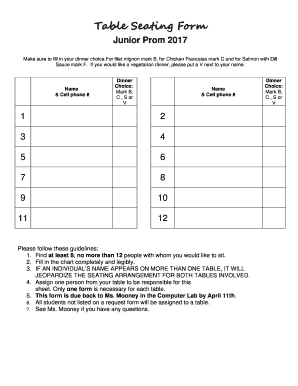
The Junior Prom 2012 Table Seating Form is a crucial document for high school students attending prom. This form serves the purpose of recording essential details, such as names, entrée choices, and cell phone numbers, which are necessary for effective table seating arrangements. Proper use of the junior prom table seating form ensures that each student is seated appropriately at the event, enhancing their overall experience.
Purpose and Benefits of the Junior Prom Table Seating Form
This form is essential in the prom planning process as it streamlines the seating arrangements, promoting better organization and enjoyment during the event. By submitting the prom seating request form, students can communicate their preferences clearly, which aids event coordinators in making informed decisions about table placements. Benefits also include reduced last-minute seating conflicts that can disrupt the evening.
Who Needs to Fill Out the Junior Prom 2012 Table Seating Form?
The audience for this form primarily consists of high school students who plan to attend the junior prom. Each student must be included on the form to ensure accurate seating arrangements. Failing to submit the form could result in students being randomly assigned to tables, impacting their experience, and possibly leading to seating with unwanted companions.
Important Guidelines for Completing the Junior Prom Table Seating Form
To ensure a smooth submission process, students should follow these guidelines when filling out the junior prom table seating form:
-
Clearly write names, entrée choices, and cell phone numbers.
-
Check that all information is legible and complete.
-
Note the submission deadline to avoid any penalties for late entries.
Completing the table assignment form accurately will prevent delays and ensure accurate seating arrangements for all attendees.
How to Fill Out the Junior Prom Table Seating Form Online
Students can conveniently complete the form digitally using pdfFiller. Follow these steps:
-
Access the form through pdfFiller.
-
Fill in the required information, including names and entrée choices.
-
Save your progress and edit if needed.
-
eSign the document to confirm submission.
This user-friendly platform enhances the experience of filling out the prom organization form, making it quick and efficient.
Submission Methods for the Junior Prom Table Seating Form
Students have several options for submitting their completed table seating forms:
-
Print and mail the form to Ms. Mooney.
-
Submit the form online through pdfFiller.
Ensure you confirm receipt of the completed form and follow up as needed to track submissions, maintaining good communication with event organizers.
Common Mistakes to Avoid When Completing the Junior Prom Table Seating Form
Avoid these frequent errors to ensure a successful submission:
-
Overlooking any required fields.
-
Submitting the form after the deadline.
Double-check all information for accuracy and adhere to submission guidelines to avoid unnecessary delays.
Security and Compliance Regarding the Junior Prom Table Seating Form
pdfFiller prioritizes the safety of sensitive information through robust security measures, including encryption for document management. Compliance with privacy regulations, such as HIPAA and GDPR, underscores our commitment to protecting student data while handling forms.
Benefits of Using pdfFiller for Your Junior Prom Table Seating Form
Utilizing pdfFiller for the Junior Prom table seating form offers several advantages:
-
Easy-to-use interface for filling forms.
-
Capabilities for editing and sharing documents.
These features streamline form management and submission, ensuring students enjoy a hassle-free prom experience.
Next Steps After Submitting the Junior Prom Table Seating Form
After submitting the prom seating form, students should:
-
Await confirmation of receipt from the event coordinators.
-
Know how to correct or make amendments if necessary.
Taking proactive steps will help students manage their prom experience and ensure that all arrangements are in place for a memorable night.
How to fill out the Donovan Catholic Table Seating Form Junior Prom
-
1.Access the Junior Prom 2012 Table Seating Form on pdfFiller by searching for the form title or by using a direct link provided by your school.
-
2.Once the form is open, navigate through the document to locate the blank fields for names, entrée choices, and cell phone numbers.
-
3.Before starting to fill out the form, gather all necessary information including your name, your guests' names, their entrée preferences, and relevant cell phone numbers.
-
4.Begin filling in the names for each table attendee in the designated field, ensuring all entries are spelled correctly.
-
5.Continue by selecting the preferred entrées from the provided options, making sure that each guest’s choice is logged next to their name.
-
6.Next, enter the cell phone numbers for each person listed on the form; double-check for accuracy to avoid discrepancies during the event.
-
7.Review the completed form carefully to confirm all required fields are filled out completely and legibly.
-
8.Once satisfied with the information provided, save your progress or download the completed form in your preferred format to keep a copy for your records.
-
9.Finally, submit the form through pdfFiller by using the 'Submit' option or follow any submission guidelines provided by your school to ensure it reaches Ms. Mooney by the deadline.

What is the deadline for submitting the Junior Prom Table Seating Form?
The deadline for submitting the Junior Prom Table Seating Form is specified by your school. Make sure to check communications from Ms. Mooney or the school administration for exact dates to avoid missing out on your preferred seating.
Do I need to submit the form if I am attending the prom with a date?
Yes, even if you have a date, it's essential to submit the form to indicate your seating preferences. This ensures that seating arrangements can accommodate all guests appropriately.
What should I do if I make a mistake on my form?
If you make a mistake, you can easily edit the form on pdfFiller before submitting. Simply click on the field you want to correct, make your changes, and then review the entire form for accuracy.
Can I submit the form electronically?
Yes, you can submit the form electronically through pdfFiller. Be sure to follow any specific submission instructions provided by your school after completing the form on the platform.
What information do I need before filling out the form?
Before you fill out the form, gather the full names of all attendees, their entrée choices, and their cell phone numbers. This will streamline the completion process and ensure accuracy.
Who should I contact if I have questions about the form?
For any questions regarding the Junior Prom Table Seating Form, you should contact Ms. Mooney or a member of the prom committee for assistance and clarification.
What happens if I do not submit the form?
If you do not submit the form, you will be assigned to a table by the school, which may not reflect your seating preferences. It is best to complete and submit the form on time.
Related Content
Related Forms



Related Catalogs
Get the latest insights from our blog



If you believe that this page should be taken down, please follow our DMCA take down process
here
.
This form may include fields for payment information. Data entered in these fields is not covered by PCI DSS compliance.