
Last updated on
Oct 2, 2026

Averitt Express OSD-F0005 2006-2026 free printable template
pdfFiller is not affiliated with any government organization

Fill out
Complete the form online in a simple drag-and-drop editor.

eSign
Add your legally binding signature or send the form for signing.

Share
Share the form via a link, letting anyone fill it out from any device.

Export
Download, print, email, or move the form to your cloud storage.
Why pdfFiller is the best tool for your documents and forms


End-to-end document management
From editing and signing to collaboration and tracking, pdfFiller has everything you need to get your documents done quickly and efficiently.
Accessible from anywhere
pdfFiller is fully cloud-based. This means you can edit, sign, and share documents from anywhere using your computer, smartphone, or tablet.
Secure and compliant
pdfFiller lets you securely manage documents following global laws like ESIGN, CCPA, and GDPR. It's also HIPAA and SOC 2 compliant.
What is Averitt Express OSD-F0005
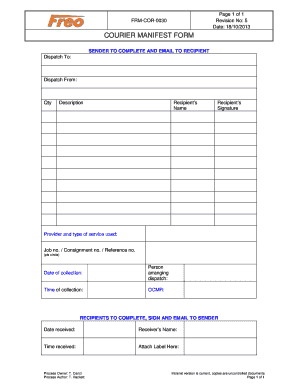
The Averitt Express OSD-F0005 is a document used by shipping and logistics personnel to manage service requests effectively.
pdfFiller scores top ratings on review platforms




Who needs Averitt Express OSD-F0005?
Explore how professionals across industries use pdfFiller.

Averitt Express OSD-F0005 is needed by:
-
Shipping companies requiring service adjustments
-
Logistics managers handling client requests
-
Customer service representatives at logistics firms
-
Individuals involved in freight transportation
-
Business owners utilizing delivery services
Comprehensive Guide to Averitt Express OSD-F0005
What is the Averitt Express OSD-F0005?
The Averitt Express OSD-F0005 is a vital document in the shipping and logistics sectors. This electronic form plays an essential role in documenting and processing express shipments. Its user-friendly design is tailored for businesses, making the management of express shipping more efficient.
Purpose and Benefits of the Averitt Express OSD-F0005
Users rely on the Averitt Express OSD-F0005 for several key benefits. By utilizing this form, businesses can streamline their shipping processes, enhancing tracking efficiency. Furthermore, the form assists in ensuring regulatory compliance within the shipping and logistics framework. Proper documentation can also lead to significant cost savings, making it a valuable tool for shippers.
Who Needs the Averitt Express OSD-F0005?
The target audience for the Averitt Express OSD-F0005 includes various businesses and individuals engaged in shipping activities. This form is particularly necessary for those who require precise documentation for express shipments, including retailers, manufacturers, and logistics companies. Industries that frequently use this form often include e-commerce, automotive, and healthcare.
How to Fill Out the Averitt Express OSD-F0005 Online (Step-by-Step)
To fill out the Averitt Express OSD-F0005 using pdfFiller, follow these steps:
-
Access the pdfFiller platform and locate the Averitt Express OSD-F0005 form.
-
Utilize the fillable fields to enter the required shipment information accurately.
-
Edit any sections as needed using the editing tools available.
-
Sign the document electronically using the eSigning feature.
-
Review all entries to ensure accuracy before proceeding to submission.
Common Errors and How to Avoid Them
When filling out the Averitt Express OSD-F0005, users often make some common mistakes. Typical errors include incomplete fields, incorrect shipment details, and failing to eSign the document. To prevent these mistakes, double-check all entries for accuracy and completeness. It is essential to review the entire form before submission to avoid complications.
Submission Methods for the Averitt Express OSD-F0005
Once completed, several submission methods are available for the Averitt Express OSD-F0005:
-
Online submission through pdfFiller.
-
Mailing the completed form to the specified address.
Selecting the appropriate submission method depends on your immediate needs and tracking preferences. After submitting, you can monitor your submission status for confirmation.
Security and Compliance for the Averitt Express OSD-F0005
Security is paramount when handling the Averitt Express OSD-F0005. pdfFiller employs advanced security measures, including 256-bit encryption, ensuring all sensitive information remains protected. Compliance with regulatory standards like HIPAA and GDPR further enhances user confidence in the handling of shipping documents. The platform maintains user data privacy throughout the form completion process.
How to Download and Save the Averitt Express OSD-F0005 PDF
To save the Averitt Express OSD-F0005 for personal records, follow these steps:
-
Complete the form on pdfFiller.
-
Select the option to download the completed form.
-
Choose your preferred file format, such as PDF or DOCX.
-
Organize saved forms in a dedicated folder for easy access in the future.
What Happens After You Submit the Averitt Express OSD-F0005?
After submission, it is helpful to understand what to expect. Generally, processing times can vary, and users should anticipate next steps in the shipping process. Tracking the status of your submission is crucial to ensuring everything proceeds smoothly. If any mistakes were made, options for correcting or amending the submission are commonly available.
Experience Seamless Document Management with pdfFiller
pdfFiller simplifies the process of filling out forms like the Averitt Express OSD-F0005. The platform not only offers easy form filling but also includes additional features such as collaboration tools and document organization capabilities. Users are encouraged to leverage pdfFiller’s capabilities for their document management needs.
How to fill out the Averitt Express OSD-F0005
-
1.Begin by visiting the pdfFiller website and log in to your account or create a new one if you do not have an account yet.
-
2.Once logged in, use the search bar to locate the Averitt Express OSD-F0005 form.
-
3.Click on the form to access it, and you will see an interactive version allowing you to fill it out online.
-
4.Before filling in the form, gather all necessary information, including shipment details, service requirements, and contact information.
-
5.Navigate through the fields, clicking on each to enter your information. Use tab or arrow keys to move between fields efficiently.
-
6.Review the information you have entered for accuracy and completeness. Ensure that all required fields are filled in correctly.
-
7.Once satisfied with your entries, finalize the form by clicking on the 'Finish' button to save your progress.
-
8.You can then download the completed form to your device, share it via email, or submit it directly through pdfFiller.

Who needs to fill out the Averitt Express OSD-F0005 form?
The Averitt Express OSD-F0005 form is needed by shipping and logistics personnel, including managers, customer service employees, and business owners involved in freight transportation. Ensure you are engaged in relevant logistics operations.
What information do I need before completing the form?
Gather details such as shipment-related information, service request specifications, and your contact information. This ensures a smooth filling process and helps avoid errors.
How do I submit the completed form?
After filling the Averitt Express OSD-F0005 form on pdfFiller, you have options to download for personal use, share via email, or submit directly through the platform. Choose the method that suits your needs best.
Are there any common mistakes to avoid when filling this form?
Common mistakes include leaving required fields blank, providing inaccurate shipment details, and failing to review for errors. Always double-check your information for correctness.
What is the processing time for service requests submitted via this form?
Processing times can vary depending on the nature of the request and shipping demands. It is advisable to follow up your submission to receive timely updates on your service request.
Is there a deadline for submitting the Averitt Express OSD-F0005 form?
There may be specific deadlines based on the type of service requested. Always check for any urgent requests that need prompt action to avoid delays.
What should I do if I encounter issues while filling out the form?
If you encounter issues during the completion of the form on pdfFiller, consult the help resources provided on the site or consider reaching out to customer support for assistance.
Related Content
Related Forms





Related Catalogs
Get the latest insights from our blog


If you believe that this page should be taken down, please follow our DMCA take down process
here
.
This form may include fields for payment information. Data entered in these fields is not covered by PCI DSS compliance.