
Last updated on
Oct 31, 2026

Get the free Weekly Sales Activity Report Template
We are not affiliated with any brand or entity on this form

Fill out
Complete the form online in a simple drag-and-drop editor.

eSign
Add your legally binding signature or send the form for signing.

Share
Share the form via a link, letting anyone fill it out from any device.

Export
Download, print, email, or move the form to your cloud storage.
Why pdfFiller is the best tool for your documents and forms


End-to-end document management
From editing and signing to collaboration and tracking, pdfFiller has everything you need to get your documents done quickly and efficiently.
Accessible from anywhere
pdfFiller is fully cloud-based. This means you can edit, sign, and share documents from anywhere using your computer, smartphone, or tablet.
Secure and compliant
pdfFiller lets you securely manage documents following global laws like ESIGN, CCPA, and GDPR. It's also HIPAA and SOC 2 compliant.
What is Sales Activity Report
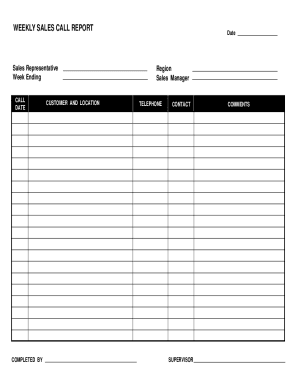
The Weekly Sales Activity Report Template is a business form used by salespersons to track and report their weekly sales activities.
pdfFiller scores top ratings on review platforms




Who needs Sales Activity Report?
Explore how professionals across industries use pdfFiller.

Sales Activity Report is needed by:
-
Sales professionals looking to optimize their selling strategies
-
Sales managers needing a standardized reporting tool
-
Businesses aiming to analyze sales performance
-
Financial analysts reviewing sales data
-
Real estate agents tracking property sales activity
-
Entrepreneurs managing sales teams
Comprehensive Guide to Sales Activity Report
What is the Weekly Sales Activity Report Template?
The Weekly Sales Activity Report Template serves as a critical tool for salespersons to track and document their weekly sales efforts. This template is designed to streamline the documentation process by including essential fields such as salesperson name, week ending date, total hours worked, number of sales, and revenue generated. Tracking weekly sales activities empowers sales teams to assess performance more effectively and refine their strategies over time.
Incorporating the weekly sales activity report template into your routine can vastly improve the management of sales data and overall performance assessments, ultimately leading to enhanced sales outcomes.
Purpose and Benefits of Using the Weekly Sales Activity Report Template
This template simplifies the organization of sales data, making it easier for salespersons to compile reports that reflect their weekly performance. By utilizing a sales report template, businesses can evaluate sales performance comprehensively and identify emerging trends. Effective communication of sales status to management is also facilitated through the use of this standardized reporting tool.
Implementing a weekly sales report form ensures clarity in reporting and aids teams in aligning their efforts toward achieving sales targets.
Key Features of the Weekly Sales Activity Report Template
The Weekly Sales Activity Report Template includes an array of functional features to enhance usability. Key sections involve a detailed breakdown of fields such as week ending dates, sales totals, and revenue metrics. With fillable options integrated into the template, users can easily input data for one or multiple properties, making it an ideal choice for diverse sales activities.
Moreover, this weekly sales tracking template’s design allows for quick updates and helps maintain thorough documentation of sales efforts.
Who Needs the Weekly Sales Activity Report Template?
This template is essential for various stakeholders within the sales domain. It is particularly beneficial for salespersons seeking to monitor their individual performance while also being a valuable asset for sales managers tracking team productivity. Furthermore, businesses aiming to standardize their reporting processes for sales performance will find this tool indispensable.
In essence, anyone involved in sales, from individual contributors to management, can leverage the business sales activity report effectively.
How to Fill Out the Weekly Sales Activity Report Template Online
Filling out the Weekly Sales Activity Report Template using pdfFiller is a straightforward process. Follow these steps to ensure accurate completion:
-
Open the template on pdfFiller.
-
Input your name and relevant details in the designated fields.
-
Fill out the total hours, sales numbers, and revenue in the respective sections.
-
Utilize tools for eSigning and digital submission.
By following these steps, users can efficiently download and save the weekly sales activity report template pdf while ensuring high accuracy in the reported data.
Common Errors and How to Avoid Them When Using the Template
To maximize the effectiveness of the Weekly Sales Activity Report Template, users should be aware of common mistakes that can hinder accurate reporting. Frequent errors include incomplete fields and miscalculations in totals. To mitigate these issues, consider implementing the following strategies:
-
Double-check all entries before submitting the report.
-
Review calculations and totals for accuracy.
-
Ensure all necessary fields are completed to maintain report completeness.
Security and Compliance When Handling Sales Activity Reports
Handling sales activity reports requires strict adherence to security and compliance standards. pdfFiller employs robust security measures, including encryption, to protect sensitive sales information. Maintaining data privacy is paramount, alongside compliance with regulations governing the handling of sales data.
Organizations must prioritize the retention and protection of sensitive information to ensure continued compliance and security regarding sales activity reports.
How to Submit the Weekly Sales Activity Report Template
Submitting the completed Weekly Sales Activity Report Template can be accomplished through various methods. Users should consider the following submission methods:
-
Email the report directly to management.
-
Print and submit a hard copy if required.
It is also crucial to be aware of timing and deadlines to ensure timely submission. Additionally, verifying receipt or tracking submission status will help maintain effective communication with relevant parties.
Maximizing the Use of Your Weekly Sales Activity Report Template
The Weekly Sales Activity Report Template can be a powerful tool for driving business success when used creatively. Explore ideas for integrating reported data into sales meetings or strategy sessions to enhance decision-making. Consistent updates and reviews of sales activities are vital for maintaining alignment with broader business goals or KPIs.
Utilizing the weekly sales tracking template in this manner ensures that the organization continues to foster a culture of performance awareness and improvement.
Encouragement to Utilize pdfFiller for Your Weekly Sales Activity Report Needs
For effortless management of your reporting tasks, pdfFiller offers a range of features that enhance the user experience. The platform simplifies form filling and editing, while also providing secure options for working with sensitive documents. Users can trust in pdfFiller’s robust security measures and benefit from real user testimonials that highlight the effectiveness of using pdfFiller for sales activity reports.
How to fill out the Sales Activity Report
-
1.To access the Weekly Sales Activity Report Template on pdfFiller, visit the pdfFiller website and use the search function to locate the form.
-
2.Once located, click on the template to open it in the pdfFiller interface, making sure you are logged into your account.
-
3.Before you start filling in the form, gather necessary information including your name, property details, week ending date, total hours worked, the number of sales made, and revenue generated for that week.
-
4.Begin by entering your name in the designated 'Salesperson:' field to identify who is filling out the report.
-
5.Fill in the details of the property you worked on, ensuring all pertinent information is accurately detailed in the 'Property:' section.
-
6.Next, enter the week's ending date to specify the reporting period for your sales activities.
-
7.Continue by inputting your total hours worked during the week, which should reflect the actual time spent on sales activities.
-
8.Enter the number of sales you successfully completed in the 'Number of Sales' field to provide an overview of your productivity.
-
9.Lastly, fill in the 'Revenue Generated' field with the total amount earned from the sales made during the week, providing a clear financial picture.
-
10.Review all information for accuracy, ensuring that every section is correctly completed without any errors.
-
11.After verifying your entries, you can finalize the form on pdfFiller, looking out for any highlighted fields that may require attention.
-
12.Once finalized, save your completed report, and choose whether to download the document as a PDF, print it directly, or submit it using your preferred method.

Who can use the Weekly Sales Activity Report Template?
This template is ideal for sales professionals, managers, and business owners who need to track weekly sales activities and performance.
What is the deadline for submitting the Weekly Sales Activity Report?
While specific deadlines may vary by organization, it is recommended to complete the report before the end of each week to maintain accurate records.
How can I submit the completed Weekly Sales Activity Report Template?
You can submit the completed report through email, by printing and handing it over in-person, or uploading it to your organization's reporting system, depending on your company’s procedures.
What information do I need to complete the template?
You will need your name, property details, week ending date, total hours worked, number of sales completed, and revenue earned to fill out the template accurately.
What common mistakes should I avoid when filling out the report?
Common mistakes include omitting necessary information, entering inaccurate figures, and not reviewing the completed report for errors before submission.
Are there any fees associated with using pdfFiller for this form?
Using pdfFiller may involve subscription fees, but creating and managing the Weekly Sales Activity Report Template typically does not incur additional costs unless specified.
How can I ensure the accuracy of my sales figures?
Maintain organized records throughout the week, noting all sales and transactions. Regular updates will help ensure the accuracy of the information you provide in the report.
Related Forms

Related Catalogs
Get the latest insights from our blog


If you believe that this page should be taken down, please follow our DMCA take down process
here
.
This form may include fields for payment information. Data entered in these fields is not covered by PCI DSS compliance.