
Last updated on
Oct 2, 2026

Costco Work Restrictions Form 2008-2026 free printable template
pdfFiller is not affiliated with any government organization

Fill out
Complete the form online in a simple drag-and-drop editor.

eSign
Add your legally binding signature or send the form for signing.

Share
Share the form via a link, letting anyone fill it out from any device.

Export
Download, print, email, or move the form to your cloud storage.
Why pdfFiller is the best tool for your documents and forms


End-to-end document management
From editing and signing to collaboration and tracking, pdfFiller has everything you need to get your documents done quickly and efficiently.
Accessible from anywhere
pdfFiller is fully cloud-based. This means you can edit, sign, and share documents from anywhere using your computer, smartphone, or tablet.
Secure and compliant
pdfFiller lets you securely manage documents following global laws like ESIGN, CCPA, and GDPR. It's also HIPAA and SOC 2 compliant.
What is Costco Work Restrictions Form
The Work Restrictions Form is a medical document used by employees and healthcare providers to document and manage employee work restrictions due to medical conditions.
pdfFiller scores top ratings on review platforms




Who needs Costco Work Restrictions Form?
Explore how professionals across industries use pdfFiller.

Costco Work Restrictions Form is needed by:
-
Employees needing to outline medical work restrictions.
-
Healthcare providers verifying and providing detailed restrictions.
-
Human Resources personnel managing workplace safety and employee health.
-
Safety officers ensuring compliance with health regulations.
-
Legal advisors reviewing documentation for workplace accommodations.
Comprehensive Guide to Costco Work Restrictions Form
What is the Work Restrictions Form?
The Work Restrictions Form is a crucial document that outlines the work restrictions imposed on employees due to medical conditions. This form is significant as it captures vital information regarding an employee's ability to perform specific tasks while ensuring workplace safety and compliance. Typically, it is used during situations when an employee experiences health issues that may affect job performance, facilitating necessary adjustments.
Employees and healthcare providers must provide key inputs on this form, ensuring that all required details are accurately documented. The collaboration between employees and healthcare professionals is essential for achieving the intended purpose of the Work Restrictions Form.
Purpose and Benefits of the Work Restrictions Form
The primary purpose of the Work Restrictions Form is to manage workplace accommodations effectively while adhering to health and safety regulations. By documenting an employee's restrictions, this form assists in complying with workplace safety and health standards, which is vital for maintaining a healthy work environment.
Furthermore, it facilitates clear communication between employees and employers regarding health needs, fostering mutual understanding. The use of this form also offers legal protection for both parties, ensuring that employees receive necessary accommodations while safeguarding employers from potential liability.
Key Features of the Work Restrictions Form
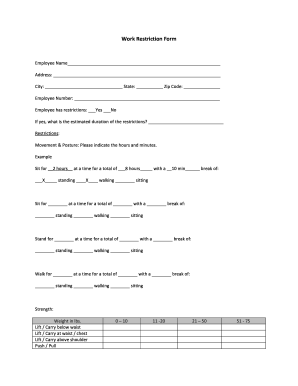
The Work Restrictions Form includes several essential elements that enhance its usability. Notable features comprise fillable fields for critical information such as the employee's name and signature, making it easier for users to provide necessary details.
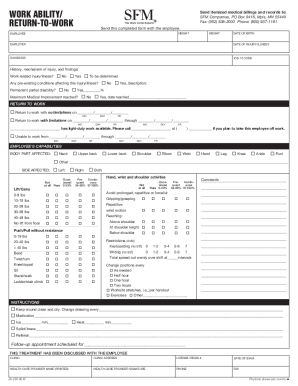
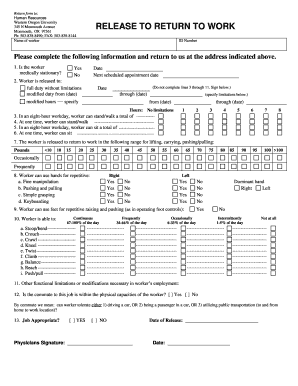
Additionally, the form contains sections dedicated to posture, strength, mental demands, and environmental conditions, allowing for a comprehensive assessment of an employee's capabilities. Clear instructions ensure that users fill out the form accurately, minimizing the risk of errors.
Who Needs the Work Restrictions Form?
The Work Restrictions Form is primarily utilized by various stakeholders, including employees with medical conditions that necessitate accommodations. These employees rely on the form to ensure their work environment aligns with their health needs.
Healthcare providers are also integral to the process as they verify the work restrictions set forth in the form. Lastly, employers benefit from using this form, as it aids in ensuring compliance with health and safety regulations, thereby promoting a safe workplace.
How to Fill Out the Work Restrictions Form Online (Step-by-Step)
Completing the Work Restrictions Form online is straightforward. Follow these steps for a smooth process:
-
Access the form through pdfFiller.
-
Edit and fill in the required fields, ensuring all sections are completed.
-
Review the information provided in each field.
-
Add the necessary signatures and dates to validate the form.
-
Save your updates and prepare for submission.
When filling out the form, pay attention to the requirements for each field to ensure accuracy and compliance with workplace policies.
Review and Validation Checklist for the Work Restrictions Form
Before submitting the Work Restrictions Form, it is crucial to review and validate the document. Here are common errors to avoid:
-
Ensure all mandatory fields are filled out.
-
Double-check the accuracy of the signatures and dates provided.
-
Verify that the restrictions have been clearly articulated.
Completing this checklist will enhance the reliability of the form and streamline the submission process.
Submission Methods for the Work Restrictions Form
Submitting the completed Work Restrictions Form can be done through various methods, either digitally or physically. Digital submissions offer convenience and immediacy, while physical submissions might be necessary in certain scenarios.
To confirm the submission, consider tracking options available, ensuring you meet any set deadlines. It's important to understand processing times associated with each method to manage expectations effectively.
Security and Compliance Considerations for the Work Restrictions Form
When handling the Work Restrictions Form, security and compliance are paramount. pdfFiller employs robust security features, including 256-bit encryption, to protect sensitive health information. Compliance with HIPAA and GDPR is fundamental, safeguarding personal data against unauthorized access.
Maintaining confidentiality throughout the processing and storage of the form is essential, and organizations must familiarize themselves with record retention requirements to ensure compliance.
Sample of a Completed Work Restrictions Form
Providing a visual reference of a completed Work Restrictions Form can significantly aid users in form completion. A sample form illustrates how the filled document should appear, highlighting key elements such as signatures and specific restrictions that were documented.
This sample can be particularly helpful in understanding common use cases and best practices when completing the form.
Utilizing pdfFiller for Your Work Restrictions Form Needs
pdfFiller offers exceptional features for managing the Work Restrictions Form effectively. Users can take advantage of functionalities such as editing, eSigning, and cloud-based storage, streamlining the overall process.
The platform is designed for ease of use, empowering users to manage their document needs conveniently. Leverage pdfFiller for all your Work Restrictions Form requirements, ensuring effective document management.
How to fill out the Costco Work Restrictions Form
-
1.To start, visit pdfFiller and log in or create an account. Once logged in, search for 'Work Restrictions Form' in the template library.
-
2.Open the form by clicking on it. Familiarize yourself with the layout which includes fillable fields and sections dedicated to different information.
-
3.Before filling out the form, gather necessary information such as employee details, work restrictions, and input from a healthcare provider. Ensure you understand the specific restrictions outlined.
-
4.Begin completing the form by filling in your name and contact information in the designated fields. Proceed to indicate your work restrictions based on discussion with your healthcare provider.
-
5.Utilize pdfFiller's tools to check and select options in checkboxes as needed. Fill out fields that require detailed explanation with clear, concise information.
-
6.Once all fields are filled, review the entire form for accuracy. Ensure all sections are completed and valid information is entered.
-
7.After finalizing your entries, save the document by selecting the 'Save' option. You can then download the PDF or share it directly through the provided options on pdfFiller.

Who is eligible to use the Work Restrictions Form?
This form is intended for employees with medical conditions that require work restrictions, as well as healthcare providers who give approval for such restrictions.
What is the deadline for submitting the Work Restrictions Form?
While there are no specific deadlines mentioned for this form, it is best to submit as soon as possible so that necessary accommodations can be made promptly.
How do I submit the Work Restrictions Form?
You can submit the completed Work Restrictions Form by downloading it from pdfFiller and sending it through your HR department via email or postal mail.
Are there any supporting documents required with the form?
Yes, it is essential to include any relevant medical documentation or statements from healthcare providers that verify the work restrictions outlined in the form.
What are common mistakes to avoid when filling out the form?
Common mistakes include leaving fields blank, not providing sufficient detail about work restrictions, and failing to secure necessary signatures from both the employee and healthcare provider.
How long does it take to process the Work Restrictions Form?
Processing times can vary, but generally, it takes a few business days once submitted to review and verify the information provided on the form.
What do I do if I have questions while filling out the form?
If you encounter questions while filling out the form, consider reaching out to your HR representative or consulting with your healthcare provider for guidance and clarifications.
Related Forms



Related Catalogs
Get the latest insights from our blog


If you believe that this page should be taken down, please follow our DMCA take down process
here
.
This form may include fields for payment information. Data entered in these fields is not covered by PCI DSS compliance.