
Last updated on
Oct 31, 2026

Get the free Employee Training Evaluation Form
We are not affiliated with any brand or entity on this form

Fill out
Complete the form online in a simple drag-and-drop editor.

eSign
Add your legally binding signature or send the form for signing.

Share
Share the form via a link, letting anyone fill it out from any device.

Export
Download, print, email, or move the form to your cloud storage.
Why pdfFiller is the best tool for your documents and forms


End-to-end document management
From editing and signing to collaboration and tracking, pdfFiller has everything you need to get your documents done quickly and efficiently.
Accessible from anywhere
pdfFiller is fully cloud-based. This means you can edit, sign, and share documents from anywhere using your computer, smartphone, or tablet.
Secure and compliant
pdfFiller lets you securely manage documents following global laws like ESIGN, CCPA, and GDPR. It's also HIPAA and SOC 2 compliant.
What is Mid-Point Evaluation
The Employee Training Evaluation Form is a performance review document used by employers to assess the progress and performance of trainees in their training programs.
pdfFiller scores top ratings on review platforms




Who needs Mid-Point Evaluation?
Explore how professionals across industries use pdfFiller.

Mid-Point Evaluation is needed by:
-
Employers conducting evaluations of their trainees
-
HR professionals responsible for employee training
-
Training managers overseeing skill development
-
Trainees seeking feedback on their performance
-
Local WIN Job Centers processing training evaluations
Comprehensive Guide to Mid-Point Evaluation
What is the Employee Training Evaluation Form?
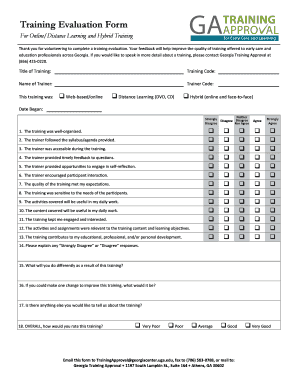
The Employee Training Evaluation Form is a comprehensive document used to gauge the performance of trainees during their training programs. This form provides a structured approach to assessing various aspects of a trainee's development, including their acceptance of responsibility, initiative, and relationships with co-workers. Implementing mid-program evaluations using the employee evaluation form is crucial for both trainees and employers, as it facilitates timely feedback and encourages continuous improvement. The trainee evaluation form serves as an essential tool for ensuring that training objectives are being met and that trainees are progressing effectively.
Purpose and Benefits of the Employee Training Evaluation Form
The primary purpose of the Employee Training Evaluation Form is to offer a standardized method for evaluating trainee performance in critical areas that contribute to training success. Key assessment areas include:
-
Responsibility
-
Initiative
-
Relationships with co-workers
-
Quality of work
-
Attendance
By utilizing this performance review form, employers can enhance training effectiveness through constructive feedback, allowing trainees to understand their strengths and areas for improvement. Additionally, submitting the training progress form to the local WIN Job Center is vital for ensuring compliance and access to necessary resources.
Key Features of the Employee Training Evaluation Form
This form incorporates several essential features that facilitate effective evaluations. Fillable fields include:
-
Employer:
-
Employee/Trainee:
-
Start Date:
-
Total Authorized Training Hours:
Both parties are required to sign the form, confirming mutual understanding and agreement on the evaluation outcome. Furthermore, the form's usability and accessibility are enhanced through platforms like pdfFiller, which enable easy completion and sharing.
Who Needs the Employee Training Evaluation Form?
The Employee Training Evaluation Form is intended for use by both employers and trainees, as it plays a critical role in the training process. It is most relevant during midpoint evaluations, allowing stakeholders to assess trainee performance accurately. Other entities, such as the WIN Job Center and training providers, may also benefit from the insights gained through this job training review, reinforcing the importance of collaboration in training efforts.
How to Fill Out the Employee Training Evaluation Form Online
Filling out the Employee Training Evaluation Form online through pdfFiller is straightforward. Follow these steps:
-
Access the form through pdfFiller.
-
Complete the key sections, ensuring all required fields are filled accurately.
-
Review the completed form for any errors or omissions.
-
Validate the information before submission.
Common errors to avoid include missing signatures and incomplete fields, which can delay the evaluation process.
Submission Methods and Requirements for the Employee Training Evaluation Form
Submitting the Employee Training Evaluation Form can be done through various methods. Options include:
-
Online submission via pdfFiller
-
In-person delivery to the local WIN Job Center
It is crucial to be aware of submission deadlines and any necessary supporting documents, as late submissions may have consequences, impacting the evaluation timeline and processing. Be prepared to expect reviews shortly after submission to ensure timely feedback.
Security and Compliance for the Employee Training Evaluation Form
When handling sensitive information, it is vital to ensure security and compliance. pdfFiller implements robust security measures, including 256-bit encryption, to protect data during the evaluation process. Compliance with regulations such as HIPAA and GDPR ensures that user privacy is respected and maintained. Secure management of evaluation documents is essential to avoid potential risks associated with data breaches.
How to Download and Save the Employee Training Evaluation Form PDF
Once you have completed the Employee Training Evaluation Form, you can easily download it from pdfFiller. Follow these instructions:
-
Click the download button after finalizing the form.
-
Select the desired format for download, such as PDF or DOCX.
For optimal organization and record-keeping of training evaluations, consider creating a dedicated folder to store completed forms and related documents.
Sample or Example of a Completed Employee Training Evaluation Form
Providing users with a sample or example of a completed Employee Training Evaluation Form can enhance understanding and facilitate accurate completions. Key sections of the form should be highlighted, allowing users to interpret fields effectively. Reference samples for accurate completion can significantly ease the form-filling process.
Enhance Your Employee Training Evaluation Process with pdfFiller
pdfFiller simplifies the entire form management process, including completion and eSigning. User testimonials highlight success stories that demonstrate the effectiveness of using the platform for managing evaluation documents. Start utilizing pdfFiller to enhance your employee evaluation form experience with innovative fillable form solutions.
How to fill out the Mid-Point Evaluation
-
1.Access pdfFiller and log into your account.
-
2.Search for the 'Employee Training Evaluation Form' using the search bar.
-
3.Click on the form to open it in the editor.
-
4.Gather all necessary information, including the trainee's name, start date, and total authorized training hours.
-
5.Begin by filling in the 'Employer:' and 'Employee/Trainee:' fields with the appropriate names.
-
6.Complete the details for 'Start Date:' and 'Total Authorized Training Hours:'.
-
7.Evaluate the trainee's performance in relevant areas such as responsibility, initiative, and quality of work by using the fillable sections provided.
-
8.Once all fields are completed, review the information entered for accuracy.
-
9.Both the employer and trainee must sign the document in the designated signature fields.
-
10.After finalizing the form, use the save option to store the completed document.
-
11.You can also download the form to your device or submit it directly to the local WIN Job Center through the provided options in pdfFiller.

Who is required to fill out the Employee Training Evaluation Form?
Both the employer and trainee are required to fill out the Employee Training Evaluation Form. The employer assesses the trainee's performance while the trainee must provide their details and sign the form.
What information must be gathered before completing this form?
Before completing the form, gather the trainee's name, start date of the training program, total authorized training hours, and examples of the trainee's performance in key evaluation areas.
How is the form submitted after completion?
Once the form is completed and signed by both parties, it can be submitted directly to the local WIN Job Center or saved and sent via email as required.
Are there any fees associated with submitting this form?
Typically, there are no fees for submitting the Employee Training Evaluation Form to local WIN Job Centers, but verify with your specific center for any processing fees or requirements.
What common mistakes should be avoided when filling out the form?
Common mistakes include missing signatures, entering incorrect or incomplete information, and not discussing the evaluation with the trainee prior to submission.
What is the purpose of the form?
The purpose of the Employee Training Evaluation Form is to assess a trainee's performance at the midpoint of their training, providing crucial feedback on their strengths and areas for improvement.
What happens if the form is not submitted on time?
Failure to submit the form on time may delay the trainee's progress and impact their evaluation results. It is advisable to submit it as soon as the evaluation is completed.
Related Forms



Related Catalogs
Get the latest insights from our blog


If you believe that this page should be taken down, please follow our DMCA take down process
here
.
This form may include fields for payment information. Data entered in these fields is not covered by PCI DSS compliance.