
Last updated on
Oct 31, 2026

Get the free Wyoming Annual Report Worksheet
We are not affiliated with any brand or entity on this form

Fill out
Complete the form online in a simple drag-and-drop editor.

eSign
Add your legally binding signature or send the form for signing.

Share
Share the form via a link, letting anyone fill it out from any device.

Export
Download, print, email, or move the form to your cloud storage.
Why pdfFiller is the best tool for your documents and forms


End-to-end document management
From editing and signing to collaboration and tracking, pdfFiller has everything you need to get your documents done quickly and efficiently.
Accessible from anywhere
pdfFiller is fully cloud-based. This means you can edit, sign, and share documents from anywhere using your computer, smartphone, or tablet.
Secure and compliant
pdfFiller lets you securely manage documents following global laws like ESIGN, CCPA, and GDPR. It's also HIPAA and SOC 2 compliant.
What is Wyoming Annual Report
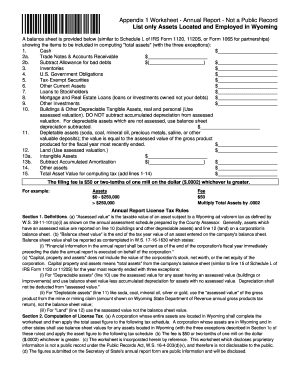
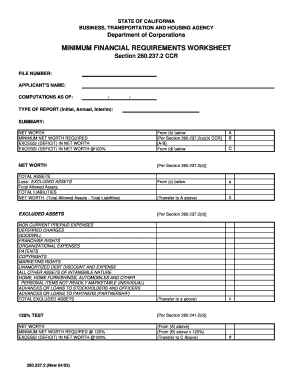
The Wyoming Annual Report Worksheet is a financial document used by corporations to report the value of assets located and employed in Wyoming.
pdfFiller scores top ratings on review platforms




Who needs Wyoming Annual Report?
Explore how professionals across industries use pdfFiller.

Wyoming Annual Report is needed by:
-
Corporations operating in Wyoming
-
Business owners filing annual reports
-
Tax professionals assisting clients
-
Accountants managing corporate finances
-
Financial officers in corporations
-
Entities subject to Wyoming license tax
Comprehensive Guide to Wyoming Annual Report
Understanding the Wyoming Annual Report Worksheet
The Wyoming Annual Report Worksheet is an essential financial document for corporations operating in Wyoming. This form serves to report the value of assets used within the state, ensuring compliance with financial regulations. By accurately completing the Wyoming corporation tax form, organizations can meet their tax obligations effectively.
Purpose and Benefits of the Wyoming Annual Report Worksheet
The primary purpose of the Wyoming Annual Report Worksheet is to facilitate accurate financial reporting and tax calculation for corporations. Using this worksheet provides several benefits, including streamlined financial reporting and a clear framework for calculating taxes. It ensures that corporations maintain proper records while adhering to the requirements set by the state.
-
Promotes accuracy in financial reporting.
-
Assists in tax calculation and compliance.
-
Serves as a basis for assessing annual license tax.
Who Needs to Complete the Wyoming Annual Report Worksheet?
This worksheet must be completed by various types of corporations registered in Wyoming. Eligible users typically include limited liability companies (LLCs) and corporations that operate or conduct business within the state. Understanding the responsibilities associated with completing this form is crucial for compliance with state regulations.
-
Corporations registered in Wyoming.
-
LLCs and other business entities operating in the state.
Key Features of the Wyoming Annual Report Worksheet
The Wyoming Annual Report Worksheet includes several key features that enhance its usability. Notably, it contains essential fields for reporting various asset categories and their respective values. This structure aids in calculating the annual license tax based on the submitted asset values.
-
Fields for cash holdings, property values, and other asset categories.
-
Structure that simplifies tax calculations.
-
Clear instructions for completing the form accurately.
How to Fill Out the Wyoming Annual Report Worksheet Online
Completing the Wyoming Annual Report Worksheet online is straightforward, especially with platforms like pdfFiller. Users can easily navigate blank fields, enter financial figures, and submit the form efficiently. Following a step-by-step guide ensures that all necessary information is accurately filled out.
-
Access the worksheet via pdfFiller.
-
Fill in the required fields with accurate figures.
-
Review the form to ensure all data is correct.
-
Submit the completed worksheet online.
Field-by-Field Instructions for the Wyoming Annual Report Worksheet
Each section of the Wyoming Annual Report Worksheet comes with detailed guidance on completing financial fields. For example, users should provide accurate figures for cash holdings and property values to avoid common errors. Ensuring precision in these fields is crucial for compliance and tax calculation.
-
Follow specific guidelines for entering financial data.
-
Pay attention to the details to minimize mistakes.
Submission Methods for the Wyoming Annual Report Worksheet
To ensure compliance, corporations must be aware of the various submission methods available for the Wyoming Annual Report Worksheet. Options typically include online submissions through pdfFiller or mailing hard copies. Timely filing is critical to avoid penalties and ensure that the report is processed efficiently.
-
Submit online through pdfFiller for convenience.
-
Mail a hard copy if preferred.
-
Be aware of submission deadlines to avoid late fees.
Tracking and Confirmation After Submission
After submitting the Wyoming Annual Report Worksheet, users can track the status of their submission. Understanding the confirmation process and what to expect after submission helps mitigate any concerns regarding acceptance. Keeping a record of submission details is advisable for future reference.
-
Track submission status through the pdfFiller platform.
-
Receive confirmation once the worksheet is accepted.
Security and Compliance When Completing the Wyoming Annual Report Worksheet
Security is paramount when handling sensitive information, such as the Wyoming Annual Report Worksheet. pdfFiller employs measures like 256-bit encryption to protect users’ personal data. Ensuring compliance with regulations related to data privacy is crucial for maintaining trust and security.
-
Utilize encryption for data protection.
-
Stay compliant with HIPAA and GDPR regulations.
Get Started with Your Wyoming Annual Report Worksheet Using pdfFiller
Utilizing pdfFiller for the Wyoming Annual Report Worksheet simplifies the document preparation process. The platform offers user-friendly features that streamline form filling and enhance accuracy, ensuring compliance with state requirements. Engage with pdfFiller today to experience the benefits of easy, efficient document management.
How to fill out the Wyoming Annual Report
-
1.Access the Wyoming Annual Report Worksheet on pdfFiller by searching for the form in the pdfFiller template library.
-
2.Open the form by clicking on it, which will launch the pdfFiller editing interface.
-
3.Before filling in the form, gather all necessary financial information, including asset types and their values as required by the worksheet.
-
4.Navigate through the form's blank fields using your mouse or keyboard to input data, ensuring you correctly categorize your assets.
-
5.Include the appropriate values next to each asset category, following the specified guidelines, such as assessing cash or property.
-
6.Review the entered data for accuracy, checking that all required sections have been completed fully.
-
7.Finalize the form by checking for any missing information, and ensure your signature is added where required.
-
8.Once everything is complete and checked, save the form by clicking the save button, or download it as a PDF for your records.
-
9.To submit the form, follow any specific instructions provided for filing with the Secretary of State or your preferred submission method.

Who is eligible to use the Wyoming Annual Report Worksheet?
The Wyoming Annual Report Worksheet is designed for corporations registered in Wyoming that need to report asset values for their annual license tax.
What is the deadline for submitting the Wyoming Annual Report Worksheet?
Wyoming corporations are typically required to submit their annual reports by the end of their anniversary month. Check Wyoming Secretary of State's website for exact dates.
How do I submit the completed Wyoming Annual Report Worksheet?
You can submit the completed worksheet directly to the Wyoming Secretary of State's office, either electronically or via postal mail, based on their submission guidelines.
Are there any supporting documents needed with the worksheet?
You generally do not need additional supporting documents for the Wyoming Annual Report Worksheet, but ensure to have your financial data ready for accurate reporting.
What are common mistakes to avoid when filling out the worksheet?
Common mistakes include omitting necessary asset categories, incorrect value entries, and failing to sign the form. Double-check all information before submitting to avoid penalties.
How long does it take to process the Wyoming Annual Report Worksheet?
Processing times can vary, but typically the Wyoming Secretary of State's office processes annual reports within a few weeks. Check their website for updates on processing times.
Is there a fee for submitting the Wyoming Annual Report Worksheet?
Yes, there is typically a fee for submitting the annual report, which is either $50 or two-tenths of one mill on the dollar, based on your assets, whichever is greater.
Related Forms





Get the latest insights from our blog


If you believe that this page should be taken down, please follow our DMCA take down process
here
.
This form may include fields for payment information. Data entered in these fields is not covered by PCI DSS compliance.