
Last updated on
Oct 31, 2026

Get the free XELSOURCE Enrollment Form
We are not affiliated with any brand or entity on this form

Fill out
Complete the form online in a simple drag-and-drop editor.

eSign
Add your legally binding signature or send the form for signing.

Share
Share the form via a link, letting anyone fill it out from any device.

Export
Download, print, email, or move the form to your cloud storage.
Why pdfFiller is the best tool for your documents and forms


End-to-end document management
From editing and signing to collaboration and tracking, pdfFiller has everything you need to get your documents done quickly and efficiently.
Accessible from anywhere
pdfFiller is fully cloud-based. This means you can edit, sign, and share documents from anywhere using your computer, smartphone, or tablet.
Secure and compliant
pdfFiller lets you securely manage documents following global laws like ESIGN, CCPA, and GDPR. It's also HIPAA and SOC 2 compliant.
What is XELSOURCE Form
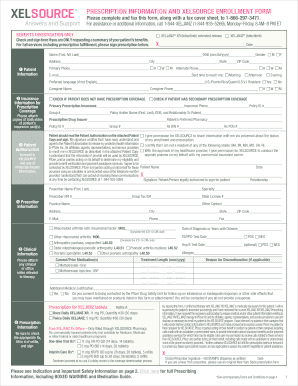
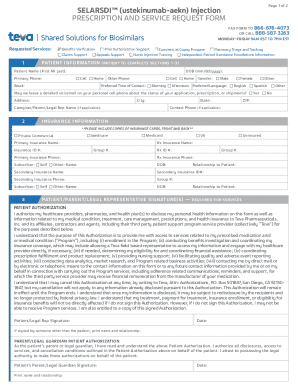
The XELSOURCE Enrollment Form is a patient consent form used by patients and prescribers to enroll in the XELSOURCE program for prescription fulfillment and benefits investigation for XELJANZ treatment.
pdfFiller scores top ratings on review platforms




Who needs XELSOURCE Form?
Explore how professionals across industries use pdfFiller.

XELSOURCE Form is needed by:
-
Patients seeking treatment with XELJANZ.
-
Healthcare providers prescribing XELJANZ.
-
Pharmacies processing XELJANZ prescriptions.
-
Insurance companies verifying patient coverage.
-
Patient advocates assisting with enrollment.
Comprehensive Guide to XELSOURCE Form
What is the XELSOURCE Enrollment Form?
The XELSOURCE Enrollment Form plays a critical role in the XELSOURCE program, facilitating the prescription fulfillment process for patients with rheumatoid arthritis who are prescribed XELJANZ (tofacitinib citrate). This form is essential for gathering necessary information regarding the patient's treatment and ensuring compliance with the program's requirements.
Designed for both patients and healthcare providers, this form aids in the enrollment process and helps streamline prescription management. Its significance lies in enabling effective communication between prescribers and specialty pharmacies to optimize patient care.
Purpose and Benefits of the XELSOURCE Enrollment Form
Completing the XELSOURCE Enrollment Form offers several practical benefits for patients and prescribers alike. Firstly, it is essential for obtaining medication through specialty pharmacy services, ensuring timely access to necessary treatments.
Furthermore, the form supports insurance investigations and coverage analysis. This helps identify potential financial resources available to patients, easing the burden of out-of-pocket costs. Completing this medication enrollment form enhances the overall patient experience.
Key Features of the XELSOURCE Enrollment Form
The XELSOURCE Enrollment Form includes several essential elements and functionalities that facilitate its completion and processing. Key features of the form include:
-
Fillable fields for vital information such as patient details, insurance data, and required signatures.
-
Clear instructions for the authorization to release personal health information, ensuring compliance with privacy regulations.
These features are designed to streamline the enrollment process, enabling better management of patient information throughout their treatment journey.
Who Needs the XELSOURCE Enrollment Form?
This form is primarily intended for patients diagnosed with rheumatoid arthritis and their prescribers. Its design reflects the collaborative effort required between patients and healthcare providers to ensure optimal treatment outcomes.
Both parties must complete the necessary sections of the form, providing comprehensive information that will assist in the prescription fulfillment and continuity of care.
How to Fill Out the XELSOURCE Enrollment Form Online (Step-by-Step)
Filling out the XELSOURCE Enrollment Form online is a straightforward process. Follow these step-by-step instructions:
-
Access the XELSOURCE Enrollment Form on the designated online platform.
-
Enter the required patient information in the fillable fields, including name, date of birth, and address.
-
Provide detailed insurance information and any other documentation requested.
-
Review all entries for accuracy before submitting.
-
Submit the form electronically or print it for traditional mailing.
By preparing necessary documents beforehand, you can minimize common errors during the filling process.
Digital Signature Requirements for the XELSOURCE Enrollment Form
Signatures are a crucial component of the XELSOURCE Enrollment Form. Users can choose between digital signatures and traditional wet signatures, with digital signing offering the advantage of swift submission.
The eSigning feature simplifies the process, allowing for quick authorization while maintaining compliance with necessary regulations. This method ensures a secure and efficient way to complete the enrollment process.
Submission Methods for the XELSOURCE Enrollment Form
Upon completing the XELSOURCE Enrollment Form, users have several options for submission. These include:
-
Electronic submission through the online platform for immediate processing.
-
Traditional paper submission by mailing the completed form to the specified address.
Instructions on where to send the completed form and details for each method are provided within the form documentation.
What Happens After You Submit the XELSOURCE Enrollment Form
Once the XELSOURCE Enrollment Form is submitted, it undergoes a review process by the healthcare provider or payer. This involves assessing the information provided to approve the enrollment.
Users can track the status of their applications, providing peace of mind and clarity regarding their prescription journey.
Security and Compliance for Handling the XELSOURCE Enrollment Form
When handling the XELSOURCE Enrollment Form, user confidentiality and the secure handling of sensitive information are paramount. pdfFiller employs advanced security measures to protect health data, ensuring compliance with various regulations, including HIPAA and GDPR.
The robust security protocols in place assure users that their information remains private and secure throughout the enrollment process.
Experience Hassle-Free Form Processing with pdfFiller
Utilizing pdfFiller for the XELSOURCE Enrollment Form enhances the overall experience. The platform offers features such as cloud editing and eSigning, enabling efficient and user-friendly form processing.
Users can benefit from the simplicity and support provided throughout the process, making it easier to complete and submit the enrollment form effectively.
How to fill out the XELSOURCE Form
-
1.To access the XELSOURCE Enrollment Form on pdfFiller, go to the pdfFiller website and use the search function to find the form by name.
-
2.Once the form is open, review the instructions provided on the top of the page to understand the information required.
-
3.Gather necessary personal information such as your full name, date of birth, address, and insurance details before starting the completion process.
-
4.Begin filling in the form by clicking on the designated fields. Use the tab key to move between sections for efficient navigation.
-
5.Be sure to provide accurate information in all fields, including the patient and prescriber sections, by entering data directly into the fillable fields.
-
6.Utilize checkboxes where indicated to confirm your consent or understanding of the statements included in the form.
-
7.Before finalizing, carefully review all entries for accuracy and completeness. Make corrections if needed to avoid delays in processing.
-
8.Once you are confident that the form is complete, look for the 'Save' button on the interface to ensure your progress is not lost.
-
9.After saving, choose the options to download or submit the form electronically if applicable, following any specific prompts provided by pdfFiller.

Who is eligible to fill out the XELSOURCE Enrollment Form?
The XELSOURCE Enrollment Form can be filled out by patients seeking treatment with XELJANZ and their healthcare providers who are prescribing the medication.
Are there any deadlines for submitting the form?
While specific deadlines for enrolling in the XELSOURCE program are not stated, it is advisable to submit the form as soon as possible to ensure timely enrollment and access to benefits.
How should I submit the completed form?
You can submit the completed XELSOURCE Enrollment Form electronically through pdfFiller or print and mail it to the appropriate address listed in the form instructions.
What supporting documents are needed for the enrollment?
Typically, you may need to provide insurance information and a valid prescription from your healthcare provider along with the completed enrollment form.
What common mistakes should I avoid when filling out the form?
Make sure to double-check all entered information for accuracy, including patient and prescriber details, and ensure all required signatures are present to avoid processing delays.
What is the processing time for the enrollment form?
Processing times can vary; however, it is common for forms to be reviewed within 1-2 weeks after submission, depending on the provider’s workload and the completeness of your application.
Is notarization required for the XELSOURCE Enrollment Form?
No, notarization is not required for the XELSOURCE Enrollment Form as per the current metadata provided.
Related Forms




Get the latest insights from our blog



If you believe that this page should be taken down, please follow our DMCA take down process
here
.
This form may include fields for payment information. Data entered in these fields is not covered by PCI DSS compliance.