
Last updated on
Nov 6, 2026

Get the free White to Pink Card Application Form
We are not affiliated with any brand or entity on this form

Fill out
Complete the form online in a simple drag-and-drop editor.

eSign
Add your legally binding signature or send the form for signing.

Share
Share the form via a link, letting anyone fill it out from any device.

Export
Download, print, email, or move the form to your cloud storage.
Why pdfFiller is the best tool for your documents and forms


End-to-end document management
From editing and signing to collaboration and tracking, pdfFiller has everything you need to get your documents done quickly and efficiently.
Accessible from anywhere
pdfFiller is fully cloud-based. This means you can edit, sign, and share documents from anywhere using your computer, smartphone, or tablet.
Secure and compliant
pdfFiller lets you securely manage documents following global laws like ESIGN, CCPA, and GDPR. It's also HIPAA and SOC 2 compliant.
What is White to Pink Card
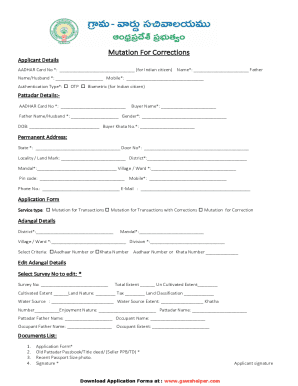
The White to Pink Card Application Form is a government document used by applicants in India to request corrections in land records.
pdfFiller scores top ratings on review platforms




Great and a great tool, I have used several aspects already and am excited to see more in the future....
It's made filling out these wretched rental applications tolerable. Thanks.
Who needs White to Pink Card?
Explore how professionals across industries use pdfFiller.

White to Pink Card is needed by:
-
Landowners needing record updates
-
Individuals applying for government permits
-
Real estate agents assisting clients
-
Property developers updating documentation
-
Farmers requiring land record changes
Comprehensive Guide to White to Pink Card
What is the White to Pink Card Application Form?
-
Importance of correcting adangal details.
-
Legislative and administrative backing.
Purpose and Benefits of the White to Pink Card Application Form
-
Minimizing disputes related to land ownership.
-
Facilitating smoother property transfer processes.
Who Needs the White to Pink Card Application Form?
-
Correcting discrepancies in land attributes.
-
Updating legal heir information.
Eligibility Criteria for the White to Pink Card Application Form
-
Age and residency qualifications for all applicants.
-
Evidence supporting the need for record updates.
How to Fill Out the White to Pink Card Application Form Online (Step-by-Step)
-
Complete the main fields with accurate information.
-
Add a digital signature if required for the submission.
-
Review all entries for accuracy and completeness.
Common Errors and How to Avoid Them
-
Omitting required information or supporting documents.
-
Failure to review the completed form before submission.
Submission Methods for the White to Pink Card Application Form
-
Aware of any deadlines associated with submission.
-
Tracking submission status once sent.
What Happens After You Submit the White to Pink Card Application Form?
-
Steps to take if there are follow-up issues.
-
Importance of keeping records of the application.
Security and Compliance While Handling Your White to Pink Card Application Form
-
Adherence to compliance protocols like HIPAA.
-
Benefits that accompany using a reputable document management platform.
Maximize Your Experience with pdfFiller for the White to Pink Card Application Form
-
Support features to assist with form completion.
-
Access to various related services and templates.
How to fill out the White to Pink Card
-
1.Access the White to Pink Card Application Form by navigating to pdfFiller's website and searching for the form by its name.
-
2.Once you locate the form, click on it to open it in the pdfFiller editor, allowing you to view and begin filling it out.
-
3.Before starting to fill the form, gather all necessary information, including your land details, applicant information, and any required supporting documents.
-
4.Use pdfFiller's interface to navigate through the form. Click on each blank field to enter information, utilizing drop-down menus where available for checkboxes and selections.
-
5.Follow the instructions provided within the form clearly. Ensure you fill out each section accurately, as this will help avoid delays during processing.
-
6.After completing the form, review all entered information for accuracy, ensuring no sections are left incomplete or incorrect.
-
7.Utilize pdfFiller's review features to check for any errors, such as mismatched information or spelling issues, before finalizing.
-
8.Once satisfied with the input, click on the save option to preserve your entries within pdfFiller, or download a copy for your records.
-
9.If required, submit the completed form directly through pdfFiller's submission options, or obtain printed copies for manual submission at the relevant government office.

Who is eligible to use the White to Pink Card Application Form?
All individuals or entities who own land and need to correct their land records in India can use this form. Eligibility includes landowners or tenants with valid claims to the land in question.
What documents are required for submitting the application?
Applicants must provide supporting documents such as proof of land ownership, identification documents, and any prior records that need correction. Ensure to gather these before filling out the form.
How do I submit the completed form?
After filling out the White to Pink Card Application Form, you can submit it either online via pdfFiller or print it out for manual submission at your local government office. Check local submission guidelines for specifics.
How long does it take to process the application?
Processing times can vary; however, it typically takes several weeks for the government to review and update land records. Check with your local authority for more accurate estimations.
Are there any fees associated with this application?
Fee structures vary by region and may depend on the specifics of the request for land record correction. Always check with local officials for exact costs associated with submission.
What should I do if I make a mistake on the form?
If you notice a mistake after submission, immediately contact the relevant authority to request a correction procedure. It's essential to provide accurate information to prevent processing errors.
Can others assist me in filling out this form?
Yes, you can receive help from family members, legal advisors, or real estate professionals while filling out the White to Pink Card Application Form, especially to ensure all legal terms are understood.
Related Forms






Get the latest insights from our blog


If you believe that this page should be taken down, please follow our DMCA take down process
here
.
This form may include fields for payment information. Data entered in these fields is not covered by PCI DSS compliance.