
Last updated on
Oct 31, 2026

Jessica Mullen Universal Grocery List 2011-2026 free printable template
We are not affiliated with any brand or entity on this form

Fill out
Complete the form online in a simple drag-and-drop editor.

eSign
Add your legally binding signature or send the form for signing.

Share
Share the form via a link, letting anyone fill it out from any device.

Export
Download, print, email, or move the form to your cloud storage.
Why pdfFiller is the best tool for your documents and forms


End-to-end document management
From editing and signing to collaboration and tracking, pdfFiller has everything you need to get your documents done quickly and efficiently.
Accessible from anywhere
pdfFiller is fully cloud-based. This means you can edit, sign, and share documents from anywhere using your computer, smartphone, or tablet.
Secure and compliant
pdfFiller lets you securely manage documents following global laws like ESIGN, CCPA, and GDPR. It's also HIPAA and SOC 2 compliant.
What is Jessica Mullen Universal Grocery List
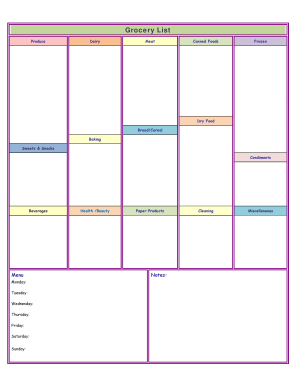
The Universal Grocery List Template is a personal finance document used by individuals to organize and manage grocery shopping efficiently.
pdfFiller scores top ratings on review platforms




Who needs Jessica Mullen Universal Grocery List?
Explore how professionals across industries use pdfFiller.

Jessica Mullen Universal Grocery List is needed by:
-
Busy families looking to simplify grocery shopping
-
Students needing to budget and track food expenses
-
Health-conscious individuals planning meals
-
Professionals wanting to streamline shopping tasks
-
Budgeters focused on tracking grocery costs
Comprehensive Guide to Jessica Mullen Universal Grocery List
What is the Universal Grocery List Template?
The Universal Grocery List Template is a comprehensive tool designed to assist users in organizing their grocery shopping effectively. Its customizable nature allows users to tailor the list for different shopping needs, accommodating various preferences. A universal shopping list is essential for maximizing efficiency and ensuring that all necessary items are included regardless of dietary requirements.
Benefits of Using the Universal Grocery List Template
Utilizing a grocery list template brings numerous advantages, including enhanced organization and improved budgeting. By planning shopping trips with a defined list, users can save time, reduce food waste, and manage personal finances more efficiently. This approach helps individuals track expenses and stick to their budget while making informed shopping decisions.
Key Features of the Universal Grocery List Template
The template includes 60 blank fields specifically designed for grocery items, which can be filled out according to individual preferences. Its flexibility enables users to accommodate diverse dietary needs and preferences effortlessly. Additionally, the template offers options for printing and easy filling, making it convenient for on-the-go shopping.
Who Can Benefit from the Universal Grocery List Template?
This grocery list template is ideal for a wide range of users, including families, singles, and budget-conscious shoppers. Each individual can customize the template to meet their specific grocery needs. By linking the benefits of the template to varying lifestyles and dietary requirements, users can ensure efficient shopping that aligns with their personal circumstances.
How to Fill Out the Universal Grocery List Template Online (Step-by-Step)
To effectively utilize the Universal Grocery List Template through pdfFiller, follow these steps:
-
Access the template on the pdfFiller platform.
-
Fill in the blank fields with the desired grocery items, ensuring clarity and accuracy.
-
Review the completed list thoroughly to confirm that nothing is overlooked.
These steps ensure a complete and organized list for your shopping endeavors.
How to Download and Print the Universal Grocery List Template
Downloading and printing the Universal Grocery List Template is straightforward. Users should follow these steps:
-
Download the template as a PDF from the pdfFiller platform.
-
Utilize printer settings to print the template effectively.
To maintain organization, it’s beneficial to keep printed lists easily accessible while shopping, ensuring a smooth experience.
Security and Compliance for Using the Universal Grocery List Template
pdfFiller prioritizes user safety by employing robust security measures to protect personal information. User data is managed with utmost care, reflecting the importance of secure document handling. Compliance with regulations such as HIPAA and GDPR highlights the platform's commitment to data protection and user privacy.
Common Mistakes to Avoid When Using the Universal Grocery List Template
While filling out the grocery list template, users should avoid common errors for better accuracy. These include:
-
Leaving out essential items due to inadequate planning.
-
Failing to double-check the list before shopping.
To ensure completeness, employing a validation checklist to review the filled-out template is highly beneficial.
Enhance Your Grocery Shopping Experience with pdfFiller
Maximizing the grocery shopping experience is possible by utilizing the features offered by pdfFiller. Users can take advantage of functionalities such as eSigning and sharing the template. Exploring additional personal finance forms and templates available on the platform can provide further benefits to users managing their expenses.
Get Started with Your Universal Grocery List Template Today
Creating, editing, and printing your grocery list using the Universal Grocery List Template is a simple process on the pdfFiller platform. Its user-friendly interface makes accessing all features easy and efficient. Leverage this tool for smarter shopping and a more organized approach to grocery management.
How to fill out the Jessica Mullen Universal Grocery List
-
1.To access the Universal Grocery List Template on pdfFiller, visit the pdfFiller website and use the search bar to find the template.
-
2.Once found, click on the template to open it in the pdfFiller editor. This will allow you to view and edit the document easily.
-
3.Before filling in the grocery list, gather all necessary information such as your favorite grocery items, current pantry stock, and any specific recipes you plan to cook.
-
4.Use the fillable fields to input your selected grocery items, ensuring to fill in all 60 blank fields provided for a comprehensive list.
-
5.As you complete each field, take advantage of pdfFiller's tools to adjust text size or organize items by categories like produce, dairy, or snacks.
-
6.After completing the list, review it thoroughly to ensure all items are accurately listed and nothing is overlooked.
-
7.To finalize your grocery list, click on the save option to store your updated document on pdfFiller. You can also download it for physical printing.
-
8.If you wish to submit the grocery list for any purpose, follow the submission guidelines specific to your needs, ensuring you choose the appropriate file format.

Who can use the Universal Grocery List Template?
The Universal Grocery List Template is designed for anyone needing help organizing their grocery shopping, including families, students, and individuals wanting to simplify their shopping experience.
Are there any fees associated with using this template on pdfFiller?
Using the Universal Grocery List Template on pdfFiller is generally free if you have a subscription. Check the pdfFiller website for specific pricing details.
What if I need to add more items than the template allows?
If you need to add more than 60 items, consider printing the completed list and using a separate sheet to continue listing additional items.
How do I save my completed grocery list?
To save your grocery list on pdfFiller, simply click the save button after you finish editing. This saves your changes, allowing you to access the list later.
Can I customize the Universal Grocery List Template?
Yes, the Universal Grocery List Template is fully customizable. You can add, remove, or adjust the items as per your shopping needs using pdfFiller's editing tools.
What is the best way to use this template for meal planning?
To use the Universal Grocery List Template for meal planning, first decide on your meals for the week, then create your shopping list based on the ingredients needed for those recipes.
Is there a mobile version of the grocery list template?
Yes, pdfFiller usually offers a mobile-compatible version of the Universal Grocery List Template, allowing users to access and edit their grocery lists on smartphones or tablets.
Related Forms

Related Catalogs
Get the latest insights from our blog



If you believe that this page should be taken down, please follow our DMCA take down process
here
.
This form may include fields for payment information. Data entered in these fields is not covered by PCI DSS compliance.