
Last updated on
Oct 31, 2026

Get the free Casualty Report Form
We are not affiliated with any brand or entity on this form

Fill out
Complete the form online in a simple drag-and-drop editor.

eSign
Add your legally binding signature or send the form for signing.

Share
Share the form via a link, letting anyone fill it out from any device.

Export
Download, print, email, or move the form to your cloud storage.
Why pdfFiller is the best tool for your documents and forms


End-to-end document management
From editing and signing to collaboration and tracking, pdfFiller has everything you need to get your documents done quickly and efficiently.
Accessible from anywhere
pdfFiller is fully cloud-based. This means you can edit, sign, and share documents from anywhere using your computer, smartphone, or tablet.
Secure and compliant
pdfFiller lets you securely manage documents following global laws like ESIGN, CCPA, and GDPR. It's also HIPAA and SOC 2 compliant.
What is Casualty Report
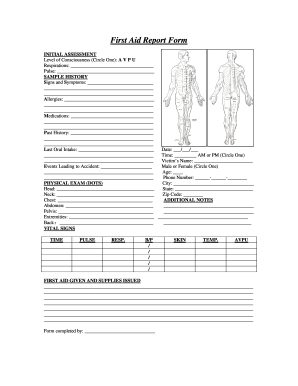
The Casualty Report Form is a medical record document used by first responders to document details of an accident or illness involving a casualty.
pdfFiller scores top ratings on review platforms




Who needs Casualty Report?
Explore how professionals across industries use pdfFiller.

Casualty Report is needed by:
-
First responders at emergency scenes
-
Healthcare providers for patient assessment
-
Mountain rescue teams in outdoor incidents
-
Emergency medical technicians (EMTs)
-
Medical record-keeping professionals
-
Casualty's next of kin for information
-
Accident investigators for reporting
Comprehensive Guide to Casualty Report
What is the Casualty Report Form?
The Casualty Report Form is a vital document utilized in healthcare settings for collecting detailed information about accidents or illnesses involving casualties. Its relevance lies in accurately recording essential data for medical responders, allowing them to take informed actions in emergency situations. This form is structured to include personal information, medical history, and injury descriptions, ensuring responders have access to comprehensive details when needed.
Maintaining an accurate record through the casualty report form is crucial for effective communication among medical staff, first responders, and hospitals. This structured approach aids in assessing the situation and determining the necessary medical interventions promptly.
Purpose and Benefits of the Casualty Report Form
The primary purpose of the Casualty Report Form is to assist in emergency medical situations by providing a clear record of the circumstances surrounding an incident. Having a comprehensive record enhances casualty assessment and improves the overall response in emergencies. By effectively documenting the details of an incident, the form facilitates seamless communication between first responders and hospitals.
Benefits of utilizing this form include improved accuracy in patient evaluation and treatment, as well as clearer information for all parties involved. Whether it's an outdoor event or a workplace incident, the form plays a crucial role in ensuring that all relevant details are captured promptly.
Key Features of the Casualty Report Form
The Casualty Report Form comprises various sections designed to collect specific information necessary for effective medical evaluation. These sections include personal information, medical history, and injury descriptions, ensuring that all critical data points are addressed. Fillable fields throughout the form guarantee accurate data collection that is essential for medical treatment.
Moreover, the form's versatility allows it to be adapted for different scenarios, such as accidents, illnesses, and outdoor emergencies. This adaptability enhances its effectiveness across various contexts, making it an indispensable tool for both first responders and medical personnel.
Who Needs the Casualty Report Form?
The Casualty Report Form is primarily utilized by first responders, medical personnel, and event organizers. It is essential in various scenarios, including outdoor events, sports activities, and workplace accidents, where documenting details accurately can be critical for the health and safety of individuals involved.
In emergencies where accurate information is paramount, having this form readily available streamlines the process of giving medical attention, making it an important resource for anyone involved in such situations.
How to Fill Out the Casualty Report Form Online (Step-by-Step)
-
Access the Casualty Report Form through the pdfFiller platform.
-
Begin filling out the personal information fields, including Name, Age, and Address.
-
Provide medical history by completing relevant sections like Allergies and Past Medical History.
-
Document the injuries found and any first aid given to ensure a thorough record.
-
Review all entered information for completeness and accuracy before submission.
Following these steps will ensure that the casualty report form is completed effectively, allowing for proper medical responses based on the information provided.
Common Errors and How to Avoid Them
When filling out the Casualty Report Form, several common mistakes can occur. These include incomplete fields, incorrect contact information, and failure to document the injuries accurately. To avoid these errors, double-check all provided information before submission.
Ensuring accuracy on the form is crucial for effective medical treatment, as any missing or incorrect details could lead to miscommunication or inadequate care during emergencies.
How to Submit the Casualty Report Form
Submissions of the Casualty Report Form can be completed through various methods. Users can submit the form online via pdfFiller or print and mail it to designated medical facilities or emergency services, depending on the circumstances of the incident.
Identifying the correct submission method ensures that all relevant information reaches the appropriate parties quickly, facilitating better responses in emergency situations.
Security and Privacy Considerations for the Casualty Report Form
Handling sensitive medical information requires stringent data protection measures. The Casualty Report Form must be managed with high security to prevent unauthorized access and maintain patient confidentiality.
pdfFiller ensures compliance with HIPAA and GDPR standards, providing users with peace of mind regarding the security of their medical documents. Utilizing secure platforms is critical when dealing with personal health information.
Record Retention Requirements for the Casualty Report Form
When it comes to record retention, guidelines specify how long submitted Casualty Report Forms should be preserved. Legal considerations often dictate a minimum retention period, and proper storage of these records is essential for future reference and compliance with health regulations.
Understanding these requirements helps ensure that records are kept appropriately, safeguarding the rights and privacy of individuals involved.
Enhance Your Experience with pdfFiller
Leveraging pdfFiller to fill out and manage the Casualty Report Form enhances the user experience significantly. The platform offers ease of use, robust document security, and additional features such as editing, signing, and sharing documents effortlessly.
Using a digital platform like pdfFiller over traditional paper forms streamlines the process and adds efficiency to managing sensitive documents securely.
How to fill out the Casualty Report
-
1.To begin, access pdfFiller and search for 'Casualty Report Form' in the available templates.
-
2.Open the form and familiarize yourself with its sections. Each field must be filled out for thorough reporting.
-
3.Before starting, gather necessary information such as the casualty's personal details, accident specifics, and medical history.
-
4.Navigate to the 'Name' field and enter the full name of the casualty, followed by their 'Age' and 'Date of Birth' in the designated areas.
-
5.Provide contact information, including the 'Address' and 'Tel' numbers, ensuring that they are accurate for follow-up purposes.
-
6.Proceed to describe the accident or illness in detail in the 'Details' section. Include 'Signs and Symptoms' observed.
-
7.List any known 'Allergies' or 'Medications' the casualty may be taking, along with their 'Past Medical History'.
-
8.Record the 'Last Meal' consumed before the incident and any witnessed events leading up to the situation.
-
9.Complete fields regarding group size, age ranges, and any pre-existing conditions for those present.
-
10.Input conditions of clothing and environmental factors such as weather and ground conditions.
-
11.Document any 'Injuries Found' and provide a detailed 'Description of Findings'.
-
12.Note the 'Level of Response' required and what 'First Aid Given' promptly after the incident.
-
13.For monitoring purposes, measure and input vital signs: 'Breathing Rate', 'Pulse', and 'Pain Score from 0-10'.
-
14.Once you have filled in all necessary fields, review the form carefully for accuracy and completeness.
-
15.After ensuring all information is correct, proceed to save your work by clicking on the 'Save' button.
-
16.You can download or print the completed form using the 'Download' option, or submit it through email or fax via the appropriate interface.

Who needs to complete the Casualty Report Form?
The form should be completed by first responders, healthcare providers, mountain rescue teams, EMTs, and anyone involved in documenting details about a casualty during an emergency.
What information is required on the Casualty Report Form?
Essential information includes the casualty's personal details, accident description, medical history, and any known allergies, as well as vital signs recorded at the time of treatment.
Is there a deadline for submitting this form?
While there isn't a strict deadline, it's vital to submit the Casualty Report Form as soon as possible to ensure accurate and timely medical documentation and response.
Can this form be submitted electronically?
Yes, you can complete the Casualty Report Form on pdfFiller and submit it electronically via email or direct print options available on the platform.
Are any supporting documents required?
Typically, no additional documents are required with the Casualty Report Form. However, supplementary medical records or evidence may be beneficial if applicable.
What common mistakes should be avoided when filling out this form?
Ensure all fields are filled accurately and completely. Common mistakes include omitting vital details, incorrect personal information, and failing to record observed symptoms.
How long does it take to process this form?
Processing time for the Casualty Report Form can vary depending on the submission method and local protocols but is generally handled promptly by medical staff or authorities.
Related Forms




Get the latest insights from our blog


If you believe that this page should be taken down, please follow our DMCA take down process
here
.
This form may include fields for payment information. Data entered in these fields is not covered by PCI DSS compliance.