
Last updated on
Oct 31, 2026

Get the free OHFA Household Information Form
We are not affiliated with any brand or entity on this form

Fill out
Complete the form online in a simple drag-and-drop editor.

eSign
Add your legally binding signature or send the form for signing.

Share
Share the form via a link, letting anyone fill it out from any device.

Export
Download, print, email, or move the form to your cloud storage.
Why pdfFiller is the best tool for your documents and forms


End-to-end document management
From editing and signing to collaboration and tracking, pdfFiller has everything you need to get your documents done quickly and efficiently.
Accessible from anywhere
pdfFiller is fully cloud-based. This means you can edit, sign, and share documents from anywhere using your computer, smartphone, or tablet.
Secure and compliant
pdfFiller lets you securely manage documents following global laws like ESIGN, CCPA, and GDPR. It's also HIPAA and SOC 2 compliant.
What is OHFA Household Form
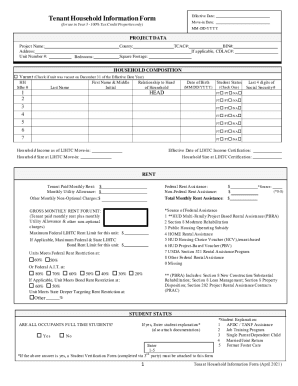
The OHFA Household Information Form is a rental application document used by tenants to provide household composition and income information necessary for eligibility at tax credit sites.
pdfFiller scores top ratings on review platforms




Who needs OHFA Household Form?
Explore how professionals across industries use pdfFiller.

OHFA Household Form is needed by:
-
Tenants applying for housing at tax credit sites
-
Property managers verifying tenant information
-
Owners representing rental properties seeking tax credits
-
Government agencies assessing housing assistance applications
-
Social workers assisting low-income families with housing
-
Housing authorities managing rental applications
Comprehensive Guide to OHFA Household Form
What is the OHFA Household Information Form?
The OHFA Household Information Form is a critical document used in rental applications to assess eligibility for housing assistance at tax credit properties. This form gathers essential information pertaining to household composition and income verification, enabling property managers and owners to evaluate potential tenants adequately.
This form plays a significant role in 100% tax credit sites, where accurate information is crucial to maintain compliance with federal and state regulations. By ensuring that the correct data is submitted, the form supports the integrity of the rental application process.
Purpose and Benefits of the OHFA Household Information Form
Completing the OHFA Household Information Form is essential for both tenants and property managers, providing various benefits that enhance the rental process. Tenants benefit by establishing eligibility for tax credits, which promotes housing stability and affordability. The advantages extend to owners and property managers, who gain from streamlined processes and improved compliance with regulatory requirements.
Accurate completion of this form not only facilitates a more efficient application process but also supports fair housing practices, ensuring that rental opportunities are afforded equitably to all applicants.
Key Features of the OHFA Household Information Form
The OHFA Household Information Form includes several key fields, each designed to collect pertinent information. Essential components include the property name, details of household members, and income information. The form features a certification section that requires accuracy and necessitates signatures from owners or representatives, reinforcing accountability and validity in the rental agreement process.
Additionally, the design of this form emphasizes user-friendliness, with fillable fields that streamline the completion process for all users.
Who Needs to Fill Out the OHFA Household Information Form?
The OHFA Household Information Form is intended for specific groups who must complete it under various circumstances. Eligible individuals include tenants applying for tax credits, as well as property managers tasked with verifying tenant information. Situations that necessitate this form typically include applications for new rentals and instances where rental assistance is sought.
Alternate submission options are also available for unique housing circumstances, ensuring that all eligible applicants can access the necessary benefits.
How to Fill Out the OHFA Household Information Form Online (Step-by-Step)
Filling out the OHFA Household Information Form online is a straightforward process. Begin by accessing the digital form through the designated platform. The form is divided into clear sections, each requiring specific information.
-
Enter the property name and address.
-
List all household members along with their details.
-
Provide accurate income information for verification.
-
Review the certification section and sign where required.
-
Final check: ensure all fields are complete before submission.
Taking the time to confirm the accuracy of your entries is essential for a successful submission.
Common Errors and How to Avoid Them When Completing the OHFA Household Information Form
Many users encounter common errors when filling out the OHFA Household Information Form. Frequent mistakes include leaving fields incomplete or inaccurately reporting income details. To avoid these pitfalls, it is crucial to adopt best practices for completion.
-
Double-check all entries for completeness.
-
Use precise income figures as required.
-
Familiarize yourself with the form's layout to prevent missed information.
-
Validate all data before signing and submitting the form.
Taking proactive measures can lead to a smoother application experience and ensure compliance with housing regulations.
How to Submit the OHFA Household Information Form
Submission of the OHFA Household Information Form can occur through various methods, including online options that simplify the process. For those providing hard copies, it's essential to know where to send the completed forms.
-
Submit online via the pdfFiller platform for rapid processing.
-
Mail or deliver hard copies to designated addresses if required.
-
Be aware of any associated deadlines to ensure timely submission.
Understanding these methods is vital to maintaining a smooth application timeline.
After Submission: What’s Next for the OHFA Household Information Form?
Once the OHFA Household Information Form has been submitted, applicants can anticipate several follow-up steps. It is crucial to track the application status and confirm receipt of the submitted form. Additionally, applicants should be prepared to provide any further documentation that may be requested post-submission.
-
Monitor application status through the designated channels.
-
Stay alert for any notification regarding missing documents or further action.
-
Familiarize yourself with common rejection reasons to avoid pitfalls.
Being proactive can facilitate efficient communication post-submission.
Security and Compliance for the OHFA Household Information Form
When utilizing the OHFA Household Information Form, users can be assured of strong security measures in place during the submission process. pdfFiller employs encryption and ensures compliance with data protection standards, safeguarding sensitive information shared within rental agreements.
Proper protection of personal data is paramount, making it vital to understand how pdfFiller secures submitted documents and facilitates easy retrieval post-submission.
Ready to Complete Your OHFA Household Information Form?
Take the first step towards completing your OHFA Household Information Form by utilizing pdfFiller's user-friendly platform. The tool offers unparalleled accessibility for editing, eSigning, and sharing documents seamlessly online. It is essential to leverage such resources for hassle-free and timely submissions.
How to fill out the OHFA Household Form
-
1.To access the OHFA Household Information Form on pdfFiller, go to the pdfFiller website and use the search bar to find the form.
-
2.Once located, click on the form to open it in the pdfFiller interface.
-
3.Make sure to gather necessary information such as property name, address, household members' details, income information, and any rental agreements before starting to fill out the form.
-
4.As you navigate through the form, use the fillable fields to enter the required details accurately, ensuring no important information is left blank.
-
5.Pay attention to optional checkboxes and ensure to mark your choices clearly.
-
6.Make sure to include your move-in date and signatures where indicated in the document.
-
7.After completing the form, review all filled fields to confirm accuracy and completeness.
-
8.Utilize pdfFiller's review options to check for any mistakes or sections that may need additional information.
-
9.Once satisfied with the form, save your work through the save option to ensure you can return to it later if needed.
-
10.To submit the completed form, utilize the download feature for a copy or share it directly via email using the submit option on pdfFiller.

What are the eligibility requirements for filling out the OHFA Household Information Form?
Eligibility typically includes being a tenant seeking housing at an OHFA-designated tax credit site and providing accurate information regarding household composition and income to qualify.
Is there a deadline for submitting the OHFA Household Information Form?
There is no specific deadline mentioned in the metadata; however, tenants should submit the form as soon as possible to ensure timely processing of their rental applications.
How can I submit my completed OHFA Household Information Form?
Completed forms can be submitted directly via email if using pdfFiller, or downloaded and printed for submission to property management. Always check any specific submission methods as instructed by the property owner.
What supporting documents are required with the OHFA Household Information Form?
Typically, supporting documents include proof of income, identification for household members, and any existing rental agreements. It's advisable to verify the exact requirements with your property manager.
What common mistakes should I avoid when filling out the OHFA Household Information Form?
Common mistakes include leaving fields blank, inaccurate income reporting, or not signing the form. Double-checking all entries and ensuring the form is signed can help avoid delays.
How long does it take to process the OHFA Household Information Form?
Processing times can vary based on the property manager’s workflow, but typically you can expect feedback within a few days to a week after submission.
Can I edit the OHFA Household Information Form after it has been submitted?
Once submitted, editing the form may not be possible without contacting the property management for further instructions. Always ensure your entries are correct before submission.
Related Forms



Get the latest insights from our blog



If you believe that this page should be taken down, please follow our DMCA take down process
here
.
This form may include fields for payment information. Data entered in these fields is not covered by PCI DSS compliance.