
Last updated on
Nov 9, 2026
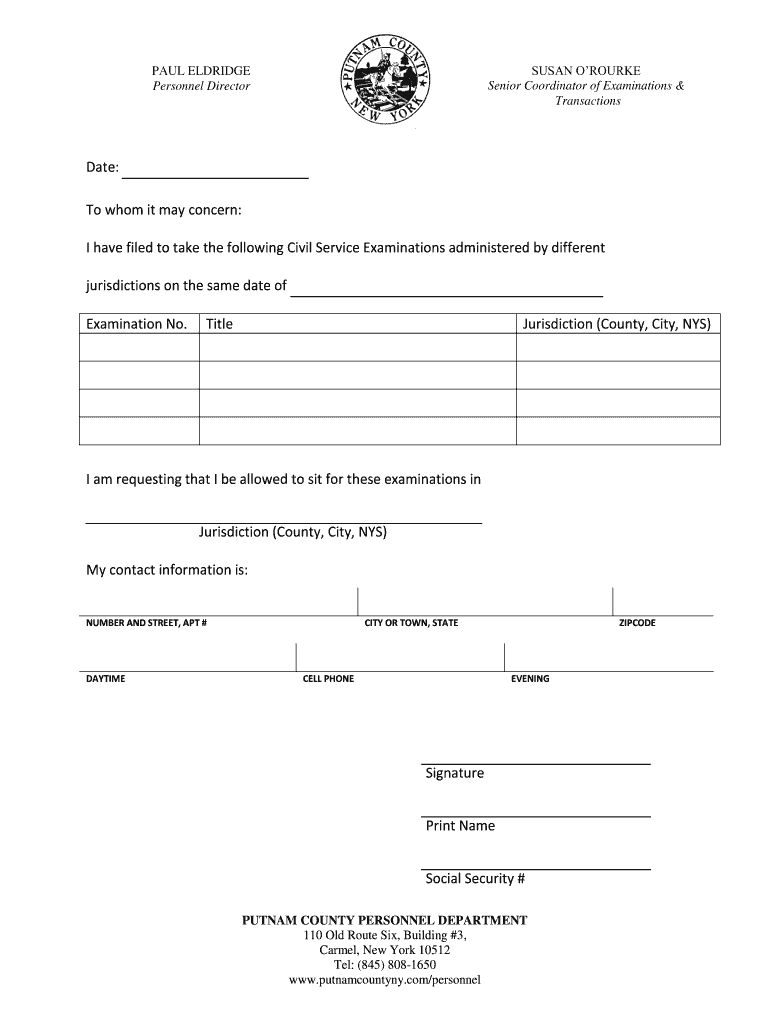
NY Cross Filing Form - Putnam County 2013-2026 free printable template
pdfFiller is not affiliated with any government organization

Fill out
Complete the form online in a simple drag-and-drop editor.

eSign
Add your legally binding signature or send the form for signing.

Share
Share the form via a link, letting anyone fill it out from any device.

Export
Download, print, email, or move the form to your cloud storage.
Why pdfFiller is the best tool for your documents and forms


End-to-end document management
From editing and signing to collaboration and tracking, pdfFiller has everything you need to get your documents done quickly and efficiently.
Accessible from anywhere
pdfFiller is fully cloud-based. This means you can edit, sign, and share documents from anywhere using your computer, smartphone, or tablet.
Secure and compliant
pdfFiller lets you securely manage documents following global laws like ESIGN, CCPA, and GDPR. It's also HIPAA and SOC 2 compliant.
What is NY Cross Filing Form - Putnam County
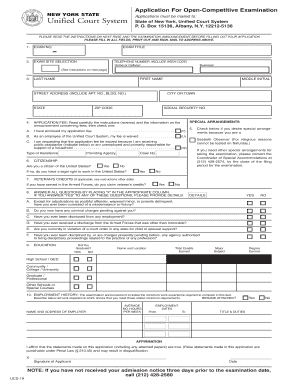
The Civil Service Examination Request Form is a government document used by individuals in New York to request permission to take multiple civil service examinations on the same date.
pdfFiller scores top ratings on review platforms




Who needs NY Cross Filing Form - Putnam County?
Explore how professionals across industries use pdfFiller.

NY Cross Filing Form - Putnam County is needed by:
-
Job applicants seeking civil service positions in New York
-
Individuals needing to compete in multiple civil service exams
-
Residents of Putnam County applying for civil service jobs
-
Public service employees looking to change roles within government
-
Candidates who require special permissions for exams in different jurisdictions
Comprehensive Guide to NY Cross Filing Form - Putnam County
What is the Civil Service Examination Request Form?
The Civil Service Examination Request Form is essential for applicants in New York who are seeking to participate in civil service examinations. This form functions as a formal request enabling individuals to obtain permission to sit for multiple exams on the same date. Its significance lies in the diverse jurisdictions within New York, where the civil service exam process may vary, ensuring that applicants adhere to localized regulations.
When completing the civil service exam request form, it's crucial to provide specific examination details, contact information, and signature, as these elements support the integrity of the application process.
Purpose and Benefits of the Civil Service Examination Request Form
The primary purpose of the civil service examination request form is to assist applicants in navigating their examination logistics efficiently. By submitting this form accurately, candidates secure scheduling permissions that are vital for compliance with examination timelines. It simplifies the process, ensuring that applicants are aware of their rights to take multiple exams concurrently.
Utilizing pdfFiller to fill out the form streamlines the overall experience, providing a user-friendly interface that facilitates managing the examination logistics effectively.
Who Needs the Civil Service Examination Request Form?
This form is crucial for anyone qualifying as an applicant for the civil service examination. Individuals planning to take exams across various jurisdictions, including Putnam County, must use the civil service exam request form to fulfill requirements specific to their locations.
Failing to complete and submit this form can lead to complications for applicants intending to sit for multiple exams, potentially hindering their ability to participate as planned.
How to Fill Out the Civil Service Examination Request Form Online
To fill out the civil service examination request form online using pdfFiller, follow these steps:
-
Begin by entering your personal information, including name and contact details.
-
Provide specific details regarding the exams you wish to take.
-
Utilize pdfFiller’s editing tools to ensure all information is accurate.
-
Digitally sign the form using the eSigning feature.
-
Review the completed form for thoroughness before submission.
Accuracy is critical when completing the civil service examination request form, as any discrepancies may lead to processing delays or rejections.
Common Errors to Avoid When Completing the Form
When filling out the civil service examination request form, applicants should be vigilant to avoid common errors that can impede their applications. Here’s a list of frequent mistakes:
-
Incorrectly entering personal details, such as name or contact information.
-
Failing to select all relevant exams correctly.
-
Neglecting to provide a proper signature.
Taking advantage of pdfFiller’s features allows users to review and validate their entries prior to submitting the form, significantly reducing the likelihood of errors.
Submitting the Civil Service Examination Request Form
Submitting the civil service examination request form can be done through various methods. Applicants may choose to submit the form online or deliver it in person at designated locations. Each submission method comes with specific guidelines that should be followed meticulously to ensure compliance.
Timely submission is essential, as there are deadlines that must be adhered to in the application process. After submission, it is advisable to track the status of the application and to be prepared for any necessary follow-up actions.
What Happens After You Submit the Form?
Following the submission of the civil service examination request form, applicants can expect several post-submission processes. Initially, there will be a confirmation of receipt, and applicants should note the processing time that may vary based on jurisdiction.
Applicants will receive notifications regarding their application status and any subsequent steps they need to undertake. Delays in responses or issues with the application can have consequences, highlighting the importance of timely submissions.
Why Choose pdfFiller for Your Civil Service Examination Request Form Needs?
pdfFiller offers numerous advantages for managing the civil service examination request form. Its features such as editing, electronic signing, and secure document storage significantly simplify the process for users.
Furthermore, pdfFiller ensures document security, compliant with privacy regulations, allowing applicants to complete their forms confidently. Choosing pdfFiller leads to a more efficient and hassle-free experience.
Tips for a Successful Examination Application
To enhance the chances of success in the civil service exam process, applicants should consider the following recommendations:
-
Gather all necessary documents and information before starting the form.
-
Submit the application early to avoid last-minute issues.
-
Stay vigilant in reviewing application requirements and preparing adequately for the examinations.
These strategies are crucial for ensuring that applicants are thoroughly prepared for the civil service examinations ahead.
How to fill out the NY Cross Filing Form - Putnam County
-
1.Access the Civil Service Examination Request Form on pdfFiller by searching for the form name in the pdfFiller search bar.
-
2.Once you locate the form, click the 'Open' button to begin.
-
3.Familiarize yourself with the pdfFiller interface, particularly the toolbar for filling out the fields.
-
4.Before starting, gather necessary information such as the examination titles, dates, and your contact details.
-
5.Begin filling in your details in the provided fields, ensuring accuracy and completeness.
-
6.Include specific examination details as requested, and enter your contact information clearly in the designated sections.
-
7.Once all fields are completed, review the information thoroughly to ensure there are no omissions or errors.
-
8.After your review, navigate to the signature field to electronically sign the form.
-
9.Once signed, you can save your progress using the 'Save' option or download the completed form to your device.
-
10.If ready, submit the form by following the on-screen instructions, ensuring it is sent to the Putnam County Personnel Department.

Who is eligible to use the Civil Service Examination Request Form?
Any individual seeking to take civil service examinations in New York is eligible, including job applicants and current employees looking to shift roles.
What is the deadline for submitting this exam request form?
Deadlines for submission vary based on the examination schedule. It is recommended to submit the form as early as possible before the exam date.
How should the form be submitted?
The completed Civil Service Examination Request Form should be submitted electronically through pdfFiller or printed and sent directly to the Putnam County Personnel Department.
Are there any supporting documents required for this form?
Generally, no specific supporting documents are required with the request form, but keep any relevant identification or qualifications ready in case of verification.
What are some common mistakes to avoid when filling out the form?
Common mistakes include leaving fields incomplete, failing to sign the form, and submitting after the deadline. Double-check all entries for accuracy.
How long does it take to process the request after submission?
Processing times can vary; typically, you should expect a response within a few weeks. Check with the Personnel Department for specific timelines.
What if I need to change information after submitting the form?
If you need to amend information, contact the Putnam County Personnel Department immediately to discuss the necessary steps for modification.
Related Content
Related Forms






Get the latest insights from our blog


If you believe that this page should be taken down, please follow our DMCA take down process
here
.
This form may include fields for payment information. Data entered in these fields is not covered by PCI DSS compliance.