
Last updated on
Oct 31, 2026

Get the free Talisman Personal Pension Plan Income Drawdown Application Form
We are not affiliated with any brand or entity on this form

Fill out
Complete the form online in a simple drag-and-drop editor.

eSign
Add your legally binding signature or send the form for signing.

Share
Share the form via a link, letting anyone fill it out from any device.

Export
Download, print, email, or move the form to your cloud storage.
Why pdfFiller is the best tool for your documents and forms


End-to-end document management
From editing and signing to collaboration and tracking, pdfFiller has everything you need to get your documents done quickly and efficiently.
Accessible from anywhere
pdfFiller is fully cloud-based. This means you can edit, sign, and share documents from anywhere using your computer, smartphone, or tablet.
Secure and compliant
pdfFiller lets you securely manage documents following global laws like ESIGN, CCPA, and GDPR. It's also HIPAA and SOC 2 compliant.
What is Pension Income Drawdown
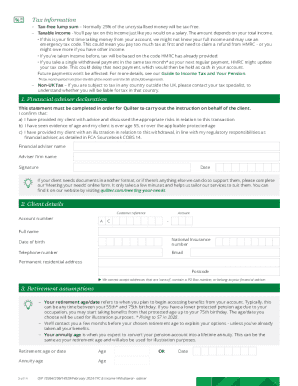
The Talisman Personal Pension Plan Income Drawdown Application Form is a personal finance document used by individuals with a Talisman Income Drawdown Plan to initiate, change, or withdraw income payments.
pdfFiller scores top ratings on review platforms




Who needs Pension Income Drawdown?
Explore how professionals across industries use pdfFiller.

Pension Income Drawdown is needed by:
-
Individuals holding a Talisman Income Drawdown Plan
-
Financial advisers facilitating pension withdrawals
-
Retirees seeking income from pension plans
-
People changing income payment preferences
-
Individuals needing to update bank details
-
Clients of Royal London seeking access to funds
Comprehensive Guide to Pension Income Drawdown
What is the Talisman Personal Pension Plan Income Drawdown Application Form?
The Talisman Personal Pension Plan Income Drawdown Application Form is a crucial document for individuals participating in the Talisman Income Drawdown Plan. This form facilitates the initiation, modification, or withdrawal of income payments. It requires applicants to provide personal details, select their income drawdown preferences, and include financial adviser information. Thus, it enables a smoother navigation through the income drawdown process.
Purpose and Benefits of Using the Talisman Income Drawdown Form
The Talisman Income Drawdown Application Form serves several key purposes for those planning their retirement finances. Firstly, it allows individuals to access their retirement funds efficiently. Secondly, users can customize their income payments according to their needs and preferences. The form is designed to assist applicants in understanding their options while effectively managing their Talisman Pension Plan.
Who Needs the Talisman Personal Pension Plan Income Drawdown Application Form?
This form is targeted at individuals who are holders of the Talisman Income Drawdown Plan. Eligibility extends to anyone looking to start or alter their income payments. It is essential for potential applicants to familiarize themselves with the form's requirements and the role that financial advisers play in the application process.
Eligibility Criteria for the Talisman Pension Withdrawal Form
To complete the Talisman Pension Withdrawal Form, applicants must meet specific eligibility criteria. Age and membership requirements are vital considerations; typically, applicants need to be of retirement age and must be members of the Talisman personal pension plan. Additionally, some specific conditions might influence eligibility, which could vary based on individual circumstances.
How to Fill Out the Talisman Personal Pension Plan Income Drawdown Application Form Online (Step-by-Step)
Filling out the Talisman Personal Pension Plan Income Drawdown Application Form is a straightforward process. Follow these steps to ensure you complete the form correctly:
-
Begin by entering your personal information, such as your name and contact details.
-
Indicate your preferred income drawdown options based on your financial planning.
-
Complete the required fields for your bank details to facilitate payments.
-
Include necessary information about your financial adviser if applicable.
-
Review all sections to verify accuracy before submission.
Common Errors and How to Avoid Them When Filing the Talisman Income Drawdown Application Form
When filling out the Talisman Income Drawdown Application Form, applicants often encounter several common errors. These mistakes can include missing information or incorrect details. To prevent issues, users should validate all provided information before finalizing their submissions. Signing the form accurately and ensuring that it is complete can also help mitigate submission errors.
Digital Signature vs. Wet Signature Requirements for the Talisman Application Form
Applicants have the option to choose between digital and wet signatures when signing the Talisman Application Form. Digital signatures offer numerous advantages, such as convenience and efficiency. If utilizing pdfFiller, users can easily sign the form electronically by following the given instructions on the platform.
Where and How to Submit the Talisman Personal Pension Plan Income Drawdown Application Form
Applicants have multiple submission options for the Talisman Personal Pension Plan Income Drawdown Application Form. Submissions can be made online, in person, or via mail. It's vital for users to be aware of any deadlines related to submissions and to consider tracking options for their application status. Maintaining a record of your submission is essential for future reference.
Security and Compliance for the Talisman Personal Pension Plan Income Drawdown Application Form
While completing the Talisman Personal Pension Plan Income Drawdown Application Form, security remains a top priority. pdfFiller implements various security measures to protect user data when filling out forms. Compliance with privacy standards and data protection regulations ensures that sensitive information is handled securely throughout the application process.
Unlock the Convenience of pdfFiller for Your Talisman Income Drawdown Application
Utilizing pdfFiller can significantly enhance your experience when completing the Talisman Income Drawdown Application Form. The platform offers several advantages, including easy access and robust security features. Users can fill out the form online, edit text, and manage documents efficiently, making the process seamless and user-friendly.
How to fill out the Pension Income Drawdown
-
1.Access the Talisman Personal Pension Plan Income Drawdown Application Form on pdfFiller by using the search function or navigating directly to the form URL.
-
2.Once the form is open, familiarize yourself with the layout and available fields using pdfFiller's interface, which includes form fields, checkboxes, and notes.
-
3.Gather essential information like your personal details, income drawdown preferences, account information, and any necessary financial adviser details before you begin filling out the form.
-
4.Start by entering your name and the plan number in the designated fields at the top of the form. Make sure the information is accurate and matches with other documentation.
-
5.Proceed to complete the income drawdown preferences section by selecting the appropriate options and checking relevant boxes. Ensure you read any associated instructions carefully.
-
6.Fill in your bank details to specify how you wish to receive payments. Double-check your bank account number and sort code for accuracy.
-
7.After completing all sections, review the entire form for any missing information or potential errors. Utilize the review tools on pdfFiller to catch inconsistencies.
-
8.Once satisfied with your entries, if needed, you can collaborate or share the form with your financial adviser directly through pdfFiller's sharing features for further input.
-
9.Finalize your form by signing electronically where required. Ensure that the applicant’s signature is included on the signature line.
-
10.Save your completed form by clicking on the 'Save' button, and choose to download the file or submit it directly through pdfFiller’s submission options.

Who is eligible to use the Talisman Personal Pension Plan Income Drawdown Application Form?
Eligibility to use this form is primarily for individuals who hold a Talisman Income Drawdown Plan and wish to start, change, or withdraw their income payments from this plan.
What information do I need to complete the form?
You will need your personal details, plan number, income drawdown preferences, bank account information, and any relevant details from your financial adviser to successfully fill out the form.
How should I submit the completed form?
Once you have completed the Talisman Income Drawdown Application Form on pdfFiller, you can save it to your device or submit it directly through the platform as per the outlined procedures.
Are there deadlines for submitting this application?
While specific deadlines may not be outlined, it is advisable to submit your application promptly, especially if there are time-sensitive income changes or federated deadlines for pension payments.
What common mistakes should I avoid when filling out the form?
Ensure all fields are filled correctly, particularly your bank details and signatures. Common mistakes include missing required information or providing incorrect account numbers, which can delay processing.
What are the processing times for withdrawals from the Talisman plan?
Processing times for withdrawals may vary. Typically, it can take several days to weeks depending on the details provided and any specific requirements from your pension scheme.
Is notarization required for this form?
No, the Talisman Personal Pension Plan Income Drawdown Application Form does not require notarization. However, make sure to sign where indicated.
Related Forms






Related Catalogs
Get the latest insights from our blog


If you believe that this page should be taken down, please follow our DMCA take down process
here
.
This form may include fields for payment information. Data entered in these fields is not covered by PCI DSS compliance.