
Last updated on
Nov 9, 2026

ZA Durban University of Technology New Student Undertaking and Indemnity for All Periods of Regis...
We are not affiliated with any brand or entity on this form

Fill out
Complete the form online in a simple drag-and-drop editor.

eSign
Add your legally binding signature or send the form for signing.

Share
Share the form via a link, letting anyone fill it out from any device.

Export
Download, print, email, or move the form to your cloud storage.
Why pdfFiller is the best tool for your documents and forms


End-to-end document management
From editing and signing to collaboration and tracking, pdfFiller has everything you need to get your documents done quickly and efficiently.
Accessible from anywhere
pdfFiller is fully cloud-based. This means you can edit, sign, and share documents from anywhere using your computer, smartphone, or tablet.
Secure and compliant
pdfFiller lets you securely manage documents following global laws like ESIGN, CCPA, and GDPR. It's also HIPAA and SOC 2 compliant.
What is ZA Durban University of Technology New Student Undertaking and Indemnity for All Periods of Registration
The Durban University of Technology Student Indemnity Form is a legal document used by students to acknowledge and accept the terms of registration at the Durban University of Technology (DUT).
pdfFiller scores top ratings on review platforms




Who needs ZA Durban University of Technology New Student Undertaking and Indemnity for All Periods of Registration?
Explore how professionals across industries use pdfFiller.

ZA Durban University of Technology New Student Undertaking and Indemnity for All Periods of Registration is needed by:
-
Students enrolling at Durban University of Technology
-
Sureties providing financial or legal guarantees for students
-
Parents or guardians signing for minors
-
University administrative staff processing registrations
-
Notaries public verifying signatures and details
Comprehensive Guide to ZA Durban University of Technology New Student Undertaking and Indemnity for All Periods of Registration
What is the Durban University of Technology Student Indemnity Form?
The Durban University of Technology Student Indemnity Form serves as a critical document for students enrolling at DUT. This form enables students to acknowledge and accept the terms and conditions of their registration. It is essential for ensuring that participants are aware of their responsibilities, thus playing a vital role in the educational process.
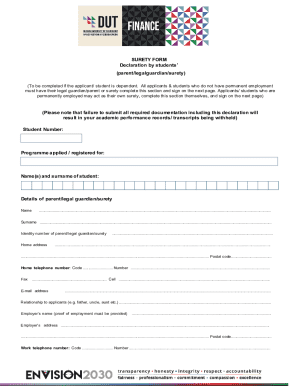
A primary requirement of the form is the inclusion of signatures from the student, surety, and a parent or guardian if the student is under 18. This practice solidifies accountability and ensures that all parties are fully aware of the obligations entailed in the student’s enrollment.
Purpose and Benefits of the Durban University of Technology Student Indemnity Form
This document is not just a formality; it provides a framework for understanding responsibilities related to student activities. By signing the form, students acknowledge their liabilities and reinforce the university's protection against potential conflicts arising from non-compliance with rules.
The proper completion of the Durban University of Technology Student Indemnity Form significantly streamlines the registration process. It ensures all necessary information is collected upfront, which helps in expediting the student's transition into university life.
Key Features of the Durban University of Technology Student Indemnity Form
The form comprises several essential components crucial for both the student and the university. Key features include:
-
Detailed fields for personal information and liability acknowledgment.
-
A notarization requirement for authenticity and legal compliance.
-
A comprehensive outline of the student’s obligations, including adherence to university rules and timely payment of fees.
These features collectively ensure that the Dubai University of Technology can operate smoothly while safeguarding its interests and those of its students.
Who Needs the Durban University of Technology Student Indemnity Form?
Students who are enrolling at DUT are the primary individuals required to fill out this form. Additionally, the surety and parent or guardian must also sign, particularly for students who are minors. Understanding each party's role is crucial, as these signatures affirm the responsibilities being undertaken.
Clarifying who is required to sign helps streamline the process and ensures compliance with university policies.
Eligibility Criteria for the Durban University of Technology Student Indemnity Form
To be eligible to fill out the Durban University of Technology Student Indemnity Form, specific criteria must be met:
-
Signatories must meet age requirements — typically 18 years or older for students, with parental consent needed for minors.
-
Enrollment at DUT is necessary for the form to be applicable.
-
Residency or citizenship status may also play a role depending on the student's situation.
These eligibility requirements ensure that all participants are qualified and understood during the registration process.
How to Fill Out the Durban University of Technology Student Indemnity Form Online (Step-by-Step)
Filling out the form online is straightforward. Follow these steps to ensure the process is completed correctly:
-
Access the online form via the university's official website.
-
Enter the required personal information in the designated fields.
-
Carefully review the liability acknowledgment section.
-
Ensure that all fields are completed before submission to prevent delays.
-
Submit the form electronically as instructed.
By carefully following these steps, students can ensure their registration process goes smoothly.
How to Sign or Notarize the Durban University of Technology Student Indemnity Form
The signing process for the form can vary depending on the method chosen. Students may opt for either a digital signature or a traditional wet signature. If notarization is required, follow these instructions:
-
Locate a certified notary public in your area.
-
Present the completed form for notarization.
-
Ensure that the signing parties are present for their respective signatures.
Understanding the requirements for signatures and notarization is essential for the form’s legal validity.
Submission Methods and Next Steps for the Durban University of Technology Student Indemnity Form
Once the form is completed and signed, several submission methods are available:
-
Online submission through the university’s platform.
-
In-person delivery to the designated department.
-
Postal mail if requested by the administration.
After submission, students can expect a confirmation of receipt, along with an outline of processing times for the form. These steps ensure that students are kept informed throughout the submission process.
Security and Compliance for the Durban University of Technology Student Indemnity Form
Handling sensitive information is crucial, and the Durban University of Technology prioritizes security through several measures. Personal data collected through the Student Indemnity Form is protected with 256-bit encryption and complies with regulations such as HIPAA and GDPR. These standards reinforce the importance of data privacy within the university.
In addition, safe document handling practices are employed to ensure that all submitted forms are secure and confidential.
Experience Effortless Form Filling with pdfFiller
Using pdfFiller to complete the Durban University of Technology Student Indemnity Form simplifies the entire process. The platform offers features that make editing, signing, and submitting forms efficient and user-friendly. With robust security measures in place, users can confidently manage their sensitive information while utilizing this online tool.
Start using pdfFiller today to streamline your document processes and ensure compliance with all required forms.
How to fill out the ZA Durban University of Technology New Student Undertaking and Indemnity for All Periods of Registration
-
1.Begin by visiting pdfFiller and logging into your account. If you don’t have an account, create one for free to access the form.
-
2.Once logged in, use the search bar to locate the 'Durban University of Technology Student Indemnity Form'. Click on the form to open it in the editor.
-
3.Before starting to fill out the form, gather necessary information such as your personal details, contact information, and any required supporting documents specified in the form.
-
4.Carefully navigate through the form fields. Click on each field to enter your personal information, including your name, ID number, and relevant education details.
-
5.Ensure to pay close attention to signature fields. You will need to sign and possibly have a surety and parent/guardian sign as well.
-
6.If there are any checkboxes indicating your acknowledgment of terms and conditions, make sure to read thoroughly and check the appropriate boxes.
-
7.After completing all fields, review the entire form for accuracy. Ensure that all required fields are filled out to avoid delays in processing.
-
8.Once satisfied with your entries, click on the save button to retain your progress. You can download the completed form as a PDF for your records.
-
9.If required, submit the form through pdfFiller’s submission features or email it as an attachment to the relevant university office.

Who needs to sign the Durban University of Technology Student Indemnity Form?
The form must be signed by the student, a surety, and a parent or guardian if the student is under 18. This ensures that all responsible parties acknowledge the terms of the registration.
Is there a deadline for submitting the Student Indemnity Form?
Yes, it is crucial to submit the form by the university's registration deadline to ensure that your registration is completed on time. Check the DUT academic calendar for specific dates.
What happens if I do not complete the Student Indemnity Form?
Failure to complete and submit the form will result in your registration not being finalized, meaning you will not be able to attend classes or access university services.
Are there any fees associated with notarizing the form?
There may be fees for notarizing the form, which can vary by location. It is advisable to check local notary fees or consult the institution for guidance on this.
Can I modify the form after I have signed it?
Modifying the form after signing is generally discouraged unless necessary. If changes are needed, consult the university for instructions on how to formally update the submitted form.
What are common mistakes to avoid while completing the form?
Common mistakes include leaving required fields empty, incorrect personal information, failing to sign in all necessary places, and not dating the form. Double-checking your entries will help prevent these errors.
How do I ensure my form is processed in time?
To ensure timely processing, complete the form as soon as possible, double-check for completion and accuracy, and submit it before the designated registration deadlines.
ZA Durban University of Technology New Student Undertaking and Indemnity for All Periods of Registration Form Versions
Related Forms


Get the latest insights from our blog


If you believe that this page should be taken down, please follow our DMCA take down process
here
.
This form may include fields for payment information. Data entered in these fields is not covered by PCI DSS compliance.