
Last updated on
Oct 31, 2026

Get the free NASFUND Membership Application Form SL5
We are not affiliated with any brand or entity on this form

Fill out
Complete the form online in a simple drag-and-drop editor.

eSign
Add your legally binding signature or send the form for signing.

Share
Share the form via a link, letting anyone fill it out from any device.

Export
Download, print, email, or move the form to your cloud storage.
Why pdfFiller is the best tool for your documents and forms


End-to-end document management
From editing and signing to collaboration and tracking, pdfFiller has everything you need to get your documents done quickly and efficiently.
Accessible from anywhere
pdfFiller is fully cloud-based. This means you can edit, sign, and share documents from anywhere using your computer, smartphone, or tablet.
Secure and compliant
pdfFiller lets you securely manage documents following global laws like ESIGN, CCPA, and GDPR. It's also HIPAA and SOC 2 compliant.
What is NASFUND Application
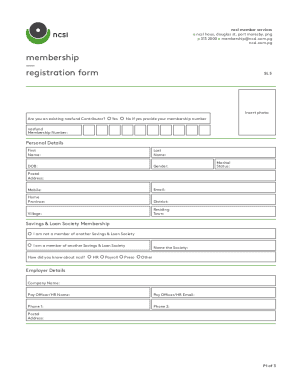
The NASFUND Membership Application Form SL5 is a personal finance document used by individuals in Papua New Guinea to apply for membership in the NASFUND Contributors Savings & Loan Society.
pdfFiller scores top ratings on review platforms




Program works good for online non-filable forms
Really easy to work and love the speed! HIGHLY RECOMMEND!
Who needs NASFUND Application?
Explore how professionals across industries use pdfFiller.

NASFUND Application is needed by:
-
Individuals seeking membership in NASFUND Contributors Savings & Loan Society
-
Employees looking to join a savings and loan program in Papua New Guinea
-
People interested in managing their personal finances through loans and savings
-
Witnesses required for signing authority on the application
-
Employers needing to assist employees in the membership application process
Comprehensive Guide to NASFUND Application
What is the NASFUND Membership Application Form SL5?
The NASFUND Membership Application Form SL5 serves a crucial purpose in establishing membership in the NASFUND Contributors Savings & Loan Society. This application form requires essential details, including personal, employer, and postal information. Alongside this, it mandates signatures from both the applicant and a witness, signifying legal recognition of the membership request.
Purpose and Benefits of the NASFUND Membership Application Form SL5
This application form provides numerous advantages to prospective members. By joining the NASFUND Contributors Savings & Loan Society, individuals gain access to financial security and multiple savings options. The application process facilitates the securing of loans and financial services while also allowing for the nomination of beneficiaries—ensuring that members can plan for the future effectively.
Key Features of the NASFUND Membership Application Form SL5
The NASFUND Membership Application Form SL5 is filled with specific features that streamline the application process. It consists of various fillable fields, checkboxes, and sections designated for declarations and beneficiary nominations. Additionally, there are important instructions within the form that explain legal signing requirements, highlighting the need for witness verification.
Who Needs the NASFUND Membership Application Form SL5?
This form is essential for individuals who are eligible to apply for membership, particularly employees contributing to NASFUND. Key identification and employment verification are necessary for the application. Common scenarios necessitating this form include first-time applicants or those transitioning their memberships to the NASFUND Contributors Savings & Loan Society.
How to Fill Out the NASFUND Membership Application Form SL5 Online (Step-by-Step)
-
Access pdfFiller’s platform to locate the NASFUND Membership Application Form SL5.
-
Fill in the required sections, ensuring accuracy in personal and employer information.
-
Review each field for completeness and check all necessary checkboxes.
-
Sign the form electronically, ensuring you have a witness also sign if required.
-
Save the completed application before submitting it according to the specified methods.
Submission Methods and Delivery for the NASFUND Membership Application Form SL5
After completing the NASFUND Membership Application Form SL5, there are multiple ways to submit it. Applicants can choose to submit online or by mail, depending on their preference. If opting for digital submission, ensure that the document meets any specific requirements regarding file formats and size limits, and keep in mind any deadlines relevant to the application process.
Tracking Your NASFUND Membership Application Status
To stay informed after submitting your application, applicants can check the status through various channels. Online portals provide updates, while contact methods may offer additional support. Typically, there are processing timelines to expect, and it is wise to be aware of common reasons for application delays for better planning.
How pdfFiller Facilitates Completing the NASFUND Membership Application Form SL5
pdfFiller serves as an invaluable resource for efficiently completing the NASFUND Membership Application Form SL5. The platform features cloud-based access and e-signature options, which significantly simplify the form-filling process. Users can also feel assured about the security measures in place that protect sensitive personal information throughout the operation.
Security and Compliance when Handling the NASFUND Membership Application Form SL5
Data protection during the form-filling process is paramount. pdfFiller offers robust encryption and adheres to strict data security protocols, including compliance with legal standards such as HIPAA and GDPR. This ensures that users' privacy is respected while managing their sensitive information online.
Get Started with Your NASFUND Membership Application Form SL5 Today
Filling out the NASFUND Membership Application Form SL5 using pdfFiller is not only easy but also secure. Users are encouraged to access the platform and start their application process seamlessly. Additional resources are available on pdfFiller for anyone seeking further assistance in filling out forms accurately.
How to fill out the NASFUND Application
-
1.Access the NASFUND Membership Application Form SL5 by navigating to the pdfFiller website and searching for the form using its name.
-
2.Once the form appears, click on it to open the document in pdfFiller's interface.
-
3.Before filling out the form, gather necessary information such as personal identification details, employer information, and postal details.
-
4.Use the toolbar in pdfFiller to navigate through the multiple fillable fields, starting with your name and ensuring accuracy in spelling and details.
-
5.Complete each section according to the instructions provided within the form, including the declaration and the nomination of beneficiaries.
-
6.Make sure that the applicant and the witness have designated areas to sign; both signatures are required for application validity.
-
7.After completing the form, review all entries thoroughly for any mistakes, ensuring all required fields are filled accurately.
-
8.Once satisfied with the completed form, save your work and download the form for your records or submission.
-
9.You may have the option to submit the form directly through pdfFiller if submission methods are provided, or you can print it for physical submission.

Who is eligible to fill out the NASFUND Membership Application Form SL5?
Individuals who wish to establish membership with NASFUND Contributors Savings & Loan Society in Papua New Guinea are eligible. Applicants must provide accurate personal and employer information and ensure appropriate signatures are acquired.
Is there a deadline for submitting this application form?
While there may not be a specific deadline for submitting the NASFUND Membership Application Form SL5, it is advised to apply as soon as possible to begin membership benefits and services.
How do I submit the completed NASFUND Membership Application Form SL5?
After completing the form, you can submit it by either printing it out for physical delivery to NASFUND or checking if online submission options are provided through pdfFiller or the NASFUND website.
What supporting documents do I need to submit with this form?
Typically, you may need to provide a form of identification, employment verification, and any relevant supporting financial documents. However, check with NASFUND for specifics based on your situation.
What are common mistakes to avoid when filling out this application form?
Common mistakes include skipping required fields, providing inaccurate information, and forgetting to obtain the necessary signatures from both the applicant and the witness. Always double-check for errors prior to submission.
How long does it take to process the NASFUND Membership Application?
The processing time can vary; typically, expect several business days for your application to be reviewed. For precise timelines, check directly with NASFUND or consult their guidelines.
Is notarization required for the NASFUND Membership Application Form SL5?
No, notarization is not required for the NASFUND Membership Application Form SL5. However, signatures from the applicant and a witness are mandatory.
Related Forms



Related Catalogs
Get the latest insights from our blog



If you believe that this page should be taken down, please follow our DMCA take down process
here
.
This form may include fields for payment information. Data entered in these fields is not covered by PCI DSS compliance.