
Last updated on
Oct 19, 2026
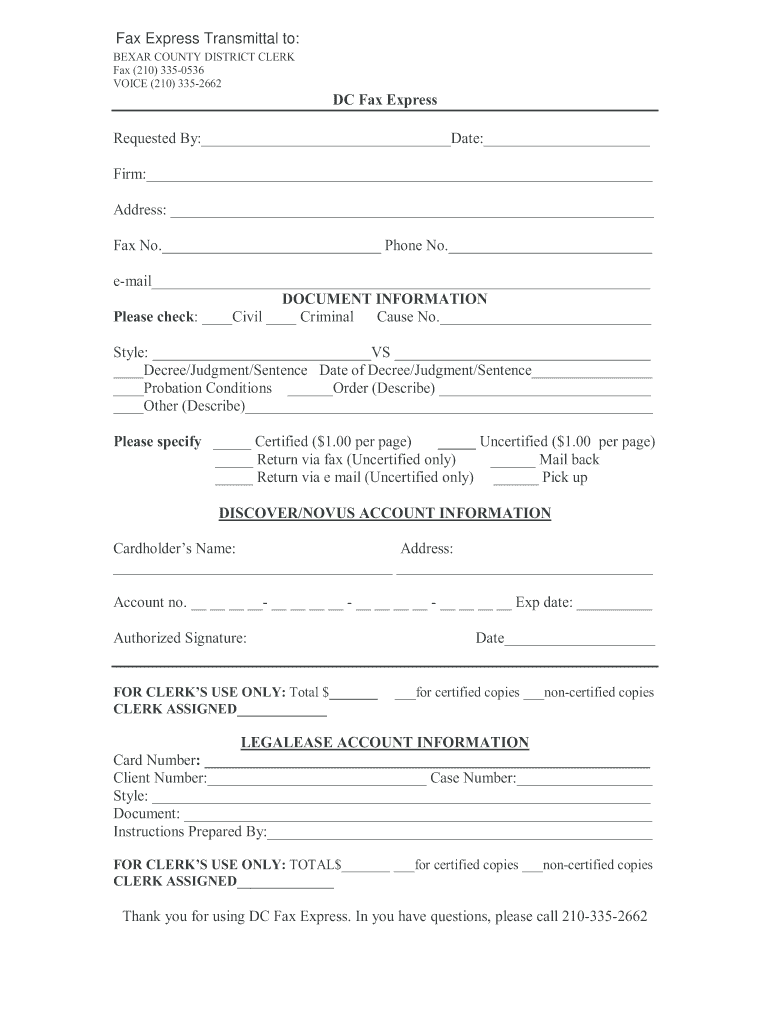
Bexar DC Fax Express Form free printable template
pdfFiller is not affiliated with any government organization

Fill out
Complete the form online in a simple drag-and-drop editor.

eSign
Add your legally binding signature or send the form for signing.

Share
Share the form via a link, letting anyone fill it out from any device.

Export
Download, print, email, or move the form to your cloud storage.
Why pdfFiller is the best tool for your documents and forms


End-to-end document management
From editing and signing to collaboration and tracking, pdfFiller has everything you need to get your documents done quickly and efficiently.
Accessible from anywhere
pdfFiller is fully cloud-based. This means you can edit, sign, and share documents from anywhere using your computer, smartphone, or tablet.
Secure and compliant
pdfFiller lets you securely manage documents following global laws like ESIGN, CCPA, and GDPR. It's also HIPAA and SOC 2 compliant.
What is Bexar DC Fax Express Form
The Fax Express Transmittal Form is a legal document used by individuals in Texas to request the faxing of legal documents to the Bexar County District Clerk.
pdfFiller scores top ratings on review platforms




Who needs Bexar DC Fax Express Form?
Explore how professionals across industries use pdfFiller.

Bexar DC Fax Express Form is needed by:
-
Attorneys submitting legal documents
-
Individuals requesting certified legal copies
-
Legal firms handling court filings
-
Clients needing document transmission for court cases
-
Administrators managing legal notices
-
Firms handling legal processes in Texas
Comprehensive Guide to Bexar DC Fax Express Form
What is the Fax Express Transmittal Form?
The Fax Express Transmittal Form is a crucial tool for submitting legal documents to the Bexar County District Clerk in Texas. This form functions as a request for faxing certified or uncertified legal documents, ensuring that all necessary information is provided effectively. Its importance in the legal submission process cannot be understated, as it facilitates communication with the district clerk while adhering to legal standards.
Purpose and Benefits of the Fax Express Transmittal Form
This form is necessary for efficiently sending legal documents, streamlining the submission process and enhancing compliance with local regulations. Using the fax transmittal form offers several benefits, including:
-
Ensured delivery of documents to the Bexar County District Clerk.
-
Faster processing times for legal submissions.
-
Improved accuracy in the submission of documents.
-
Support for both certified and uncertified legal documents.
Key Features of the Fax Express Transmittal Form
The Fax Express Transmittal Form consists of essential components, which include fields such as 'Requested By', 'Date', and 'Authorized Signature'. These sections require specific user input, and the form includes instructions like "Please check" and "Please specify" to guide users effectively. Each field serves a distinct purpose, ensuring that the information is correctly submitted to the district clerk.
Who Needs the Fax Express Transmittal Form?
The target audience for the Fax Express Transmittal Form includes legal professionals and individuals responsible for submitting court documents. Scenarios where this form is essential include:
-
Submitting legal notices.
-
Requesting copies of court documents.
-
Filing responses in ongoing legal matters.
Step-by-Step Guide on How to Fill Out the Fax Express Transmittal Form Online
Filling out the form online is straightforward. Follow these steps for a successful submission:
-
Open the form on the pdfFiller platform.
-
Enter your details in the 'Requested By' section.
-
Fill in the date and provide the required document information.
-
Review the form for any common issues, such as missing fields.
-
Submit the completed form according to the specified methods.
Filing Process and Submission Methods for the Fax Express Transmittal Form
Submitting the Fax Express Transmittal Form to the Bexar County District Clerk can be done through multiple methods:
-
Fax: Directly send the completed form via fax.
-
Mail: Send a physical copy to the district clerk's office.
-
In-Person: Deliver the form directly to the clerk's office.
Be aware of any associated fees or deadlines within the submission process to ensure timely filing.
Confirmation and Tracking Your Fax Express Transmittal Form Submission
After submitting the form, it is important for users to confirm that their submission has been accepted. You can track the status of your fax submission through the clerk's office. Keeping a detailed record of submissions is essential for future reference and verification.
Security and Compliance for the Fax Express Transmittal Form
When using the Fax Express Transmittal Form, data security and privacy are paramount. Robust measures are in place to protect sensitive information, in compliance with regulations such as HIPAA and GDPR. Users can be assured that their information is safe throughout the submission process.
Sample of a Completed Fax Express Transmittal Form
A sample completed Fax Express Transmittal Form can provide valuable guidance for users. This template illustrates how to accurately fill out the necessary fields, offering tips for ensuring correct submissions. Utilizing this example can greatly assist users in preparing their own forms.
Start Filling Out Your Fax Express Transmittal Form Today!
Utilizing pdfFiller for completing the Fax Express Transmittal Form streamlines the process. The platform offers convenient features for editing and managing documents securely, ensuring a smooth experience when handling sensitive legal documents.
How to fill out the Bexar DC Fax Express Form
-
1.Access the Fax Express Transmittal Form by visiting pdfFiller and searching for the form name or category in their document library.
-
2.Open the form once located, and familiarize yourself with the fields that need to be filled out, such as 'Requested By', 'Date', and 'Address'.
-
3.Gather all necessary information before starting, including your contact details, the type of documents you are faxing, and payment method if applicable.
-
4.Use the pdfFiller interface to click on each field and input the required data. Take your time to ensure accuracy.
-
5.Review all entered information carefully. This includes checking for spelling errors and confirming that all required fields are filled correctly.
-
6.Once you are satisfied with the form, look for options to save your progress or finalize the document.
-
7.You can download the completed form to your device or submit it directly through pdfFiller using their integrated submission options.

Who is eligible to use the Fax Express Transmittal Form?
The Fax Express Transmittal Form is available for use by anyone needing to fax legal documents to the Bexar County District Clerk in Texas, including attorneys and individuals seeking certified copies.
What documents should I gather before filling out the form?
Before starting, ensure you have your personal contact information, the specific type of legal documents to be faxed, and any payment details ready if needed.
What are the submission methods for this form?
You can submit the Fax Express Transmittal Form via fax to the Bexar County District Clerk or through online submission options available on pdfFiller, ensuring you follow the guidelines provided.
How long does it take to process faxed legal documents?
Processing times for faxed legal documents can vary. Generally, it may take a few business days, depending on the workload of the Bexar County District Clerk's office.
What common mistakes should I avoid when completing this form?
Common mistakes include failing to sign the form, missing the required fields, and not double-checking fax number accuracy. Always review your form before submitting.
Is notarization required for the Fax Express Transmittal Form?
No, notarization is not required for the Fax Express Transmittal Form, but a signature from the requester is mandatory to validate the request.
Are there any fees associated with faxing legal documents?
Yes, there may be fees associated with faxing legal documents. It's advisable to check with the Bexar County District Clerk's office for specific fees related to your document requests.
Related Forms





Related Catalogs
Get the latest insights from our blog


If you believe that this page should be taken down, please follow our DMCA take down process
here
.
This form may include fields for payment information. Data entered in these fields is not covered by PCI DSS compliance.