
Last updated on
Oct 2, 2026

Get the free Rent Receipt Attachment
We are not affiliated with any brand or entity on this form

Fill out
Complete the form online in a simple drag-and-drop editor.

eSign
Add your legally binding signature or send the form for signing.

Share
Share the form via a link, letting anyone fill it out from any device.

Export
Download, print, email, or move the form to your cloud storage.
Why pdfFiller is the best tool for your documents and forms


End-to-end document management
From editing and signing to collaboration and tracking, pdfFiller has everything you need to get your documents done quickly and efficiently.
Accessible from anywhere
pdfFiller is fully cloud-based. This means you can edit, sign, and share documents from anywhere using your computer, smartphone, or tablet.
Secure and compliant
pdfFiller lets you securely manage documents following global laws like ESIGN, CCPA, and GDPR. It's also HIPAA and SOC 2 compliant.
What is Rent Receipt
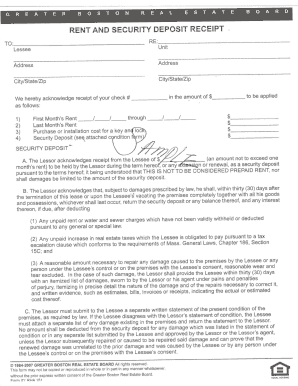
The Rent Receipt Attachment is a real estate document used by landlords in Massachusetts to acknowledge the receipt of rent payments from tenants.
pdfFiller scores top ratings on review platforms




Who needs Rent Receipt?
Explore how professionals across industries use pdfFiller.

Rent Receipt is needed by:
-
Landlords needing to document rent payments
-
Tenants requiring proof of payment for records
-
Real estate agents facilitating lease agreements
-
Property management companies handling rentals
-
Legal professionals overseeing lease compliance
-
Accountants managing clients' property finances
Comprehensive Guide to Rent Receipt
What is the Rent Receipt Attachment?
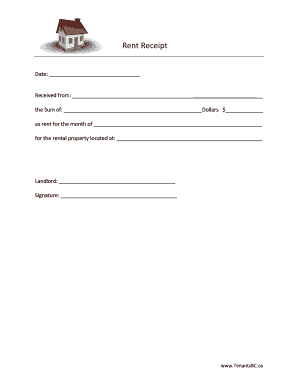
The Rent Receipt Attachment is a crucial document utilized in Massachusetts that serves to formalize the acknowledgment of rent payments between landlords and tenants. This form includes essential fields requiring dates, names, addresses, and amounts, making it a vital tool for record-keeping.
The importance of the rent receipt attachment cannot be overstated, as it protects the rights of both parties involved in the rental agreement. It ensures that landlords and tenants maintain accurate records of payments, and it creates a commitment to signatures, emphasizing the legal implications of the document.
Purpose and Benefits of the Rent Receipt Attachment
This form is essential because it provides a formal acknowledgment of rent payments, which is beneficial for both landlords and tenants. By using the rent receipt attachment, tenants can have proof of payment, which is crucial for any disputes or potential legal issues.
Moreover, the document highlights tenant rights concerning interest on the last month's rent, offering legal protection for both parties. Utilizing a landlord receipt template not only facilitates smooth transactions but also enhances transparency in rental agreements.
Key Features of the Rent Receipt Attachment
-
Includes fields for critical information such as dates, names, addresses, and payment amounts.
-
Requires the landlord's signature to validate the transaction legally.
-
Complies with Massachusetts rental regulations, ensuring it meets legal standards.
Who Needs the Rent Receipt Attachment?
The primary users of the Rent Receipt Attachment include landlords who need to document rent collection systematically and tenants who require formal acknowledgment of their payments. The form becomes particularly necessary in situations involving disputes or when maintaining records for financial planning.
In essence, both landlords and tenants in Massachusetts should utilize this form to ensure a clear and formal understanding of each rental payment, reinforcing accountability.
How to Fill Out the Rent Receipt Attachment Online (Step-by-Step)
-
Navigate to pdfFiller to access the Rent Receipt Attachment.
-
Fill in the tenant's and landlord's information accurately in the designated fields.
-
Enter the payment amount and the date of payment carefully.
-
Review the form for any inaccuracies before submitting it.
By following these steps, users can create a comprehensive lease receipt form that serves its intended purpose effectively.
Security and Compliance for the Rent Receipt Attachment
Security is paramount when handling sensitive information, and using pdfFiller ensures that the Rent Receipt Attachment is completed with top-notch security measures in place. The platform uses 256-bit encryption to protect user data and complies with legal standards such as HIPAA and GDPR.
By safeguarding sensitive information during the process, pdfFiller helps users manage their documents without compromising privacy and compliance requirements.
Common Errors and How to Avoid Them
-
Incorrectly filled fields such as names or payment amounts.
-
Missing signatures or dates that can lead to rejection.
-
Not double-checking the information before submission to avoid amendments later.
How to Print and Submit the Rent Receipt Attachment
Once the Rent Receipt Attachment has been completed, users can easily print the form for physical submission. Various submission methods are available, including in-person delivery, mailing, or digital submission through email.
It is essential to track and confirm submissions to ensure the documentation reaches the appropriate parties effectively and that no deadlines are missed.
What Happens After You Submit the Rent Receipt Attachment?
After submission, users can expect a confirmation of receipt, which serves as proof of the transaction. If corrections or amendments are necessary, the process to do so should be clear and straightforward.
Monitoring the status of submissions is advisable, as it helps keep records organized and highlights any follow-up actions needed.
Effortlessly Manage Your Rent Receipts with pdfFiller
pdfFiller simplifies the management of rental documents, making it easy to create, edit, and eSign forms that comply with regulations. Utilizing pdfFiller allows users to enhance their experience with features such as fillable forms, text editing, and efficient document management.
By choosing pdfFiller, users benefit from a secure platform that streamlines the process of handling rental receipts and ensures all documents are managed efficiently.
How to fill out the Rent Receipt
-
1.Access pdfFiller and log in to your account. Search for 'Rent Receipt Attachment' in the template library.
-
2.Open the form by clicking the template. Familiarize yourself with the layout, including the fields for tenant and landlord information.
-
3.Gather necessary information before filling out the form. Collect the tenant's name, rental property address, the amount paid, and the payment date.
-
4.Navigate to the fields on the form. Click on a blank space to activate it and input the required information.
-
5.Carefully fill in all fields. Ensure you include essential details like the amount of rent received and purpose of the payment.
-
6.After completing the form, review all entries for accuracy. Double-check names, addresses, and amounts to avoid mistakes.
-
7.Finalize the form by clicking the ‘Save' button. You may also access options for additional review or to print the document if necessary.
-
8.Choose to save, download, or submit the form through pdfFiller’s provided options. You can also email it directly to the tenant.

Who needs to sign the Rent Receipt Attachment?
The Rent Receipt Attachment requires a signature only from the landlord. Tenants do not need to sign it, but it is advisable for them to keep a copy for their records.
Is notarization required for this form?
No, the Rent Receipt Attachment does not require notarization. A signature from the landlord is sufficient to validate the receipt of rent.
What information is needed to complete this form?
To complete the Rent Receipt Attachment, you need the tenant's name, rental property address, the rent amount paid, payment date, and the landlord's signature.
How do I submit the completed form?
After filling out the Rent Receipt Attachment, you can save and download it from pdfFiller. You may also choose to email the finalized document to the tenant as proof of payment.
When should I provide a Rent Receipt Attachment?
You should provide a Rent Receipt Attachment to your tenant promptly after receiving each rent payment. This ensures accurate record-keeping for both parties.
What are common mistakes to avoid when filling out this form?
Common mistakes include omitting important details like the amount paid or payment date and failing to check for accuracy before finalizing the form. Always double-check all entries.
Related Content
Related Forms


Related Catalogs
Get the latest insights from our blog



If you believe that this page should be taken down, please follow our DMCA take down process
here
.
This form may include fields for payment information. Data entered in these fields is not covered by PCI DSS compliance.