
Last updated on
Nov 9, 2026

National Grid CM6752 2006 free printable template
We are not affiliated with any brand or entity on this form

Fill out
Complete the form online in a simple drag-and-drop editor.

eSign
Add your legally binding signature or send the form for signing.

Share
Share the form via a link, letting anyone fill it out from any device.

Export
Download, print, email, or move the form to your cloud storage.
Why pdfFiller is the best tool for your documents and forms


End-to-end document management
From editing and signing to collaboration and tracking, pdfFiller has everything you need to get your documents done quickly and efficiently.
Accessible from anywhere
pdfFiller is fully cloud-based. This means you can edit, sign, and share documents from anywhere using your computer, smartphone, or tablet.
Secure and compliant
pdfFiller lets you securely manage documents following global laws like ESIGN, CCPA, and GDPR. It's also HIPAA and SOC 2 compliant.
What is National Grid CM6752
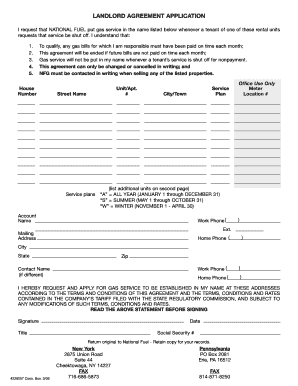
The Leave on For Landlord Application is a rental application form used by landlords to enroll in the 'Leave on for Landlord' program, ensuring continuous utility service during tenant disconnections.
pdfFiller scores top ratings on review platforms




Who needs National Grid CM6752?
Explore how professionals across industries use pdfFiller.

National Grid CM6752 is needed by:
-
Landlords managing rental properties
-
Real estate owners wanting uninterrupted utility service
-
Property management agencies handling rental agreements
-
Rental agencies supporting landlord requests
-
Individuals representing landlords for utility applications
Comprehensive Guide to National Grid CM6752
What is the Leave on For Landlord Application?
The Leave on For Landlord Application is a vital form for landlords and property owners. Its primary function is to ensure that continuous electric and gas service remains active in the landlord's name when a tenant disconnects their service. By enrolling in the Leave on for Landlord program, landlords can safeguard their rental properties from service interruptions, allowing for a seamless transition between tenants.
This application is also referred to as the National Grid landlord form, as it is used specifically for managing utility services provided by National Grid.
Benefits of Using the Leave on For Landlord Application
Enrolling in the Leave on for Landlord program offers numerous advantages. Landlords can prevent potential disruptions in utility service, which can lead to complications for future tenants. Additionally, the process protects the property during vacancy periods, ensuring that essential services remain uninterrupted.
Other benefits include ease of implementation and compliance with utility regulations, making it a practical solution for property management.
Who Needs the Leave on For Landlord Application?
The primary audience for the Leave on for Landlord Application includes landlords, property owners, and rental agencies. This form is particularly useful for various types of rental properties, including residential homes, multi-unit apartments, and commercial facilities.
In situations where a tenant vacates a property, landlords in New York can greatly benefit from using this application to maintain uninterrupted service.
How to Fill Out the Leave on For Landlord Application Online (Step-by-Step)
Filling out the Leave on for Landlord Application online is a straightforward process. Follow these steps:
-
Access the online form on the National Grid website.
-
Enter the Landlord/Owner Name as it appears in official records.
-
Provide your Contact Telephone number for communication.
-
Input your Mailing Address to receive correspondence.
-
Review the information and ensure accuracy before submission.
-
Sign the application and date it as required.
This digital method allows for efficient completion and submission of the National Grid landlord form.
Field-by-Field Instructions for the Leave on For Landlord Application
The Leave on for Landlord Application consists of several fillable fields that require specific information. Key fields include:
-
Landlord/Owner Name: The legal name of the individual or entity responsible for the property.
-
Contact Telephone: A reliable phone number where you can be reached.
-
Mailing Address: The address where any communications should be sent.
-
Signature Line: Include your signature and the date to validate the application.
Attention to detail in these sections is crucial for a smooth application process.
Submission Methods for the Leave on For Landlord Application
Once the application is filled out, landlords can submit the completed form to National Grid through various methods. Options for submission include:
-
Online submission via the National Grid website
-
Mailing the form to the designated address provided on the application
-
Email submission, if permitted by National Grid
Be mindful of any specified deadlines or processing times related to your application to ensure timely service initiation.
Common Errors and How to Avoid Them
When completing the Leave on For Landlord Application, common errors can lead to processing delays. To avoid these mistakes, consider the following tips:
-
Double-check all entries for accuracy, particularly phone numbers and addresses.
-
Ensure the signature is included and dated as required.
-
Review the form for any missing fields before submission.
By following these guidelines, landlords can streamline their application experience and reduce the likelihood of errors.
Security and Compliance in Using the Leave on For Landlord Application
Handling sensitive information is a critical aspect of submitting the Leave on for Landlord Application. It is paramount to ensure that data security is maintained throughout the process. pdfFiller employs 256-bit encryption and adheres to SOC 2 Type II, HIPAA, and GDPR compliance standards, safeguarding your information against unauthorized access.
Utilizing pdfFiller enhances security measures when managing your rental forms and protects your documents effectively.
How pdfFiller Simplifies the Leave on For Landlord Application Process
pdfFiller offers a suite of features designed to simplify the Leave on for Landlord Application process. With capabilities such as eSigning, users can quickly validate their applications without the need for physical documents. Other tools include editing features, allowing landlords to customize forms as needed.
The platform also enables users to save documents for future reference, making it an efficient choice for real estate form management.
Your Next Steps with the Leave on For Landlord Application
Once you're ready to proceed, you can complete the Leave on For Landlord Application using pdfFiller. By leveraging this platform, you can enjoy a secure and user-friendly document submission experience.
Start the process today to ensure uninterrupted utility service for your rental property.
How to fill out the National Grid CM6752
-
1.Begin by accessing the Leave on For Landlord Application on pdfFiller's website. Use the search bar to find the form by typing its official name.
-
2.Once the form is open, review the fillable fields. Begin with entering your 'Landlord / Owner Name' at the top of the document.
-
3.Proceed to input your 'Contact Telephone' number in the designated field. Make sure it's a number where you can be easily reached.
-
4.Next, fill in the 'Mailing Address' accurately. This should be a permanent address where you receive correspondence.
-
5.Gather any supporting information such as existing utility account details if you have them ready. This information is crucial for form completion.
-
6.After filling out all required fields, take a moment to review your entries for any errors or omissions.
-
7.Once you have confirmed that all information is correct, save your progress. pdfFiller allows you to save the form to your account or download it directly to your device.
-
8.If you prefer, you can submit the completed form to National Grid electronically through pdfFiller. Ensure you follow any submission instructions provided on the form for a successful application.

Who is eligible to submit the Leave on For Landlord Application?
Landlords, property owners, and authorized representatives of rental agencies applying for utility services can complete this application.
What details are required to complete the application?
You will need to provide your name, contact telephone, mailing address, and account details. Make sure to supply accurate information to avoid delays.
How do I submit the Leave on For Landlord Application?
After completing the form on pdfFiller, you can save and print or submit electronically following the submission guidelines on the form. Ensure you provide any required signatures.
Is notarization required for this application?
No, the Leave on For Landlord Application does not require notarization. However, make sure to sign the form where indicated.
What common mistakes should I avoid when filling out the form?
Common mistakes include missing required fields, submitting incorrect account details, and not providing a signature. Double-check all entries before submission.
What is the processing time for this application?
Processing times can vary, but typically you should allow a few days for National Grid to review and respond to the application. Check their guidelines for any specifics.
Can I make changes to the form after submission?
Once submitted, changes might not be permitted. If you need to update your application, contact National Grid directly for guidance on how to proceed.
National Grid CM6752 Form Versions
Related Content
Related Forms




Get the latest insights from our blog



If you believe that this page should be taken down, please follow our DMCA take down process
here
.
This form may include fields for payment information. Data entered in these fields is not covered by PCI DSS compliance.