
Last updated on
Oct 15, 2026

Get the free Physician Order for Knee Orthosis
We are not affiliated with any brand or entity on this form

Fill out
Complete the form online in a simple drag-and-drop editor.

eSign
Add your legally binding signature or send the form for signing.

Share
Share the form via a link, letting anyone fill it out from any device.

Export
Download, print, email, or move the form to your cloud storage.
Why pdfFiller is the best tool for your documents and forms


End-to-end document management
From editing and signing to collaboration and tracking, pdfFiller has everything you need to get your documents done quickly and efficiently.
Accessible from anywhere
pdfFiller is fully cloud-based. This means you can edit, sign, and share documents from anywhere using your computer, smartphone, or tablet.
Secure and compliant
pdfFiller lets you securely manage documents following global laws like ESIGN, CCPA, and GDPR. It's also HIPAA and SOC 2 compliant.
What is Knee Orthosis Order
The Physician Order for Knee Orthosis is a medical form used by physicians to authorize the provision of a knee orthosis device for patients with specific knee conditions.
pdfFiller scores top ratings on review platforms




Who needs Knee Orthosis Order?
Explore how professionals across industries use pdfFiller.

Knee Orthosis Order is needed by:
-
Physicians issuing prescriptions for knee orthoses
-
Patients diagnosed with knee conditions requiring orthotic devices
-
Medical offices handling orthotic claims
-
Insurance companies processing knee orthosis claims
-
Healthcare providers monitoring patient treatment plans
-
Orthotists or medical suppliers providing knee braces
Comprehensive Guide to Knee Orthosis Order
What is the Physician Order for Knee Orthosis?
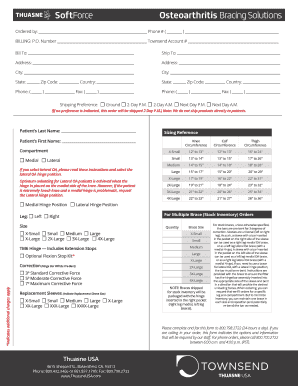
The Physician Order for Knee Orthosis serves as a critical form in patient care, allowing healthcare providers to authorize the provision of a knee orthosis device. This order is essential for patients suffering from various knee conditions, such as osteoarthritis, ligament injuries, or post-surgical rehabilitation. The form includes important components, including patient and physician information, necessary for processing insurance claims and ensuring proper care.
Key elements within the form consist of details such as the patient's full name, address, and date of birth, along with the treating physician's contact information. Additionally, there are checkboxes for medical conditions that warrant a knee orthosis, which streamline the prescription process.
Purpose and Benefits of the Physician Order for Knee Orthosis
The medical necessity for patients requiring a knee orthosis is well-established, as proper support can significantly enhance mobility and comfort. This form is crucial for obtaining necessary insurance coverage, ensuring that patients receive appropriate financial support for their treatment. Knee orthoses have proven effective in reducing pain and improving function, making the order an indispensable part of patient management.
By using the Physician Order for Knee Orthosis, patients benefit from a clear delineation of their medical needs, which aids in the approval process for insurance claims. Its structured format facilitates better communication between healthcare providers and insurance companies.
Key Features of the Physician Order for Knee Orthosis
The Physician Order for Knee Orthosis includes various fields that must be completed accurately to ensure proper authorization. Essential fields on the form comprise patient details, such as Medicare number, as well as ICD-9 codes relevant to the patient's medical condition. The inclusion of checkboxes allows for quick identification of the specific condition that necessitates the orthosis.
Moreover, the form requires a physician's signature, which underscores its legal importance. This signature not only validates the order but also confirms that the physician has conducted a thorough examination of the patient. Specific product selection options may also be highlighted on the form, allowing for tailored care.
Who Needs the Physician Order for Knee Orthosis?
This form is intended primarily for patients experiencing knee issues, which may encompass a range of conditions requiring supportive devices. Healthcare providers play a crucial role in identifying candidates for this orthosis based on symptoms and medical history. Typical conditions that may necessitate a knee orthosis include severe ligament injuries, degenerative joint diseases, or therapeutic needs following surgeries.
Eligibility criteria for patients seeking this order may include a recent diagnosis from a qualified healthcare professional, as well as an assessment showing the necessity of a knee orthosis to enhance mobility and support recovery.
How to Fill Out the Physician Order for Knee Orthosis (Step-by-Step)
Filling out the Physician Order for Knee Orthosis requires attention to detail. Follow these steps for accurate completion:
-
Enter patient information, including full name, address, and Medicare number.
-
Provide the treating physician's details, including NPI number and contact information.
-
Select the appropriate ICD-9 code and check applicable medical conditions.
-
Specify the duration of the patient's condition and estimated length of need.
-
Ensure the physician signs and dates the form to authorize the order.
It's vital to double-check all entered information, as common errors such as illegible handwriting or incorrect codes could delay processing and approval.
Submission and Delivery of the Physician Order for Knee Orthosis
Once the Physician Order for Knee Orthosis is completed, it can be submitted through various methods to insurance companies or medical facilities. Options include faxing the form, mailing it directly, or submitting it through an online portal, if available. Users should be aware of any deadlines for submission to avoid delays in processing.
After submission, it is advisable to follow up with the relevant party to confirm receipt and inquire about the status of the order. This proactive approach can help ensure that patients receive timely support for their knee issues.
Security and Compliance for the Physician Order for Knee Orthosis
When handling medical documents such as the Physician Order for Knee Orthosis, security measures are of utmost importance. This form must be processed in compliance with HIPAA regulations to ensure patient confidentiality and data protection. Utilizing platforms like pdfFiller, which implements 256-bit encryption and adheres to SOC 2 Type II compliance, provides reassurance regarding the safety of sensitive information.
pdfFiller's features further facilitate secure handling of medical documents, ensuring that patient data remains protected throughout the order process.
Using pdfFiller to Complete Your Physician Order for Knee Orthosis
pdfFiller significantly simplifies the process of filling out the Physician Order for Knee Orthosis. With its features including eSigning, cloud storage, and template creation, users can easily edit, complete, and store their forms online. This tool enhances the user experience, allowing for seamless document management and sharing.
By taking advantage of pdfFiller’s capabilities, healthcare providers and patients can streamline their workflows and maintain efficiency in managing healthcare forms.
Sample Filled-Out Physician Order for Knee Orthosis
To assist users visually, a sample filled-out Physician Order for Knee Orthosis is provided. This example illustrates key fields that should be completed accurately. Common pitfalls such as incomplete patient details or missing signatures are highlighted for better understanding.
Users can access and modify sample templates through pdfFiller, allowing for personalized adjustments to meet specific needs while ensuring compliance with necessary requirements.
How to fill out the Knee Orthosis Order
-
1.Access pdfFiller and search for 'Physician Order for Knee Orthosis' in the templates section. Click on the relevant template to open it in the editor.
-
2.Once the form is open, review the fields available. You will find sections for patient information, physician details, and medical condition checkboxes.
-
3.Before starting, gather all necessary information including the patient's name, address, Medicare number, date of birth, and treating physician's details.
-
4.Begin filling in the patient's personal information in the designated fields. Ensure accuracy to avoid processing delays.
-
5.Next, specify the medical condition by checking the appropriate checkbox. Be thorough in this section to meet documentation requirements.
-
6.Enter the relevant ICD-9 codes associated with the patient's knee condition in the provided space. If unsure, consult a medical coding reference.
-
7.Document the duration of the condition and the estimated length of need for the orthosis in the indicated fields.
-
8.Select the specific knee orthosis product needed for treatment from the options available in the form.
-
9.Finally, ensure that the treating physician digitally signs and dates the form in the appropriate areas.
-
10.Once all information is complete, review the form thoroughly for any mistakes or missing information.
-
11.To save, click on the 'Save' option, or download the completed form to your device. You can also submit it via email if required.

Who needs to sign the Physician Order for Knee Orthosis?
The physician treating the patient is required to sign the Physician Order for Knee Orthosis. This signature is essential to validate the prescription and ensure it meets medical necessities.
What information is required to complete this form?
You will need patient details including name, Medicare number, date of birth, and treating physician's information. Specific ICD-9 codes, medical condition selections, and orthosis product details are also necessary.
Where can I submit the completed Physician Order for Knee Orthosis?
The completed form can be submitted to a medical supplier or health insurance company. Make sure to follow their specific submission guidelines to avoid delays.
What should I do if I make a mistake on the form?
If you make a mistake while filling out the form, you can easily correct it in pdfFiller. Simply click on the field, make your corrections, and review the document before finalizing.
Is notarization required for the Physician Order for Knee Orthosis?
No, notarization is not required for the Physician Order for Knee Orthosis. However, ensure all necessary signatures are included for validation.
How quickly can I process the Physician Order for Knee Orthosis?
Processing times for the Physician Order for Knee Orthosis can vary. Once submitted, check directly with the insurance provider or supplier for specific turnaround times.
What happens if I do not provide the required supporting documents?
Failing to provide required supporting documents may result in delays or rejections of the prescription. Always verify with the recipient what documents are necessary for successful processing.
Related Content
Related Forms





Related Catalogs
Get the latest insights from our blog


If you believe that this page should be taken down, please follow our DMCA take down process
here
.
This form may include fields for payment information. Data entered in these fields is not covered by PCI DSS compliance.