
Last updated on
Oct 19, 2026

Get the free Bibliophile Books Mail Order Form
We are not affiliated with any brand or entity on this form

Fill out
Complete the form online in a simple drag-and-drop editor.

eSign
Add your legally binding signature or send the form for signing.

Share
Share the form via a link, letting anyone fill it out from any device.

Export
Download, print, email, or move the form to your cloud storage.
Why pdfFiller is the best tool for your documents and forms


End-to-end document management
From editing and signing to collaboration and tracking, pdfFiller has everything you need to get your documents done quickly and efficiently.
Accessible from anywhere
pdfFiller is fully cloud-based. This means you can edit, sign, and share documents from anywhere using your computer, smartphone, or tablet.
Secure and compliant
pdfFiller lets you securely manage documents following global laws like ESIGN, CCPA, and GDPR. It's also HIPAA and SOC 2 compliant.
What is Bibliophile Order Form
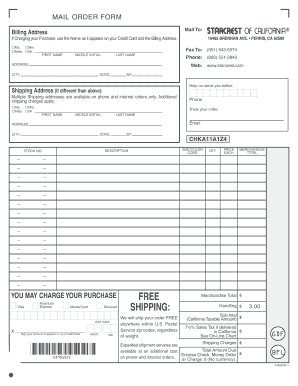
The Bibliophile Books Mail Order Form is a business document used by customers to purchase books from Bibliophile Books, facilitating the ordering process.
pdfFiller scores top ratings on review platforms




Who needs Bibliophile Order Form?
Explore how professionals across industries use pdfFiller.

Bibliophile Order Form is needed by:
-
Book lovers looking to order titles
-
Educational institutions needing bulk orders
-
Libraries ordering new acquisitions
-
Gift buyers purchasing books for others
-
Businesses seeking corporate gifts or employee rewards
Comprehensive Guide to Bibliophile Order Form
What is the Bibliophile Books Mail Order Form?
The Bibliophile Books Mail Order Form is a crucial document designed for customers wishing to order books from Bibliophile Books in London, England. This form streamlines the process of placing orders, allowing for easier transactions between customers and the bookstore. By utilizing this form, users ensure a smooth ordering experience, minimizing potential transaction issues.
Purpose and Benefits of the Bibliophile Books Mail Order Form
The mail order form serves essential purposes for both the bookstore and its customers. Using this form enhances efficiency and organization in the ordering process, which is vital for maintaining accurate records. Here are some key benefits:
-
Simplifies the ordering process, making it accessible for users.
-
Reduces potential errors, ensuring customers receive the correct items.
-
Provides convenience for those ordering from the UK and beyond.
Key Features of the Bibliophile Books Mail Order Form
This mail order form includes several user-friendly features that enhance functionality. Key aspects include:
-
Fillable fields for quantity, book number, title, and payment information.
-
Options for selecting delivery methods and payment processes.
-
A designated signature line, requiring customers to sign for validation.
How to Fill Out the Bibliophile Books Mail Order Form Online
Filling out the form online using pdfFiller can be accomplished through a simple, step-by-step process. Follow these guidelines for accurate completion:
-
Begin with entering the quantity of each book you want to order.
-
Input the book number and title in the respective fields.
-
Provide the necessary payment information carefully.
-
Review all information for accuracy before submission.
Double-checking your entries will help avoid common mistakes, ensuring a smooth order process.
Submission Methods for the Bibliophile Books Mail Order Form
Users can submit their completed forms through several methods. The following options are available:
-
Email submission for quick digital processing.
-
Postal service for traditional mailing of orders.
It is crucial to adhere to specific submission requirements based on the chosen method and to retain a copy of the form for personal records.
Payment Options for Ordering Books with the Mail Order Form
Customers have a variety of payment methods available when placing orders using the mail order form:
-
Credit cards for immediate payments.
-
Bank transfers for larger purchases.
Be mindful of any associated processing fees and familiarize yourself with the refund policies to ensure a smooth transaction experience.
Common Errors to Avoid When Filling Out the Bibliophile Books Mail Order Form
Being aware of common mistakes can save users time during the order process. Some frequent errors to avoid include:
-
Leaving fields incomplete, which can cause delays.
-
Providing incorrect information, leading to miscommunication.
A checklist for double-checking the form before submission can be beneficial. In case of errors post-submission, specific solutions can be applied to rectify them.
How pdfFiller Supports Your Use of the Bibliophile Books Mail Order Form
pdfFiller enhances the experience of using the Bibliophile Books Mail Order Form with features geared toward user convenience. These features include:
-
Edit and annotate capabilities to customize the form as needed.
-
eSigning options for secure document approval.
-
Tracking submissions for peace of mind.
The security measures in place ensure that users' sensitive information remains protected during the form-filling process.
Next Steps After Submitting the Bibliophile Books Mail Order Form
After submission, users can expect several follow-up processes. To track their orders, consider the following:
-
Confirming the order status with the bookstore through the chosen communication method.
-
Understanding options available if any changes need to be made post-submission.
Additionally, maintaining personal copies of the form is advisable for record retention.
Your Trusted Partner in Filling Out the Bibliophile Books Mail Order Form
For a seamless filling experience, consider utilizing pdfFiller's tools. The platform makes the process easy and secure, even for those unfamiliar with digital forms. Users can trust pdfFiller to handle sensitive information and provide reliable service at every step of their form-filling journey.
How to fill out the Bibliophile Order Form
-
1.Access the Bibliophile Books Mail Order Form by visiting the pdfFiller website and logging in to your account.
-
2.Navigate to the ‘Forms’ section, and use the search bar to locate the 'Bibliophile Books Mail Order Form'. Click on it to open.
-
3.Gather all necessary information before starting, such as book titles, quantities, payment information, and your contact details.
-
4.Use the fillable fields provided in the document. Click on each box to enter the required information like QTY, BOOK NUMBER, and TITLE.
-
5.Ensure that you review the instructions regarding payment methods and delivery times included in the form.
-
6.Once you have filled in all the sections, double-check your entries for accuracy.
-
7.To finalize, look for the signature line and sign electronically using pdfFiller's signature tool.
-
8.After completing the form, save your changes by clicking the 'Save' button.
-
9.You can then download the filled form as a PDF to keep a copy for your records.
-
10.If you wish to submit your order, click on the 'Submit' button to send it directly to Bibliophile Books through the platform.

What is the eligibility requirement to use the Bibliophile Books Mail Order Form?
The form is available for any customer wishing to order books from Bibliophile Books. You must provide accurate contact and payment information to process your order.
Are there any deadlines for submitting an order using this form?
While there are no specific deadlines, timely submission is recommended to ensure availability of items and to adhere to delivery schedules provided on the form.
How can I submit the completed Bibliophile Books Mail Order Form?
You can submit the completed form directly through pdfFiller by clicking the 'Submit' button, which will send your order to Bibliophile Books efficiently.
What supporting documents are required when using the mail order form?
No additional documents are usually required aside from the completed form. However, ensure that your payment information is accurate to avoid processing delays.
What are some common mistakes to avoid when filling out the form?
Common mistakes include leaving required fields blank, entering incorrect payment details, and not signing the form. Always review your form before submission to catch these errors.
What is the typical processing time for orders after submission?
Processing times can vary, but you should typically expect your order to be processed within 3-5 business days, depending on stock availability and order volume.
Is notarization required for submitting the Bibliophile Books Mail Order Form?
No, notarization is not required for this form. You just need to fill it out completely and sign it before submission.
Related Content
Related Forms




Get the latest insights from our blog


If you believe that this page should be taken down, please follow our DMCA take down process
here
.
This form may include fields for payment information. Data entered in these fields is not covered by PCI DSS compliance.