
Last updated on
Sep 30, 2026
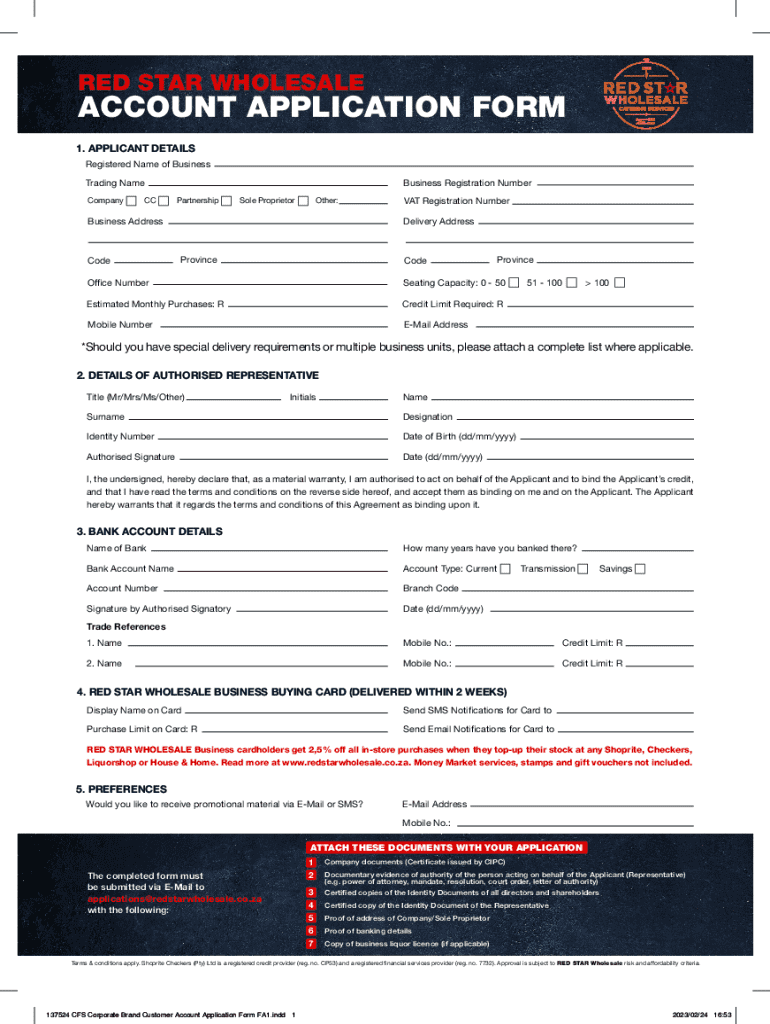
Get the free Red Star Wholesale Account Application Form
We are not affiliated with any brand or entity on this form

Fill out
Complete the form online in a simple drag-and-drop editor.

eSign
Add your legally binding signature or send the form for signing.

Share
Share the form via a link, letting anyone fill it out from any device.

Export
Download, print, email, or move the form to your cloud storage.
Why pdfFiller is the best tool for your documents and forms


End-to-end document management
From editing and signing to collaboration and tracking, pdfFiller has everything you need to get your documents done quickly and efficiently.
Accessible from anywhere
pdfFiller is fully cloud-based. This means you can edit, sign, and share documents from anywhere using your computer, smartphone, or tablet.
Secure and compliant
pdfFiller lets you securely manage documents following global laws like ESIGN, CCPA, and GDPR. It's also HIPAA and SOC 2 compliant.
What is Red Star Application
The Red Star Wholesale Account Application Form is a business document used by companies to apply for a wholesale account with Red Star Wholesale, facilitating wholesale purchases.
pdfFiller scores top ratings on review platforms




Who needs Red Star Application?
Explore how professionals across industries use pdfFiller.

Red Star Application is needed by:
-
Businesses seeking to establish a wholesale account.
-
Authorized representatives who represent their company's interests.
-
Financial departments managing business accounts.
-
Entrepreneurs starting new ventures that require wholesale supplies.
-
Retailers wanting to stock Red Star products.
-
Existing Shoprite Checkers partners needing to update account information.
Comprehensive Guide to Red Star Application
What is the Red Star Wholesale Account Application Form?
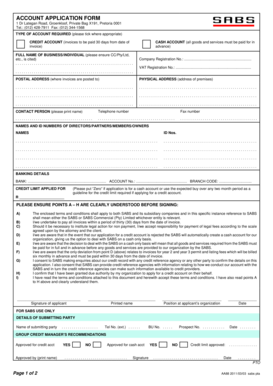
The Red Star Wholesale Account Application Form serves as a pivotal instrument for businesses seeking to establish a wholesale purchasing relationship with Red Star Wholesale, a division of Shoprite Checkers (Pty) Ltd. This form is designed to collect essential details about your business, including its registered name, address, and bank account information. By submitting this form, companies can access the benefits associated with wholesale pricing and bulk purchasing, thereby enhancing their procurement strategies.
Purpose and Benefits of the Red Star Wholesale Account Application Form
Businesses that apply for the Red Star wholesale account can enjoy various advantages. One of the primary benefits is access to exclusive wholesale pricing, which allows for significant cost savings when purchasing in bulk. Additionally, having a wholesale account facilitates streamlined procurement processes and strengthens supplier relationships. It is crucial for all applicants to understand and accept the terms and conditions outlined in the application.
Key Features of the Red Star Wholesale Account Application Form
This application form includes multiple fillable fields to gather necessary information, such as:
-
Registered Name of Business
-
Business Address
-
Authorised Representative Information
-
Bank Account Details
Furthermore, accepting the terms and conditions is vital for successful application submission. This transparency helps ensure that all parties understand their responsibilities and requirements under the wholesale purchasing agreement.
Who Needs the Red Star Wholesale Account Application Form?
Various types of businesses can benefit from applying for a wholesale account with Red Star Wholesale. Industries such as retail, hospitality, and food services often leverage wholesale accounts to maximize their purchasing power. Additionally, small to medium-sized enterprises (SMEs) and larger corporations alike can find value in this application. To qualify, applicants typically need to meet certain eligibility criteria, which may include proof of business registration and financial solvency.
How to Fill Out the Red Star Wholesale Account Application Form Online
Completing the Red Star Wholesale Account Application Form online can be a straightforward process if you follow these steps:
-
Access the form online and review all instructions provided.
-
Fill out the required fields accurately, ensuring that all information is complete.
-
Double-check your entries for any spelling or numerical errors.
-
Submit the form via email as instructed.
Be aware of common troubleshooting issues, such as format errors in attached documents. Following best practices will help ensure your application is processed without delays.
Submission Methods for the Red Star Wholesale Account Application Form
Once completed, the Red Star Wholesale Account Application Form can be submitted through specified methods. Applicants should use the designated email address to send their forms, making sure to attach any necessary supporting documents. Confirming receipt of the application submission can also help avoid any potential miscommunication.
Common Errors and How to Avoid Them When Filling Out the Form
Applicants should be mindful of common mistakes when filling out the application. Here are several key points to consider:
-
Incomplete fields that may lead to application rejection.
-
Errors in business details, such as incorrect names or addresses.
-
Failure to provide adequate documentation for verification.
Taking the time to double-check your information can help validate the completed form and enhance the likelihood of approval.
What Happens After You Submit the Red Star Wholesale Account Application Form?
After submitting the application, applicants should anticipate a processing period during which their information is reviewed. Tracking your application status can typically be done through follow-up communication with Red Star Wholesale. Depending on the outcome, applicants will receive notification regarding acceptance or rejection, which will include next steps or further clarifications as necessary.
Ensuring Security and Compliance with Your Red Star Wholesale Account Application
To protect sensitive information submitted through the Red Star Wholesale Account Application Form, several security measures are implemented. These include data protection protocols that ensure compliance with relevant industry regulations and standards. By being aware of these security practices, applicants can feel more confident in the confidentiality of their submitted details.
Experience a Streamlined Process with pdfFiller for Your Red Star Wholesale Application Form
Utilizing pdfFiller for the Red Star Wholesale Account Application Form can simplify your form-filling experience. This platform allows easy editing and eSigning of documents, ensuring secure handling of your business information. Its cloud-based solution provides convenient access to manage your application forms from anywhere, making the process both efficient and user-friendly.
How to fill out the Red Star Application
-
1.To access the Red Star Wholesale Account Application Form, visit pdfFiller and search for the form using its name.
-
2.Once you find the form, click on it to open it in the pdfFiller interface.
-
3.Before filling out the form, gather all necessary information such as your business's registered name, address, authorized representative's details, and bank account information.
-
4.Navigate through the form's fillable fields and enter the required information. Use the text fields to input your details accurately.
-
5.If you need help, utilize pdfFiller's tools such as tooltips or help icons for guidance on completing specific sections.
-
6.After filling out the form, review all information for accuracy and completeness. Make any necessary corrections before finalizing.
-
7.Once you're satisfied with the form, save your progress in pdfFiller to avoid losing any information.
-
8.To submit your completed application, download the final version of the form and email it to applications@redstarwholesale.co.za as instructed.

Who is eligible to use the Red Star Wholesale Account Application Form?
Any registered business in South Africa looking to establish a wholesale account with Red Star Wholesale is eligible to use this form.
What information is required to complete the form?
You will need your business's registered name, address, authorized representative details, and bank account information to complete the application.
What is the submission method for the completed form?
Submit the completed Red Star Wholesale Account Application Form by downloading it from pdfFiller and emailing it to applications@redstarwholesale.co.za.
Are there deadlines for submitting the form?
There are no specific deadlines mentioned for this form. However, it is recommended to submit as soon as possible for timely processing.
What are common mistakes to avoid when filling out the form?
Common mistakes include incomplete fields, missing signatures, or inaccurate business information. Always double-check the information before submitting.
Is notarization needed for the form?
No, notarization is not required for the Red Star Wholesale Account Application Form.
How long does processing take once submitted?
While specific processing times are not provided, expect a reasonable duration for application review after submission to applications@redstarwholesale.co.za.
Related Forms





Related Catalogs
Get the latest insights from our blog


If you believe that this page should be taken down, please follow our DMCA take down process
here
.
This form may include fields for payment information. Data entered in these fields is not covered by PCI DSS compliance.