
Last updated on
Nov 4, 2026

UK TPT Retirement Solutions Opt Out Notice 2015 free printable template
We are not affiliated with any brand or entity on this form

Fill out
Complete the form online in a simple drag-and-drop editor.

eSign
Add your legally binding signature or send the form for signing.

Share
Share the form via a link, letting anyone fill it out from any device.

Export
Download, print, email, or move the form to your cloud storage.
Why pdfFiller is the best tool for your documents and forms


End-to-end document management
From editing and signing to collaboration and tracking, pdfFiller has everything you need to get your documents done quickly and efficiently.
Accessible from anywhere
pdfFiller is fully cloud-based. This means you can edit, sign, and share documents from anywhere using your computer, smartphone, or tablet.
Secure and compliant
pdfFiller lets you securely manage documents following global laws like ESIGN, CCPA, and GDPR. It's also HIPAA and SOC 2 compliant.
What is UK TPT Retirement Solutions Opt Out Notice
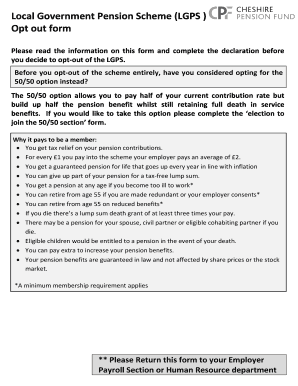
The Pension Opt Out Notice is a document used by employees in the UK to formally opt out of pension saving.
pdfFiller scores top ratings on review platforms




Who needs UK TPT Retirement Solutions Opt Out Notice?
Explore how professionals across industries use pdfFiller.

UK TPT Retirement Solutions Opt Out Notice is needed by:
-
Employees looking to opt out of pension contributions
-
Employers managing employee pension plans
-
HR professionals handling employee management forms
-
Financial advisors guiding employees on pension decisions
-
Payroll departments processing pension-related paperwork
-
Legal entities ensuring pension compliance
Comprehensive Guide to UK TPT Retirement Solutions Opt Out Notice
What is the Pension Opt Out Notice?
The Pension Opt Out Notice serves as a formal mechanism for employees in the UK to withdraw from pension saving schemes. This document is essential for ensuring that employees provide the necessary information, such as their full name, date of birth, and employer's name, allowing them to formally opt out. Opting out may have significant implications for future retirement savings and must be considered carefully.
By utilizing the Pension Opt Out Notice, employees comply with the requirement to officially inform their employer of their decision to stop pension contributions, securing both their present financial flexibility and preparing for future needs.
Purpose and Benefits of the Pension Opt Out Notice
The Pension Opt Out Notice is crucial for employees looking to manage their financial priorities effectively. One of the primary benefits of opting out is increased financial flexibility, allowing employees to redirect funds that would have been allocated to pension savings towards immediate needs or other investments.
Employees may find opting out beneficial under various circumstances, such as short-term financial strain or changes in employment status. This form also aligns with broader employee management principles, enabling individuals to exercise autonomy over their financial decisions in the workplace.
Key Features of the Pension Opt Out Notice
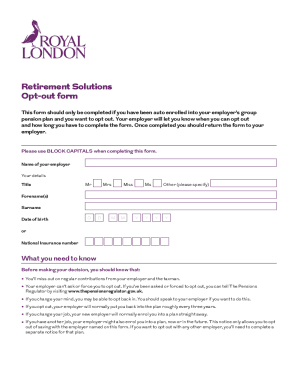
The Pension Opt Out Notice consists of several fillable fields, each designed for critical information. Key components include:
-
Full name of the employee
-
Employer's name
-
Date of birth or National Insurance number
-
Signature of the employee
Each section of the form comes with explicit instructions to ensure clarity. Accurately completing this form is vital to avoid misunderstandings and ensure proper processing by the employer.
Who Needs the Pension Opt Out Notice?
The target audience for the Pension Opt Out Notice includes employees throughout the UK who are currently enrolled in pension schemes. These workers must be aware of their eligibility to use the notice to formally opt out.
Additionally, it's essential for employers to efficiently process these requests to avoid administrative complications. Understanding who qualifies can help both parties navigate the opting-out process more smoothly.
How to Fill Out the Pension Opt Out Notice Online (Step-by-Step)
Filling out the Pension Opt Out Notice online through pdfFiller involves the following steps:
-
Access the Pension Opt Out Notice template on the pdfFiller platform.
-
Download the form for digital completion.
-
Fill in each required field, ensuring accuracy with personal details.
-
Review the form for any potential errors before submission.
-
Sign the document electronically to validate your request.
By following these instructions, employees can complete their Pension Opt Out Notice effectively, reducing the risk of common mistakes.
Submission Methods for the Pension Opt Out Notice
Once the Pension Opt Out Notice is completed, it must be submitted to the employer to officially end pension contributions. Submissions can typically be made by:
-
Directly handing the completed notice to the HR department
-
Emailing a scanned copy to the employer
Adhering to submission deadlines is crucial, as it ensures that the request is processed appropriately. After submission, employees should track the status of their request to confirm its acceptance.
Consequences of Not Submitting the Pension Opt Out Notice
Failure to submit the Pension Opt Out Notice can lead to significant risks, primarily surrounding financial preparedness for retirement. If an employee opts out without proper documentation, they may face various complications, including fines.
Submitting the notice in a timely manner is essential to avoid potential penalties and ensure a smooth withdrawal from pension contributions.
Security and Compliance for the Pension Opt Out Notice
Handling the Pension Opt Out Notice securely is paramount due to its sensitive nature. When using pdfFiller, robust security measures are in place, including 256-bit encryption, which protects personal data during form completion.
It’s also important to comply with data protection laws, such as GDPR, when processing pension documents. Users can trust that their privacy is maintained throughout the entire process of filling out the form.
Utilizing pdfFiller for Your Pension Opt Out Notice
pdfFiller offers a comprehensive solution for creating and managing the Pension Opt Out Notice. The platform streamlines the process by providing features such as eSigning, which simplifies the signing process, and cloud storage, ensuring easy access to completed documents.
By choosing pdfFiller, users can enjoy hassle-free form filling and benefit from additional features that enhance their overall experience when managing important forms like the Pension Opt Out Notice.
How to fill out the UK TPT Retirement Solutions Opt Out Notice
-
1.Access the Pension Opt Out Notice on pdfFiller by typing the form name in the search bar and selecting it from the results.
-
2.Once the form opens, familiarize yourself with the fillable fields. You will need to complete areas such as your full name, employer's name, date of birth or national insurance number, and signature.
-
3.Before starting, gather necessary information including your personal details, your employer's name, and your signature. It makes the process smoother.
-
4.Navigate each field using your mouse or keyboard to click and type. Ensure all fields are filled out accurately to prevent errors.
-
5.Read the instructions provided in the document carefully. This ensures you understand the implications of opting out and reminds you about the steps to opt back in if needed.
-
6.Once all information is entered, review the filled-out form thoroughly. Check for any missing or incorrect information that may delay your submission.
-
7.Finalize the form by signing where indicated and entering the date. This shows your consent and commitment to the opt-out process.
-
8.Save your completed document using the 'Save' function in pdfFiller. You can download the file to your device or choose to submit it directly via email if your employer accepts electronic submissions.

Who is eligible to use the Pension Opt Out Notice?
Any employee in the UK who wishes to opt out of pension savings can utilize the Pension Opt Out Notice. It's essential to be an active participant in your employer's pension scheme before submitting this form.
What are the consequences of opting out of pension savings?
When you opt out of pension savings, you will stop contributing towards your retirement scheme, which may affect your future benefits. It's crucial to understand the long-term implications before completing the form.
Is there a deadline for submitting the Pension Opt Out Notice?
While the Pension Opt Out Notice does not have a specific deadline, it's advisable to submit it promptly to ensure the next payroll cycle reflects your decision. Consult your employer for specific guidelines.
What supporting documents should I provide with the form?
Typically, no additional documents are required with the Pension Opt Out Notice. However, verify with your employer if any specific identification or proof is needed alongside your form.
What mistakes should I avoid when filling out the Pension Opt Out Notice?
Common mistakes include leaving fields blank, providing incorrect information, and not signing the form. Double-check all details to ensure accuracy before submission.
How long does it take for my Pension Opt Out to be processed?
Processing times can vary by employer, but typically, it may take one full payroll cycle for your opt-out notice to take effect. Contact your HR department for specific timing.
Can I opt back into the pension scheme after opting out?
Yes, you can opt back into the pension scheme after opting out. You will need to follow your employer's specific process to re-enroll, which is usually detailed in your employee handbook.
UK TPT Retirement Solutions Opt Out Notice Form Versions
Related Forms





Get the latest insights from our blog


If you believe that this page should be taken down, please follow our DMCA take down process
here
.
This form may include fields for payment information. Data entered in these fields is not covered by PCI DSS compliance.