
Last updated on
Nov 9, 2026
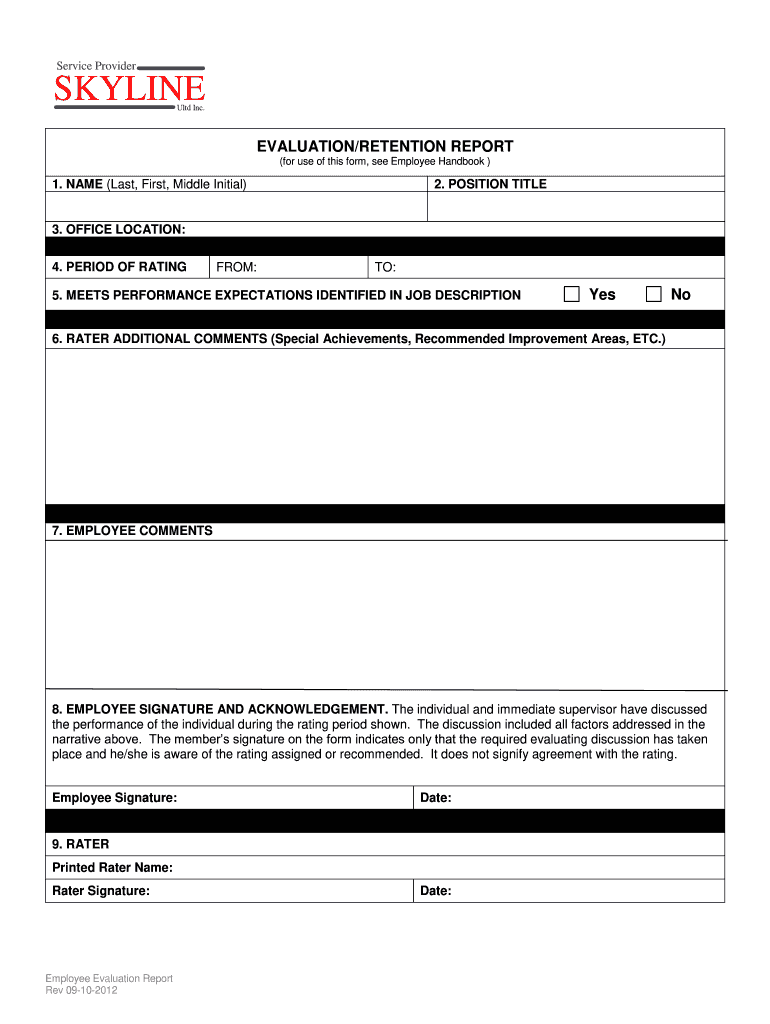
Skyline Employee Evaluation Report 2012-2026 free printable template
pdfFiller is not affiliated with any government organization

Fill out
Complete the form online in a simple drag-and-drop editor.

eSign
Add your legally binding signature or send the form for signing.

Share
Share the form via a link, letting anyone fill it out from any device.

Export
Download, print, email, or move the form to your cloud storage.
Why pdfFiller is the best tool for your documents and forms


End-to-end document management
From editing and signing to collaboration and tracking, pdfFiller has everything you need to get your documents done quickly and efficiently.
Accessible from anywhere
pdfFiller is fully cloud-based. This means you can edit, sign, and share documents from anywhere using your computer, smartphone, or tablet.
Secure and compliant
pdfFiller lets you securely manage documents following global laws like ESIGN, CCPA, and GDPR. It's also HIPAA and SOC 2 compliant.
What is Skyline Employee Evaluation Report
The Employee Evaluation Report is a performance review form used by employers to assess and document employee performance.
pdfFiller scores top ratings on review platforms




Who needs Skyline Employee Evaluation Report?
Explore how professionals across industries use pdfFiller.

Skyline Employee Evaluation Report is needed by:
-
HR professionals conducting performance evaluations
-
Managers and supervisors providing feedback
-
Employees undergoing performance reviews
-
Companies implementing employee assessment procedures
-
Organizations looking to standardize performance evaluations
Comprehensive Guide to Skyline Employee Evaluation Report
What is the Employee Evaluation Report?
The Employee Evaluation Report is a vital tool for assessing employee performance within an organization. This document plays a crucial role in employment settings by defining performance standards and offering a framework for employee feedback. The report includes essential components such as employee information and established performance criteria that provide a structured approach to evaluation.
Utilizing this report fosters constructive feedback and supports employee development by setting clear expectations. It serves as a foundation for discussions about strengths, areas for improvement, and future goals, thereby enhancing overall performance management strategies.
Purpose and Benefits of Using the Employee Evaluation Report
Using the Employee Evaluation Report offers numerous advantages for both employees and employers. For employees, it provides valuable feedback that can help enhance individual performance and guide career development. Employers benefit from thorough documentation of performance that informs decisions on promotions, raises, and training opportunities.
Incorporating performance evaluations into organizational practices can significantly boost workplace productivity and morale, creating an environment where employees feel recognized and motivated. Furthermore, this report aids in setting clear goals, aligning expectations, and fostering a culture of continuous improvement.
Key Features of the Employee Evaluation Report
The Employee Evaluation Report contains several key features designed to facilitate effective performance assessment. Notable components include:
-
Fillable fields for essential information such as employee name, position title, and office location.
-
Specific rating criteria to measure performance against established benchmarks.
-
Signature lines that require both the employee and rater to sign, ensuring mutual accountability.
-
An area for comments from both parties, enabling comprehensive feedback and dialogue.
These features enhance the report's utility by ensuring that evaluations are thorough, transparent, and actionable.
Who Needs the Employee Evaluation Report?
The Employee Evaluation Report is beneficial for a diverse audience within organizations. Key users include HR managers, team leaders, and employees who partake in performance evaluations. This report is crucial during specific scenarios, such as annual reviews or performance appraisals.
Industry-specific applications of the evaluation report can vary, but its fundamental purpose remains consistent: to assess and improve job performance. This versatile tool can be adapted to fit the unique evaluation needs of various sectors.
How to Fill Out the Employee Evaluation Report Online (Step-by-Step)
Filling out the Employee Evaluation Report online can streamline the process and enhance efficiency. Follow these steps to complete the report using pdfFiller tools:
-
Access the form through the pdfFiller platform.
-
Input the employee's name, position title, and relevant performance dates.
-
Rate the employee’s performance according to the established criteria in the report.
-
Provide comments and feedback that address key performance areas.
-
Secure signatures from both the employee and the rater using the eSigning feature.
Utilizing electronic completion and eSigning options offers significant convenience and ensures timely submissions.
Common Errors When Filling Out the Employee Evaluation Report
While completing the Employee Evaluation Report, users may encounter several common errors that can affect submission validity. Typical mistakes include:
-
Failing to complete all required fields.
-
Submitting forms without appropriate signatures from both parties.
To prevent these errors, users should take advantage of the review checklist feature available in pdfFiller. This ensures that all information is accurate and complete before submission.
Digital Signature vs. Wet Signature Requirements
Understanding the signature requirements for the Employee Evaluation Report is essential. Digital signatures are widely accepted in employee evaluations and offer a secure alternative to traditional wet signatures. PdfFiller provides compliant eSigning options that adhere to necessary regulations.
Users must ensure that the digital signatures meet jurisdictional requirements. Following the platform’s guidelines for the signature process will help maintain the report's validity and integrity in compliance with legal standards.
Submission Methods for the Employee Evaluation Report
Once the Employee Evaluation Report is completed, several submission methods are available to facilitate the process. Options include submitting the report via email, printing and delivering a hard copy, or using online platforms for sharing.
Utilizing pdfFiller simplifies the submission process by providing a seamless way to share completed evaluations. Employers should be aware of any deadlines or preferred practices when submitting these documents to ensure they meet organizational standards.
Security and Compliance When Using the Employee Evaluation Report
Users can feel confident in the security and compliance measures implemented by pdfFiller when handling the Employee Evaluation Report. The platform employs advanced 256-bit encryption and adheres to regulations such as HIPAA and GDPR to protect sensitive employee performance data.
Adopting best practices for safeguarding this information is crucial. Secure handling and storage of evaluation forms can prevent unauthorized access and maintain the confidentiality of employee evaluations.
Why Choose pdfFiller for Your Employee Evaluation Report Needs
PdfFiller stands out as an exceptional choice for managing Employee Evaluation Reports due to its user-friendly interface and comprehensive features. The platform simplifies the processes of creating, filling, and sharing documents, making it easy to manage evaluations efficiently.
In addition to the evaluation report, pdfFiller offers various tools such as editing capabilities, form merging, and intuitive document management options. Users can experience the convenience and efficiency that pdfFiller brings to their employee evaluation processes.
How to fill out the Skyline Employee Evaluation Report
-
1.To access the Employee Evaluation Report, visit pdfFiller and search for the document using the provided keywords or by the form's name.
-
2.Once you have located the form, click on it to open it within the pdfFiller interface.
-
3.Before filling out the form, gather essential information including the employee's name, position title, office location, and the review period.
-
4.Begin completing the form by filling in the employee's name in the specified field labeled 'NAME (Last, First, Middle Initial)'.
-
5.Next, enter the positioning title of the employee in the corresponding field below the name.
-
6.Record the office location of the employee accurately to ensure clarity on the context of the evaluation.
-
7.Proceed to the section regarding performance expectations. Use the checkboxes to indicate whether the employee meets the required performance standards.
-
8.In the comments area designated for the rater, provide specific feedback and observations regarding the employee's performance.
-
9.Allow space for the employee to add their own comments in the designated section to facilitate a two-way feedback process.
-
10.Both the employee and the rater should utilize the signature lines at the bottom of the form to acknowledge the evaluation discussion.
-
11.Once all fields are completed, review the information for accuracy and clarity before finalizing.
-
12.To save your progress, utilize the save option available in pdfFiller. You can also download the completed document or submit it electronically through the platform.

What is an Employee Evaluation Report?
An Employee Evaluation Report is a performance review document used by employers to assess an employee's work performance, highlighting strengths and areas for improvement.
Who needs to sign the Employee Evaluation Report?
Both the employee being evaluated and the rater must sign the Employee Evaluation Report to confirm that the evaluation discussion took place.
What should I include in my comments on the form?
When providing comments, include specific feedback on the employee's performance, noting achievements and areas for development based on their job responsibilities.
Can I edit the Employee Evaluation Report after filling it out?
Yes, you can edit the Employee Evaluation Report within pdfFiller before saving or submitting it. Make sure to review your responses for accuracy.
Is there a specific deadline for submitting the Employee Evaluation Report?
While specific deadlines may vary by organization, it is generally advisable to complete performance evaluations promptly to ensure timely feedback and reviews.
What common mistakes should I avoid when completing the form?
Avoid common mistakes such as incomplete fields, unclear comments, and lack of necessary signatures. Ensure all information is accurate and thorough.
Can this form be used for different performance evaluation periods?
Yes, the Employee Evaluation Report can be utilized for various performance evaluation periods, allowing customization according to your organization's review schedule.
Related Content
Related Forms



Related Catalogs
Get the latest insights from our blog


If you believe that this page should be taken down, please follow our DMCA take down process
here
.
This form may include fields for payment information. Data entered in these fields is not covered by PCI DSS compliance.