
Last updated on
Nov 6, 2026

Freedom Healthcare Staffing CNA Skills Checklist 2010-2026 free printable template
pdfFiller is not affiliated with any government organization

Fill out
Complete the form online in a simple drag-and-drop editor.

eSign
Add your legally binding signature or send the form for signing.

Share
Share the form via a link, letting anyone fill it out from any device.

Export
Download, print, email, or move the form to your cloud storage.
Why pdfFiller is the best tool for your documents and forms


End-to-end document management
From editing and signing to collaboration and tracking, pdfFiller has everything you need to get your documents done quickly and efficiently.
Accessible from anywhere
pdfFiller is fully cloud-based. This means you can edit, sign, and share documents from anywhere using your computer, smartphone, or tablet.
Secure and compliant
pdfFiller lets you securely manage documents following global laws like ESIGN, CCPA, and GDPR. It's also HIPAA and SOC 2 compliant.
What is Freedom Healthcare Staffing CNA Skills Checklist
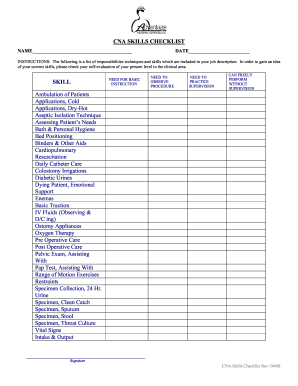
The CNA Skills Checklist is a healthcare form used by applicants to assess their proficiency in clinical skills required for nursing assistant roles.
pdfFiller scores top ratings on review platforms




PDFfiller is a great tool that allows me to conveniently complete forms that result in a professional look. The verified signature is a useful feature that I really appreciate since it streamlines the completion process on numerous forms.
gets the job done when I need that unusual form
Who needs Freedom Healthcare Staffing CNA Skills Checklist?
Explore how professionals across industries use pdfFiller.

Freedom Healthcare Staffing CNA Skills Checklist is needed by:
-
Certified Nursing Assistants applying for jobs
-
Healthcare facilities conducting staff assessments
-
Clinical training programs evaluating applicant skills
-
Recruiters in healthcare staffing agencies
-
Educational institutions training CNA students
-
Employers seeking to verify competencies
Comprehensive Guide to Freedom Healthcare Staffing CNA Skills Checklist
What is the CNA Skills Checklist?
The CNA Skills Checklist is a crucial tool for certified nursing assistant applicants, facilitating the assessment of their clinical skills and proficiency levels. This form plays a significant role in the healthcare application process by allowing candidates to clearly demonstrate their qualifications. By utilizing the checklist, applicants can effectively convey their competencies, which is vital for securing roles in the healthcare field.
Benefits of Using the CNA Skills Checklist
Employing the CNA Skills Checklist provides applicants with several distinct advantages. It serves as an effective method for self-assessing skills and competencies, enabling candidates to identify their strengths and areas for improvement. Moreover, this assessment is instrumental in enhancing employability within the healthcare sector, as it equips applicants with a clear outline of their capabilities. For employers, the checklist aids in evaluating applicants' readiness for nursing assistant roles, ensuring the best fit for patient care needs.
Key Features of the CNA Skills Checklist
The CNA Skills Checklist includes several critical components that improve its usability and efficacy. It features a proficiency scale that allows applicants to rate their skill levels accurately based on established criteria. Additionally, the form requires a signature for authorization, including a printed name field, ensuring that all submissions are verified. Users will find the form is fillable online, enhancing accessibility and convenience.
Who Should Use the CNA Skills Checklist?
This checklist is primarily designed for certified nursing assistant applicants who wish to document their qualifications accurately. It can also be beneficial for trainers or educational institutions assessing candidates' readiness for the healthcare industry. Furthermore, stakeholders such as employers or licensing bodies may reference the checklist to evaluate an applicant's training and competence.
Step-by-Step Guide: How to Fill Out the CNA Skills Checklist Online
Completing the CNA Skills Checklist online involves several specific steps to ensure accuracy and completeness. First, applicants should start by entering personal information in the designated fields. Next, they need to rate their competencies using the proficiency scale provided, paying attention to the rating criteria. It's important to avoid common pitfalls, such as underestimating skill levels or leaving fields incomplete, as these can impact the impression made on potential employers.
How to Submit the CNA Skills Checklist
When it comes to submitting the CNA Skills Checklist, users have multiple digital options available. Submissions can be made directly through pdfFiller, a platform designed for easy form handling. Completed forms should be sent to relevant parties, which could include potential employers or educational institutions. Applicants should be aware of potential deadlines or fees associated with submission to ensure a smooth application process.
Security and Compliance with the CNA Skills Checklist
Ensuring the security and confidentiality of the CNA Skills Checklist is a top priority. pdfFiller utilizes advanced security measures, such as 256-bit encryption, to protect sensitive information and maintain compliance with HIPAA regulations. Users can rest assured that their submitted data will be handled with care, and it is advised to retain a copy of the form for personal records, enhancing both security and accountability.
What Happens After You Submit the CNA Skills Checklist?
Once the CNA Skills Checklist has been submitted, applicants can take specific steps to track their application status. Regular follow-ups may be necessary based on the responses received, helping to keep applicants informed and engaged. Additionally, understanding common rejection reasons can greatly assist candidates in addressing any issues that arise during the evaluation of their qualifications.
Why Use pdfFiller for Your CNA Skills Checklist?
The advantages of using pdfFiller for completing the CNA Skills Checklist are noteworthy. This platform simplifies the process of editing, signing, and submitting forms online, ensuring a user-friendly experience for healthcare professionals. Users can take advantage of the reliability and security inherent in pdfFiller, making it a preferred choice for handling essential healthcare documents efficiently.
Get Started with Your CNA Skills Checklist Today
Now is the perfect time to create, edit, and submit your CNA Skills Checklist using pdfFiller. This seamless process allows you to highlight your skills effectively, which is crucial for your journey towards securing employment in the healthcare field. Begin your application process today and ensure your competencies are well-presented to potential employers.
How to fill out the Freedom Healthcare Staffing CNA Skills Checklist
-
1.Start by accessing pdfFiller and searching for the 'CNA Skills Checklist' template.
-
2.Open the form by clicking on the document link to load it in the pdfFiller editor.
-
3.Before filling out the form, gather your experience details, including your clinical skills and previous patient care tasks.
-
4.Begin completing the form by entering your proficiency ratings in the provided fields for each skill listed.
-
5.Use the checkboxes next to each skill to indicate your comfort level and competency, ensuring an accurate reflection of your abilities.
-
6.Be sure to sign on the designated signature line using the digital signature tool available in pdfFiller.
-
7.Next, enter your printed name in the appropriate field under the signature line to authenticate your submission.
-
8.Once all fields are filled and reviewed for accuracy, use the 'Save' option to securely store the completed form.
-
9.You can also download a copy to your device or submit the form directly to the intended recipient through pdfFiller's submission tools.
-
10.Confirm that the submission method aligns with the requirements of the organization you are applying to.

What are the eligibility requirements for filling out the CNA Skills Checklist?
Eligibility typically includes being a certified nursing assistant or a student in a CNA training program. Ensure you have relevant clinical experience to complete the checklist accurately.
Are there deadlines for submitting the CNA Skills Checklist?
Deadlines vary by employer or training program. It is advisable to check with the specific organization regarding submission timelines to ensure timely processing.
How can I submit the completed CNA Skills Checklist?
You can submit the form electronically via pdfFiller's submission feature or download it and send it directly to your prospective employer or training program via email.
What supporting documents might I need to provide with the CNA Skills Checklist?
Supporting documents may include copies of your CNA certification, transcripts from your training program, and any additional references or proof of clinical experience as required.
What common mistakes should I avoid while completing the CNA Skills Checklist?
Common mistakes include not signing the form, providing inaccurate proficiency ratings, or neglecting to review the document for clarity and completeness before submission.
How long does it take to process the CNA Skills Checklist once submitted?
Processing times can vary depending on the organization. Typically, you may expect feedback within a week or two, but it's best to inquire directly with the receiving entity.
Is the CNA Skills Checklist required for all CNA job applications?
While not all applications may require this form, it is often requested by employers to assess candidates’ clinical competencies. Check with each employer for specific requirements.
Related Forms





Related Catalogs
Get the latest insights from our blog


If you believe that this page should be taken down, please follow our DMCA take down process
here
.
This form may include fields for payment information. Data entered in these fields is not covered by PCI DSS compliance.