
Last updated on
Oct 31, 2026

Mr Gones Proximi 2009-2026 free printable template
We are not affiliated with any brand or entity on this form

Fill out
Complete the form online in a simple drag-and-drop editor.

eSign
Add your legally binding signature or send the form for signing.

Share
Share the form via a link, letting anyone fill it out from any device.

Export
Download, print, email, or move the form to your cloud storage.
Why pdfFiller is the best tool for your documents and forms


End-to-end document management
From editing and signing to collaboration and tracking, pdfFiller has everything you need to get your documents done quickly and efficiently.
Accessible from anywhere
pdfFiller is fully cloud-based. This means you can edit, sign, and share documents from anywhere using your computer, smartphone, or tablet.
Secure and compliant
pdfFiller lets you securely manage documents following global laws like ESIGN, CCPA, and GDPR. It's also HIPAA and SOC 2 compliant.
What is Mr Gones Proximi
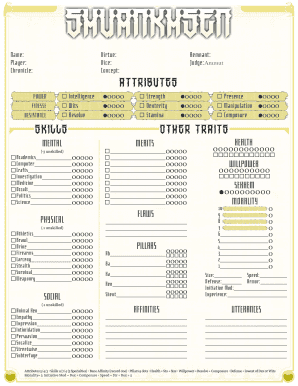
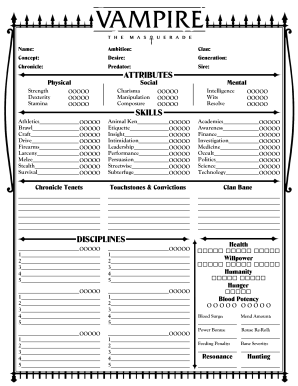
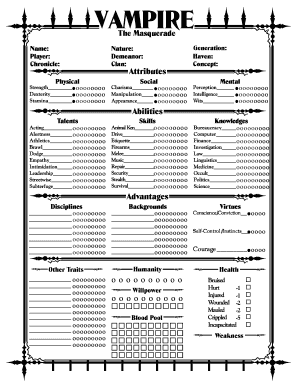
The Proximi Character Sheet is a personal form used by players of the Proximi role-playing game to track character attributes, skills, and traits.
pdfFiller scores top ratings on review platforms




Given my mediocre technology skills, navigating this site was user friendly and allowed creativity to flow :)
Slightly confused, but only because I'm extremely technically challenged. I like a way to electronically sign docs and modify PDF docs. Thx!
Who needs Mr Gones Proximi?
Explore how professionals across industries use pdfFiller.

Mr Gones Proximi is needed by:
-
Players of the Proximi role-playing game
-
Game masters facilitating Proximi sessions
-
Tabletop RPG enthusiasts
-
Character development coaches
-
Creative writers designing characters
-
Game developers testing gameplay mechanics
Comprehensive Guide to Mr Gones Proximi
What is the Proximi Character Sheet?
The Proximi Character Sheet is a crucial tool designed for players of the Proximi role-playing game. This form serves the purpose of tracking character attributes, skills, and various traits that contribute to gameplay. Players can utilize this sheet to manage their character creation effectively, including details on attributes like Intelligence, Strength, and Presence.
In addition to character attributes, the sheet allows users to monitor skills, empowering them to maintain a comprehensive character profile tailored to their gameplay style.
Purpose and Benefits of Using the Proximi Character Sheet
Utilizing the Proximi Character Sheet enhances gameplay and simplifies character management for players. This form streamlines the process of tracking vital character attributes and skills, ensuring players have quick access to important information during sessions.
Benefits of using the sheet include easier organization of character data, improved focus on role-playing aspects, and the ability to adapt characters dynamically as gameplay progresses.
Key Features of the Proximi Character Sheet
This character sheet boasts several key components that facilitate ease of use and functionality. Players will find fillable fields that allow for straightforward entry of character attributes and skills.
-
Detailed categories for character attributes and skills
-
Fillable fields and checkboxes for quick tracking
-
User-friendly layout designed for efficient character management
Who Can Use the Proximi Character Sheet?
The Proximi Character Sheet is intended for players of the Proximi RPG, including those who engage in various player roles. Each player can utilize the sheet to create and customize their characters, allowing for unique gameplay experiences.
This versatility ensures that character tracking is accessible and practical, enhancing the overall enjoyment of the game.
How to Fill Out the Proximi Character Sheet Online (Step-by-Step Guide)
Filling out the Proximi Character Sheet online is a straightforward process. Here are the steps to complete your character sheet digitally.
-
Access the Proximi Character Sheet through the designated platform.
-
Gather necessary information about your character's attributes and skills before starting.
-
Fill in the relevant fields, ensuring accuracy in your entries.
-
Review the completed sheet for any missing information or errors.
Field-by-Field Instructions for the Proximi Character Sheet
Each field on the Proximi Character Sheet serves a specific purpose:
-
Attributes: Key attributes include Intelligence, Strength, and Presence, each impacting gameplay.
-
Skills: The sheet includes sections for various skills, such as Academics, Athletics, and Empathy, that enhance character actions.
Understanding these fields allows players to build well-rounded characters that align with their gameplay strategies.
Common Errors and How to Avoid Them
While filling out the Proximi Character Sheet, users often encounter a few common mistakes. These include leaving fields incomplete or miscalculating skill levels. To ensure accuracy and completeness, players should carefully review each section before finalizing their sheet.
Additionally, taking a moment to double-check entries can prevent common errors in character stats and abilities.
How to Save, Print, and Submit the Proximi Character Sheet
Once you have completed the Proximi Character Sheet, follow these guidelines to save and print your document.
-
Select the appropriate save option to keep your filled character sheet in your desired format.
-
Use the print function to create a physical copy of the form if required.
-
Submit the completed form as directed by your game master or gaming group.
Security and Compliance Aspects of Filling Out the Proximi Character Sheet
When using the Proximi Character Sheet, security is paramount. pdfFiller implements 256-bit encryption to protect your data, ensuring compliance with HIPAA and GDPR standards. This means that players can fill out their character sheets with peace of mind regarding the security of their personal information.
Transform Your Gaming Experience with the Proximi Character Sheet
Using the Proximi Character Sheet streamlined by pdfFiller can significantly enhance your gaming experience. By leveraging a cloud-based approach for character management, players can effortlessly adjust and track their characters across various sessions.
Embracing this form allows for a more seamless and enjoyable role-playing experience, supporting players in realizing their character’s full potential.
How to fill out the Mr Gones Proximi
-
1.To access the Proximi Character Sheet, visit pdfFiller and log into your account or create a new one if you haven't already.
-
2.Use the search bar to find the Proximi Character Sheet by typing the form's name, or browse the Personal Forms category.
-
3.Once you find the form, click on it to open. You'll see the form displayed in pdfFiller's editing interface.
-
4.Before filling out the form, gather necessary details about your character, including their attributes like Intelligence, Strength, and Presence, as well as relevant skills such as Academics and Athletics.
-
5.In the form interface, navigate to each fillable field. Click on the field with your mouse to begin entering information about your character attributes and skills.
-
6.You can use the checkboxes provided to indicate selected skills or traits. Ensure that you thoroughly evaluate each element to accurately reflect your character.
-
7.After completing all sections of the character sheet, take a moment to review your entries for any mistakes or missing information.
-
8.Once you're satisfied with the completed form, use the preview option to ensure everything appears correctly.
-
9.You can save your entries to your pdfFiller account, download the completed character sheet as a PDF, or submit it directly as per your needs.

Who can use the Proximi Character Sheet?
The Proximi Character Sheet is primarily designed for players of the Proximi role-playing game and game masters. Anyone involved in character creation and gameplay can benefit from using this form.
What information do I need before starting to fill out the form?
Before filling out the Proximi Character Sheet, gather information about your character's attributes, skills, and traits. Refer to the game's guidelines or character creation rules for specific values.
Can I save my progress in filling out the form?
Yes, pdfFiller allows you to save your progress. After entering information, make sure to save the document to your account to continue filling it out later without losing any data.
What should I do if I make a mistake on the form?
If you make a mistake while filling out the Proximi Character Sheet, simply click on the field with the error and enter the correct information. Use the preview option to check for errors before finalizing.
Is there a deadline for submitting the completed character sheet?
There is typically no formal deadline for submitting the Proximi Character Sheet unless specified by your gaming group. Make sure to consult with your game master for any specific timeframes.
How can I submit the completed character sheet?
Once completed, you can save and download the Proximi Character Sheet to your device or print it out. You can also submit it via email or share it digitally with your game master as required.
What common mistakes should I avoid while filling out this form?
Common mistakes include forgetting to fill out skill levels, miscalculating attribute values, or not reviewing entries for accuracy. Double-check all fields to ensure the character sheet is complete and correct.
Related Forms




Get the latest insights from our blog


If you believe that this page should be taken down, please follow our DMCA take down process
here
.
This form may include fields for payment information. Data entered in these fields is not covered by PCI DSS compliance.