
Last updated on
Nov 9, 2026
FB DES Form 190-11-R free printable template
pdfFiller is not affiliated with any government organization

Fill out
Complete the form online in a simple drag-and-drop editor.

eSign
Add your legally binding signature or send the form for signing.

Share
Share the form via a link, letting anyone fill it out from any device.

Export
Download, print, email, or move the form to your cloud storage.
Why pdfFiller is the best tool for your documents and forms


End-to-end document management
From editing and signing to collaboration and tracking, pdfFiller has everything you need to get your documents done quickly and efficiently.
Accessible from anywhere
pdfFiller is fully cloud-based. This means you can edit, sign, and share documents from anywhere using your computer, smartphone, or tablet.
Secure and compliant
pdfFiller lets you securely manage documents following global laws like ESIGN, CCPA, and GDPR. It's also HIPAA and SOC 2 compliant.
What is FB DES Form 190-11-R
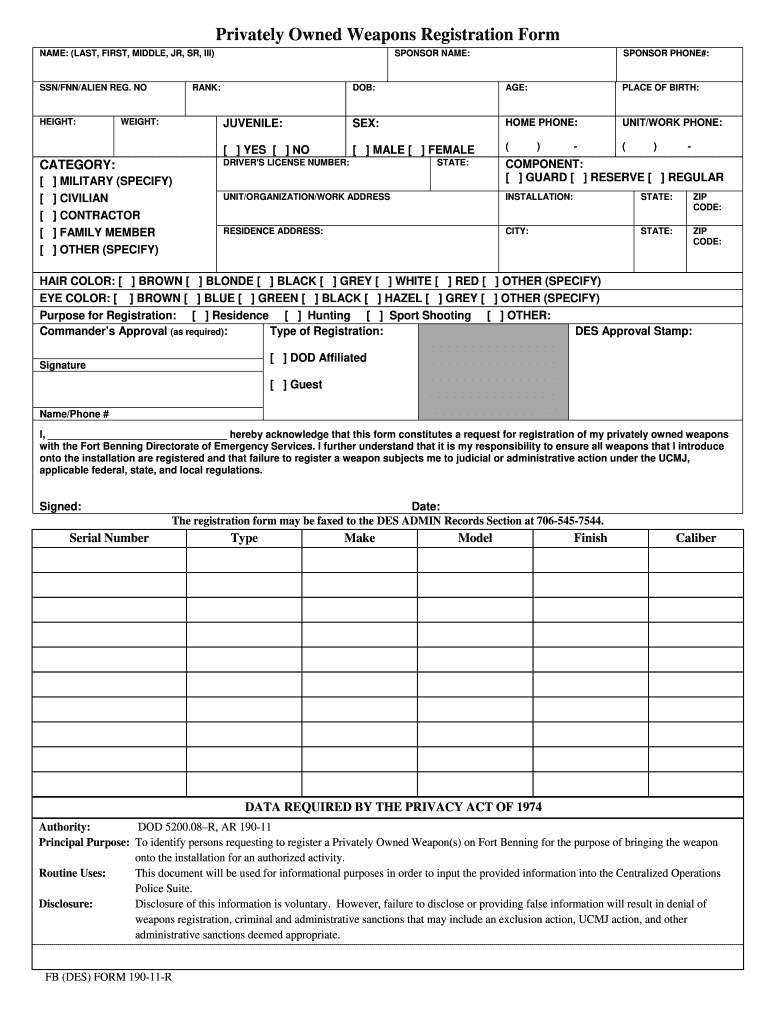
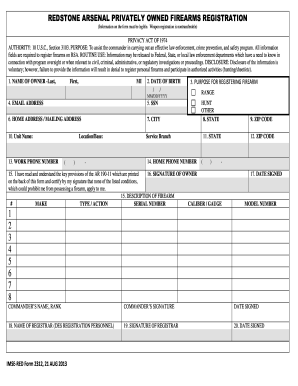
The Privately Owned Weapons Registration Form is a government document used by individuals to register their privately owned weapons with the Fort Benning Directorate of Emergency Services.
pdfFiller scores top ratings on review platforms




Who needs FB DES Form 190-11-R?
Explore how professionals across industries use pdfFiller.

FB DES Form 190-11-R is needed by:
-
Military personnel registering personal weapons
-
Civilian residents near Fort Benning
-
Gun owners applying for permits
-
Anyone transferring weapons ownership
-
Service members complying with DOD regulations
Comprehensive Guide to FB DES Form 190-11-R
What is the Privately Owned Weapons Registration Form?
The Privately Owned Weapons Registration Form is essential for residents in Georgia to comply with local laws regarding weapon ownership. This form plays a significant role in ensuring that individuals register their privately owned weapons with the Fort Benning Directorate of Emergency Services. This registration process is crucial for maintaining an accurate record of weapon ownership and adhering to state regulations.
Purpose and Benefits of Registering Weapons
Registering privately owned weapons is important to comply with local laws and regulations. By completing the Georgia weapons permit application or the DOD weapons registration form, individuals secure legal protection for their ownership and may gain liability coverage. This ensures that they are protected in case of any legal issues that may arise related to their weapon ownership.
Who Needs the Privately Owned Weapons Registration Form?
Eligibility for the Privately Owned Weapons Registration Form includes various individuals in Georgia. Military personnel, veterans, and other related government employees are required to register their privately owned weapons. It is vital for these specific groups to ensure compliance with the local laws governing weapon registration.
Key Features of the Privately Owned Weapons Registration Form
The Privately Owned Weapons Registration Form includes several specific fields necessary for proper completion. Key fields consist of personal information, such as the applicant's name, and detailed descriptions of the weapons owned. Additionally, a signature is required to acknowledge the terms and conditions of registration. Important sections may require headers such as 'Weapon Details' and 'Owner's Information' to clarify what information is expected.
Step-by-Step Guide on How to Fill Out the Privately Owned Weapons Registration Form
Completing the Privately Owned Weapons Registration Form can be done either online or manually. Follow these steps to successfully fill out the form:
-
Begin by providing your personal information in the designated fields.
-
Detail your weapon information, including make, model, and serial number.
-
Ensure your signature is placed in the appropriate section to confirm your acknowledgment.
Common errors to avoid include missing required fields and providing incomplete information, which could lead to registration delays.
Filing and Submitting the Privately Owned Weapons Registration Form
Submission methods for the Privately Owned Weapons Registration Form include both online and offline options. Completed forms can be sent directly to the Fort Benning Directorate of Emergency Services. To ensure timely processing, be aware of submission deadlines and any associated fees that may apply to the registration process.
What Happens After You Submit the Registration Form?
Once you submit the Privately Owned Weapons Registration Form, your application will undergo a verification process. Applicants can expect a confirmation regarding the status of their submission. It is crucial to address any issues promptly, as penalties or consequences of not filing can include judicial or administrative action.
Security and Compliance with the Privately Owned Weapons Registration Form
Security measures are in place to protect the information provided in the Privately Owned Weapons Registration Form. The handling of sensitive information complies with legal standards to ensure privacy and data protection. Users can rest assured that their data is secure throughout the registration process.
Using pdfFiller for the Privately Owned Weapons Registration Form
pdfFiller simplifies the process of filling out and submitting the Privately Owned Weapons Registration Form with its various functionalities. Users can take advantage of features such as eSigning, editing, and secure sharing options to ensure a smooth registration experience. Utilizing pdfFiller’s tools can streamline the entire process, making it effortless for applicants.
Sample Completed Privately Owned Weapons Registration Form
Referencing a sample of a completed Privately Owned Weapons Registration Form can be extremely beneficial for applicants. This example illustrates how to properly fill out all fields to minimize rejection risks. Ensuring clarity and completeness in every section will help in navigating the registration process successfully.
How to fill out the FB DES Form 190-11-R
-
1.Access the Privately Owned Weapons Registration Form by navigating to pdfFiller and using the search feature to locate it.
-
2.Once opened, review the form layout, noting blank fields and checkboxes provided.
-
3.Before filling out the form, gather all relevant personal information, including your full name, contact details, and weapon specifics.
-
4.Begin filling in your name at the top of the form. Ensure you follow the format: LAST, FIRST, MIDDLE, JR, SR, III.
-
5.Proceed to enter your contact information accurately where prompted.
-
6.Complete the weapon details section, including make, model, and serial number.
-
7.Use pdfFiller's checkboxes to mark any appropriate responses regarding your weapon ownership or status.
-
8.Carefully read the instructions accompanying each section to ensure no required fields are left incomplete.
-
9.When you've completed the form, review all entered information for accuracy and completeness.
-
10.Use the pdfFiller toolbar to finalize the form. Ensure all edits are saved correctly to avoid losing information.
-
11.Once satisfied, download the finalized document or choose the submit option if required by the Fort Benning Directorate.

Who is eligible to use the Privately Owned Weapons Registration Form?
The form is open for use by military personnel, civilian residents near Fort Benning, and any gun owners wishing to register their privately owned weapons in compliance with local laws.
What information is required to complete the form?
You will need personal details such as your full name, contact information, and specific information about your weapon, like the make, model, and serial number.
How do I submit the completed form?
Once the form is filled out, you can submit it according to the instructions provided by the Fort Benning Directorate, which may include personal delivery or electronic submission through specific channels.
Are there deadlines for submitting this form?
It is best to register your privately owned weapon as soon as possible to avoid potential judicial or administrative actions. Always check for any specific deadlines from Fort Benning's regulations.
What common mistakes should I avoid when filling out the form?
Ensure all fields are completed accurately and avoid leaving any required sections blank. Double-check your personal information and weapon details for errors before submission.
How long does it take to process the registration?
Processing times can vary, but it is advisable to allow several weeks for the completion of your registration. Contact the Directorate of Emergency Services for specific time frames.
Is notarization required for this form?
No, the Privately Owned Weapons Registration Form does not require notarizing. Simply ensure you sign where indicated, acknowledging the terms and conditions.
Related Content
Related Forms


Related Catalogs
Get the latest insights from our blog


If you believe that this page should be taken down, please follow our DMCA take down process
here
.
This form may include fields for payment information. Data entered in these fields is not covered by PCI DSS compliance.