
Last updated on
Oct 15, 2026
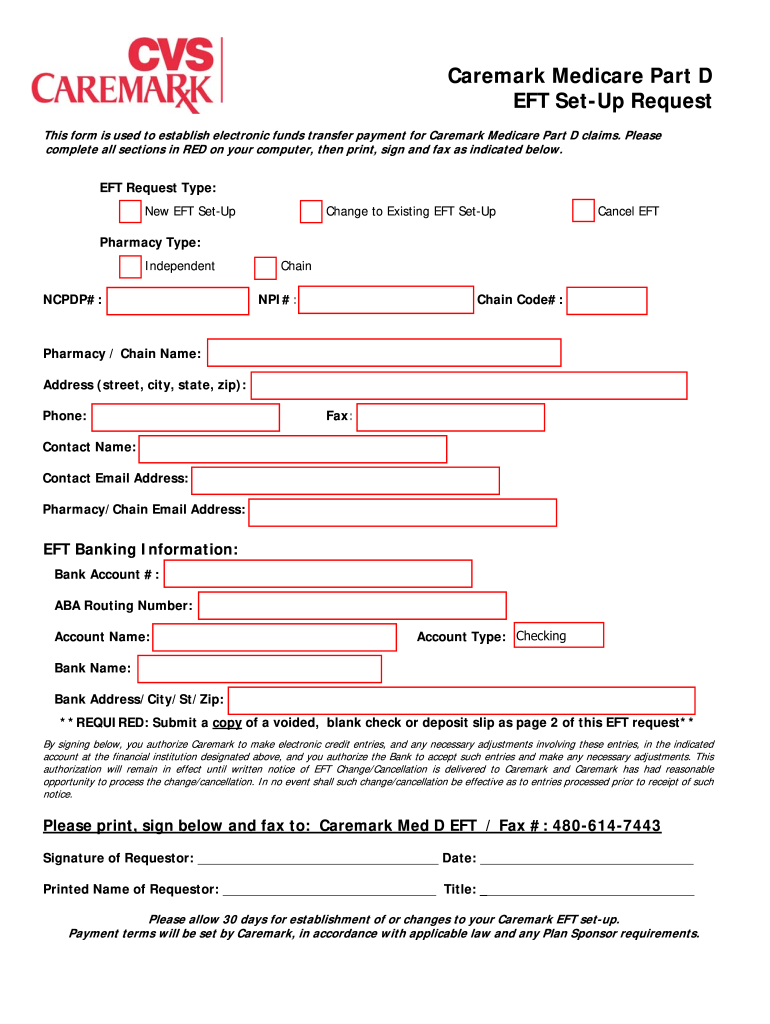
Caremark Medicare Part D EFT Set-Up free printable template
pdfFiller is not affiliated with any government organization

Fill out
Complete the form online in a simple drag-and-drop editor.

eSign
Add your legally binding signature or send the form for signing.

Share
Share the form via a link, letting anyone fill it out from any device.

Export
Download, print, email, or move the form to your cloud storage.
Why pdfFiller is the best tool for your documents and forms


End-to-end document management
From editing and signing to collaboration and tracking, pdfFiller has everything you need to get your documents done quickly and efficiently.
Accessible from anywhere
pdfFiller is fully cloud-based. This means you can edit, sign, and share documents from anywhere using your computer, smartphone, or tablet.
Secure and compliant
pdfFiller lets you securely manage documents following global laws like ESIGN, CCPA, and GDPR. It's also HIPAA and SOC 2 compliant.
What is Caremark Medicare Part D EFT Set-Up
The Caremark Medicare Part D EFT Set-Up Request is a medical billing form used by pharmacies to establish electronic funds transfer payments for Caremark Medicare Part D claims.
pdfFiller scores top ratings on review platforms




Who needs Caremark Medicare Part D EFT Set-Up?
Explore how professionals across industries use pdfFiller.

Caremark Medicare Part D EFT Set-Up is needed by:
-
Pharmacy owners or managers setting up EFT with Caremark
-
Healthcare providers submitting claims to Caremark
-
Billing specialists handling Medicare Part D transactions
-
Accountants managing pharmacy financial operations
-
Plan sponsors requiring payment processing details
Comprehensive Guide to Caremark Medicare Part D EFT Set-Up
What is the Caremark Medicare Part D EFT Set-Up Request?
The Caremark Medicare Part D EFT Set-Up Request is a form designed to establish electronic funds transfer payments specifically for Caremark Medicare Part D claims. This form plays a crucial role in healthcare billing, ensuring that payments are handled efficiently and accurately. By utilizing the Caremark Medicare Part D EFT Set-Up Request, healthcare providers can streamline their payment processes and enhance their billing operations.
Purpose and Benefits of the Caremark Medicare Part D EFT Set-Up Request
The primary purpose of the Caremark Medicare Part D EFT Set-Up Request is to enable pharmacies to benefit from electronic funds transfers (EFT). Leveraging this form significantly enhances payment efficiency and accuracy, resulting in faster reimbursements and reduced administrative burdens. Additionally, pharmacies can experience a streamlined claims process, leading to improved cash flow and operational effectiveness.
Who Needs the Caremark Medicare Part D EFT Set-Up Request?
The Caremark Medicare Part D EFT Set-Up Request is intended for various pharmacies and healthcare practitioners, particularly those who submit claims to Caremark. Any pharmacy looking to optimize its payment processes and ensure swift reimbursement should consider submitting this EFT setup request. Eligibility extends to all participating Medicare Part D providers who process claims through Caremark.
Key Features of the Caremark Medicare Part D EFT Set-Up Request
This form requires specific information to be completed accurately, which includes:
-
Pharmacy details, including name and address
-
Banking information necessary for EFT transactions
-
A voided check or deposit slip to verify account details
These elements are vital in ensuring that the EFT setup process is seamless, allowing for prompt payment processing through the Caremark EFT request template.
How to Fill Out the Caremark Medicare Part D EFT Set-Up Request Online (Step-by-Step)
Completing the Caremark Medicare Part D EFT Set-Up Request online involves several straightforward steps:
-
Access the form and input all pharmacy details in the designated fields.
-
Provide banking information, ensuring accuracy to avoid processing delays.
-
Attach a voided check or deposit slip as required for verification.
-
Review the form for completeness and accuracy before submission.
-
Print, sign, and prepare the form for submission to Caremark.
By following these steps and paying attention to common pitfalls, users can effectively complete the Medicare Part D EFT form.
Submission Methods for the Caremark Medicare Part D EFT Set-Up Request
Once the Caremark Medicare Part D EFT Set-Up Request is completed, there are various submission methods available:
-
Fax the completed form directly to Caremark for processing.
-
Ensure that the submission includes a cover sheet for clarity.
-
Keep a record of the submission date to follow up if needed.
Timely delivery is crucial; thus, it’s important to confirm receipt following submission.
What Happens After You Submit the Caremark Medicare Part D EFT Set-Up Request?
After submission, the Caremark team will review the Caremark Medicare Part D EFT Set-Up Request. Here’s what to expect during this process:
-
A thorough review of the provided information for correctness.
-
Expected timelines for processing and approval.
-
Options for tracking the status of the submitted request.
Understanding these factors helps set proper expectations for pharmacies awaiting confirmation.
Security and Compliance Considerations for the Caremark Medicare Part D EFT Set-Up Request
When submitting the Caremark Medicare Part D EFT Set-Up Request, users can rest assured regarding the security of their sensitive information. Key compliance features include:
-
Data protection measures compliant with HIPAA regulations.
-
Use of 256-bit encryption to safeguard personal information.
-
Commitment to security by pdfFiller, ensuring trustworthiness in document handling.
Such measures are vital for maintaining user privacy when dealing with healthcare forms.
Best Practices for Completing the Caremark Medicare Part D EFT Set-Up Request
To ensure a successful submission of the Caremark Medicare Part D EFT Set-Up Request, consider the following best practices:
-
Double-check all fields for accuracy before submitting the form.
-
Use a pre-filing checklist to gather necessary documents and information.
-
Avoid common errors such as missing signatures or incomplete banking details.
Following these recommendations can enhance the likelihood of a smooth approval process.
Streamline Your Process with pdfFiller
pdfFiller offers an efficient solution for filling out and submitting the Caremark Medicare Part D EFT Set-Up Request. The platform enables users to edit and manage the form securely online, ensuring that all necessary documents are easily accessible. With robust security features and user-friendly tools, pdfFiller empowers pharmacies to complete their forms accurately and submit them with confidence.
How to fill out the Caremark Medicare Part D EFT Set-Up
-
1.Begin by accessing pdfFiller and locating the Caremark Medicare Part D EFT Set-Up Request form in the templates section.
-
2.Open the form in the editor interface to begin filling it out.
-
3.Before starting, gather necessary information including pharmacy details, banking information, and a voided check or deposit slip for reference.
-
4.In the form, identify sections marked with red fields that require your input.
-
5.Navigate through each field, clicking on them to enter the required information using your computer keyboard.
-
6.Ensure that you complete all mandatory fields to avoid any submission issues.
-
7.If you need to make selections regarding EFT request types, use the checkboxes provided.
-
8.Once all information is entered, review the completed form for accuracy, ensuring that all necessary documents are mentioned.
-
9.After your review, print the form directly from pdfFiller to get a hard copy.
-
10.Sign the printed document where indicated, specifically next to 'Signature of Requestor'.
-
11.Fax the signed form to Caremark following any provided instructions for submission to ensure it is received correctly.
-
12.Finally, you can save the blank form or your completed version using the save or download option provided in pdfFiller for your records or future use.

Who is eligible to use the Caremark Medicare Part D EFT Set-Up Request form?
This form is primarily for pharmacies, healthcare providers, and billing specialists who need to set up electronic funds transfers with Caremark for Medicare Part D claims.
Is there a deadline for submitting the EFT Set-Up Request?
There is no specific deadline mentioned for submitting this form, but it is advisable to complete it promptly to avoid delays in payment processing.
How should I submit the completed EFT Set-Up Request form?
The completed form must be printed, signed, and then faxed to Caremark, according to the submission instructions included with the form.
What supporting documents are required with the form?
You must include banking information and a voided check or deposit slip as supporting documents when submitting the EFT Set-Up Request.
What are common mistakes to avoid when filling out the form?
Ensure that all necessary fields, especially those marked in red, are completed and double-check that the form is signed before faxing to avoid processing delays.
How long does it take to process the EFT Set-Up Request?
Processing times may vary, but it is important to allow adequate time for Caremark to receive and process the form after fax submission.
Can I save a copy of the form for my own records?
Yes, you can save a copy of the blank or filled form on pdfFiller for your records before printing and faxing it to Caremark.
Related Content
Related Forms





Related Catalogs
Get the latest insights from our blog


If you believe that this page should be taken down, please follow our DMCA take down process
here
.
This form may include fields for payment information. Data entered in these fields is not covered by PCI DSS compliance.