
Last updated on
Oct 12, 2026
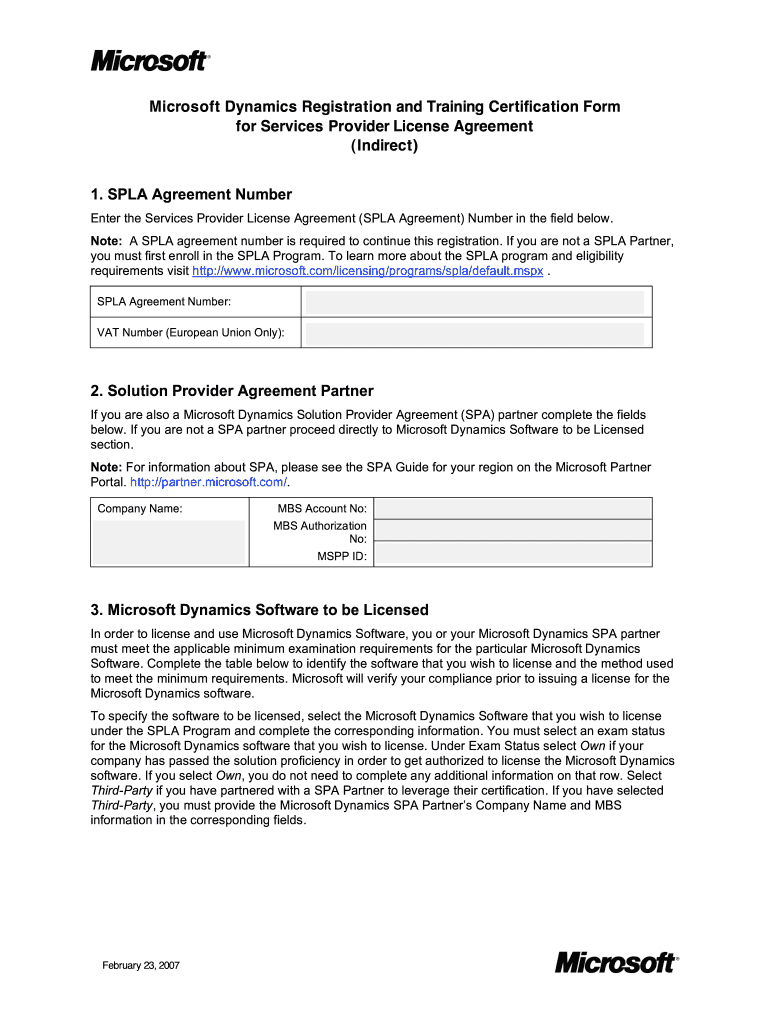
Microsoft Dynamics Registration and Training Certification Form for Service Provider License Agre...
We are not affiliated with any brand or entity on this form

Fill out
Complete the form online in a simple drag-and-drop editor.

eSign
Add your legally binding signature or send the form for signing.

Share
Share the form via a link, letting anyone fill it out from any device.

Export
Download, print, email, or move the form to your cloud storage.
Why pdfFiller is the best tool for your documents and forms


End-to-end document management
From editing and signing to collaboration and tracking, pdfFiller has everything you need to get your documents done quickly and efficiently.
Accessible from anywhere
pdfFiller is fully cloud-based. This means you can edit, sign, and share documents from anywhere using your computer, smartphone, or tablet.
Secure and compliant
pdfFiller lets you securely manage documents following global laws like ESIGN, CCPA, and GDPR. It's also HIPAA and SOC 2 compliant.
What is Microsoft Dynamics Registration and Training Certification Form for Service Provider License Agreement
The Microsoft Dynamics SPLA Registration Form is a business document used by service providers to register and license Microsoft Dynamics software under the SPLA program.
pdfFiller scores top ratings on review platforms




Who needs Microsoft Dynamics Registration and Training Certification Form for Service Provider License Agreement?
Explore how professionals across industries use pdfFiller.

Microsoft Dynamics Registration and Training Certification Form for Service Provider License Agreement is needed by:
-
Service providers looking to license Microsoft Dynamics software
-
Businesses operating under the SPLA program
-
IT professionals managing software licenses
-
Companies involved in software reselling
-
Accountants responsible for compliance with SPLA requirements
-
Legal teams ensuring licensing agreements are in order
Comprehensive Guide to Microsoft Dynamics Registration and Training Certification Form for Service Provider License Agreement
What is the Microsoft Dynamics SPLA Registration Form?
The Microsoft Dynamics SPLA Registration Form is a crucial document utilized by service providers to register for the Services Provider License Agreement (SPLA) program. Its primary purpose is to facilitate the licensing of Microsoft Dynamics software, ensuring compliance with Microsoft's guidelines.
This form plays an essential role for service providers as it enables them to legally obtain licenses, which are necessary for offering Microsoft Dynamics solutions to their own clients. The SPLA program empowers businesses to provide these services with flexibility and reliability.
Benefits of Completing the Microsoft Dynamics SPLA Registration Form
Completing the Microsoft Dynamics SPLA Registration Form offers numerous advantages that can significantly impact a business's growth trajectory. Through this registration, service providers can secure the necessary licenses for Microsoft Dynamics software, which is vital for delivering quality services to end-users.
Moreover, registering under the SPLA program can open doors to various business growth opportunities, including access to exclusive Microsoft resources, promotional programs, and the ability to scale services based on client demands, thus providing a competitive edge.
Who Needs the Microsoft Dynamics SPLA Registration Form?
The Microsoft Dynamics SPLA Registration Form is essential for a variety of businesses, particularly those that provide IT services, cloud computing, or software-as-a-service (SaaS) solutions. This includes independent software vendors, hosting providers, and consultancy firms that wish to resell Microsoft Dynamics software.
Service providers within the SPLA ecosystem play a vital role in ensuring users have continuous access to Microsoft Dynamics products and updates, helping to streamline business operations for their clients.
How to Fill Out the Microsoft Dynamics SPLA Registration Form Online
Filling out the Microsoft Dynamics SPLA Registration Form online requires attention to detail. Begin by gathering essential information such as your SPLA Agreement Number, company name, and VAT number. Follow these steps to successfully complete the registration:
-
Access the online registration portal for the SPLA form.
-
Enter your SPLA Agreement Number in the specified field.
-
Fill in your company details, including name and address.
-
Provide relevant information, such as contact email and VAT details.
-
Review all fields carefully to ensure accuracy before submission.
This structured approach helps in preventing errors and ensures that the submission process is streamlined.
Common Mistakes When Filling Out the Microsoft Dynamics SPLA Registration Form
Users often encounter mistakes when completing the Microsoft Dynamics SPLA Registration Form, which can delay the processing of their applications. Some frequent pitfalls include:
-
Entering incorrect SPLA Agreement Numbers.
-
Leaving mandatory fields empty.
-
Providing outdated contact information.
To minimize these errors, validate all information before submission. Double-check each entry against company records and ensure that all required fields are completed.
Submission and Processing: Where and How to Submit the Microsoft Dynamics SPLA Registration Form
Once completed, the Microsoft Dynamics SPLA Registration Form must be submitted through designated channels. You can choose from several options for submitting the form:
-
Online submission via the SPLA registration portal.
-
Through a SPLA Reseller for physical processing.
After submission, anticipate standard processing times which usually vary, and be prepared for potential follow-ups if additional information is needed. Understanding these steps helps streamline your registration experience.
Security and Compliance in Handling the Microsoft Dynamics SPLA Registration Form
Security and compliance are paramount when managing sensitive documents like the Microsoft Dynamics SPLA Registration Form. It's important to highlight the security measures that pdfFiller employs, including 256-bit encryption and compliance with regulations such as HIPAA and GDPR.
These measures ensure that all personal and business data entered into the form remains protected, offering peace of mind to users concerned about data privacy during this critical process.
Enhancing Your Experience: Using pdfFiller for Your SPLA Registration Form
Utilizing pdfFiller offers a streamlined experience when completing the Microsoft Dynamics SPLA Registration Form. The platform provides tools for editing, filling, and eSigning the form with ease. Key features of pdfFiller include:
-
Edit text and images within the form.
-
Store documents securely online for easy access.
-
Track submission status and manage your forms efficiently.
This user-friendly experience simplifies the registration process, allowing you to focus on your business needs.
Example of a Completed Microsoft Dynamics SPLA Registration Form
For guidance, an example of a completed Microsoft Dynamics SPLA Registration Form is invaluable. This illustrated sample demonstrates how to correctly fill out the form, providing clarity on which fields to complete and how to approach each section.
Additionally, you can access a downloadable PDF version of the completed form, serving as a useful reference for ensuring accuracy in your own submissions.
How to fill out the Microsoft Dynamics Registration and Training Certification Form for Service Provider License Agreement
-
1.Access the Microsoft Dynamics SPLA Registration Form on pdfFiller by searching for the form in the pdfFiller search bar or uploading a PDF copy directly.
-
2.Open the form in pdfFiller to view all sections that require completion. Familiarize yourself with the layout and available tools on the interface.
-
3.Before beginning to fill out the form, gather the required information, including your SPLA Agreement Number, VAT Number, Company Name, and E-mail Address. This ensures a smooth completion process.
-
4.Start by entering your SPLA Agreement Number in the designated field. Follow the prompts carefully to make sure the information is accurate.
-
5.Continue filling out the remaining fields, including your Company Name and VAT Number. Use the checkboxes provided where applicable to indicate your selections.
-
6.As you progress, use pdfFiller's features to assist you, such as auto-save, spell-check, and format adjustment tools, which can enhance the quality of your submission.
-
7.After completing all necessary fields, go back and review the form for any missing or incorrect information. Ensure that everything is filled in correctly to avoid delays.
-
8.Once you're satisfied with your form, finalize your changes by clicking 'Review' in pdfFiller. This will allow you to double-check all entries before submission.
-
9.To save your work, choose 'Download' to save the completed form to your device, or select the 'Submit' option to send it directly to the SPLA Reseller for processing.

Who is eligible to complete the Microsoft Dynamics SPLA Registration Form?
Eligibility to complete the Microsoft Dynamics SPLA Registration Form generally requires that you are a service provider looking to license Microsoft Dynamics software under the SPLA program.
What is the deadline for submitting the SPLA Registration Form?
There are no specific deadlines mentioned for the SPLA Registration Form submission; however, it is advisable to submit it as soon as possible to ensure timely processing.
How do I submit the completed SPLA Registration Form?
You can submit the completed Microsoft Dynamics SPLA Registration Form through pdfFiller by selecting the 'Submit' button to send the form directly to the SPLA Reseller for processing.
What supporting documents are required when submitting the SPLA Registration Form?
Typically, no additional documents are required when submitting the Microsoft Dynamics SPLA Registration Form; however, keep your SPLA Agreement Number and company information readily available.
What common mistakes should I avoid when filling out the form?
Common mistakes include entering incorrect SPLA Agreement Numbers, missing required fields, or failing to review your form before submission. Always double-check your information.
How long does it take to process the SPLA Registration Form?
Processing times for the Microsoft Dynamics SPLA Registration Form can vary depending on the SPLA Reseller. It is best to follow up directly with them for updates on your submission.
Are there any fees associated with the SPLA Registration Form?
There are typically no fees for completing and submitting the Microsoft Dynamics SPLA Registration Form itself, but there may be costs associated with licensing the Microsoft software post-registration.
Related Forms






Related Catalogs
Get the latest insights from our blog


If you believe that this page should be taken down, please follow our DMCA take down process
here
.
This form may include fields for payment information. Data entered in these fields is not covered by PCI DSS compliance.