
Last updated on
Oct 2, 2026
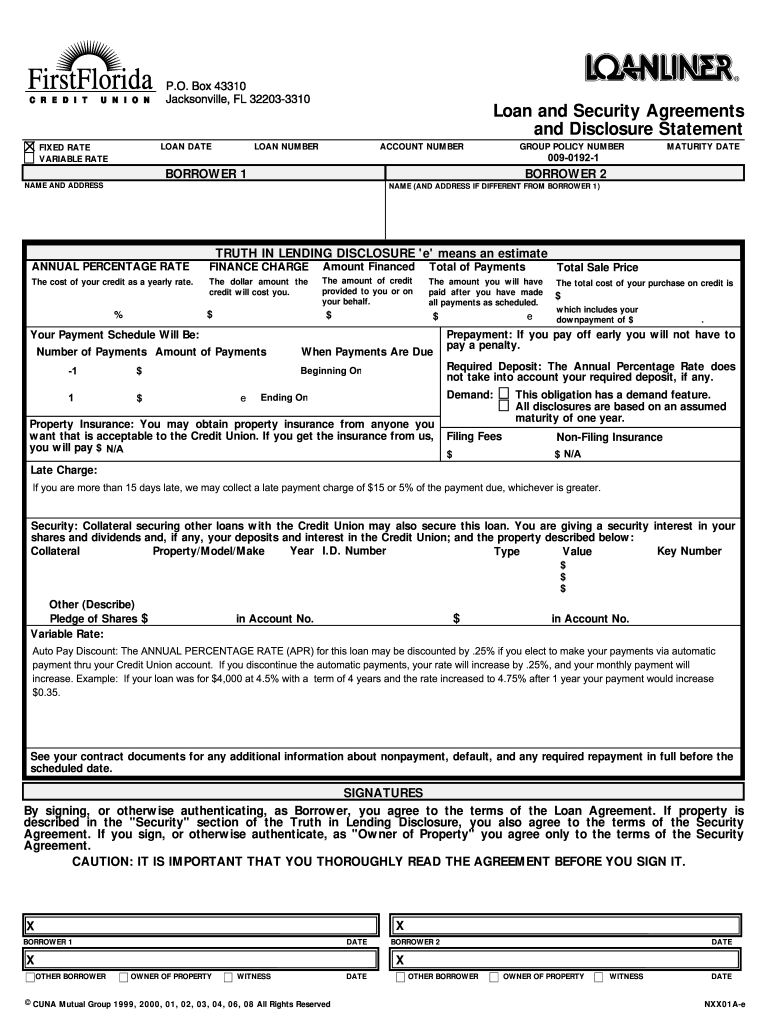
Get the free Loan and Security Agreement
We are not affiliated with any brand or entity on this form

Fill out
Complete the form online in a simple drag-and-drop editor.

eSign
Add your legally binding signature or send the form for signing.

Share
Share the form via a link, letting anyone fill it out from any device.

Export
Download, print, email, or move the form to your cloud storage.
Why pdfFiller is the best tool for your documents and forms


End-to-end document management
From editing and signing to collaboration and tracking, pdfFiller has everything you need to get your documents done quickly and efficiently.
Accessible from anywhere
pdfFiller is fully cloud-based. This means you can edit, sign, and share documents from anywhere using your computer, smartphone, or tablet.
Secure and compliant
pdfFiller lets you securely manage documents following global laws like ESIGN, CCPA, and GDPR. It's also HIPAA and SOC 2 compliant.
What is Loan Agreement
The Loan and Security Agreement is a legal document used by borrowers and credit unions to detail the terms and conditions of a loan arrangement.
pdfFiller scores top ratings on review platforms




Who needs Loan Agreement?
Explore how professionals across industries use pdfFiller.

Loan Agreement is needed by:
-
Borrowers seeking loans from credit unions
-
Property owners looking to secure financing
-
Witnesses to validate loan agreements
-
Legal professionals assisting in loan documentation
-
Financial institutions providing loans
-
Real estate agents involved in property financing
Comprehensive Guide to Loan Agreement
What is the Loan and Security Agreement?
The Loan and Security Agreement serves as a pivotal legal document that formalizes the relationship between borrowers and creditors. This agreement outlines crucial elements such as the loan amount, interest rates, and payment terms.
-
It is defined as a legal document that binds borrowers and creditors.
-
Key elements include loan amount, interest rates, and payment terms.
-
All parties, including borrowers and the property owner, must provide their signatures to validate the agreement.
Purpose and Benefits of the Loan and Security Agreement
This specific loan agreement form presents numerous advantages for both parties involved. It enhances legal protection and fosters trust between borrowers and lenders.
-
The agreement safeguards the interests of both parties.
-
Having a legally binding document minimizes risks in case of disputes.
-
Clear terms enhance mutual trust and understanding.
Key Features of the Loan and Security Agreement
The Loan and Security Agreement is structured to include various components that facilitate clarity and ease of use. Its features ensure that all necessary information is accurately captured.
-
It includes fillable fields for each party involved, such as Borrower 1, Borrower 2, Owner of Property, and Witness.
-
Signature lines, date fields, and checkboxes are provided for completeness.
-
Instructions within the document guide users on how to correctly complete the agreement.
Who Needs the Loan and Security Agreement?
The target audience for the Loan and Security Agreement includes individuals and businesses in various financial contexts. These parties typically benefit from formalizing their loan agreements.
-
Individuals or businesses aiming to secure loans from credit unions or financial institutions.
-
Borrowers who seek a structured approach for their loan agreements.
-
Property owners involved in securing loans may also need this document.
How to Fill Out the Loan and Security Agreement Online (Step-by-Step)
Utilizing pdfFiller simplifies the process of completing the Loan and Security Agreement. Below is a step-by-step breakdown for users.
-
Begin by accessing the fillable fields for Borrower 1, Borrower 2, and Owner of Property.
-
Follow the instructions provided in the document for accurate completion.
-
Utilize pdfFiller’s features to edit, sign, and save the document.
-
Review the finished agreement to ensure all information is correctly filled in.
How to Sign the Loan and Security Agreement: Digital vs. Wet Signature
When it comes to signing the Loan and Security Agreement, borrowers have options. Understanding these methods is essential for compliance and legality.
-
Digital signatures are legally valid and convenient.
-
Traditional wet signatures might be required in specific circumstances.
-
State-specific regulations must be adhered to regarding signature methods.
Where to Submit the Loan and Security Agreement
After completing the Loan and Security Agreement, knowing where to submit it is crucial for proper processing. Several avenues exist for submission.
-
Potential channels for submission include credit unions and online platforms.
-
Additional documentation may need to be submitted alongside the agreement.
-
Be aware of any fees and deadlines associated with the submission process.
Security and Compliance When Using the Loan and Security Agreement
Ensuring security and compliance when handling the Loan and Security Agreement is paramount. Users must be aware of best practices to protect sensitive information.
-
pdfFiller employs 256-bit encryption for data protection.
-
It is compliant with HIPAA and GDPR regulations to ensure confidentiality.
-
Proper record retention is necessary for legal documentation.
Use pdfFiller for Your Loan and Security Agreement Needs
Leveraging pdfFiller for managing the Loan and Security Agreement offers numerous advantages. This platform enhances the entire document handling process.
-
pdfFiller provides robust cloud-based PDF editing capabilities.
-
It simplifies eSigning and sharing documents securely.
-
Additional security measures ensure that your sensitive documents remain protected.
How to fill out the Loan Agreement
-
1.To begin, access pdfFiller and search for the Loan and Security Agreement form using the search bar.
-
2.Once located, open the document by clicking on it. The form will load within the pdfFiller platform, ready for editing.
-
3.Before filling out the form, gather the necessary information, including borrower names, loan details, property descriptions, and witness information.
-
4.Navigate to each fillable field in the form. Click on the designated areas to enter the required information, ensuring accurate completion of all sections.
-
5.Make use of the checkboxes for any relevant options or conditions that apply to your loan agreement. Review these selections carefully.
-
6.As you fill out the form, ensure that you save your progress regularly to avoid losing any information.
-
7.After entering all the necessary details, thoroughly review the entire form for completeness and accuracy.
-
8.Once satisfied with the filled-in document, finalize it by adding the required signatures for Borrower 1, Borrower 2, Owner of Property, and Witness in the designated fields.
-
9.To save your completed form, click the 'Save' button, then choose 'Download' to keep a copy for your records or select 'Submit' to send it electronically, if applicable.

Who is eligible to use the Loan and Security Agreement?
Any individual or legal entity that is entering into a loan agreement with a credit union or lender can utilize this form. It is essential for borrowers and property owners involved in the transaction.
Are there specific deadlines for submitting this form?
While there are no strict deadlines associated with completing the Loan and Security Agreement, it is vital to finalize it before the loan disbursement or property transaction to ensure legality.
What methods can be used for submission of the completed form?
You can submit the completed Loan and Security Agreement directly through pdfFiller by following the submission options provided if supported, or download and send via email to the relevant parties.
What supporting documents are needed when using this agreement?
Typically, you may need credit history documentation, identification, proof of income, and any property-related documents pertinent to the loan. Ensure all supporting documents align with your loan terms.
What are some common mistakes to avoid when filling out the form?
Avoid incomplete sections, incorrect spelling of names, and failing to secure all necessary signatures. Thoroughly review each part of the form before submission to prevent processing issues.
How long does it take to process the Loan and Security Agreement once submitted?
Processing times can vary based on the lender or credit union's policies. Generally, expect a few days for verification and approval once the form is submitted correctly.
Can the Loan and Security Agreement be modified after signing?
Once signed, modifications to the agreement usually require additional documentation or amendments to be legally binding. Consult with a legal expert for guidance on making changes.
Related Forms




Related Catalogs
Get the latest insights from our blog


If you believe that this page should be taken down, please follow our DMCA take down process
here
.
This form may include fields for payment information. Data entered in these fields is not covered by PCI DSS compliance.