
Last updated on
Nov 9, 2026
Windstream Lifeline Program Application 2014 free printable template
We are not affiliated with any brand or entity on this form

Fill out
Complete the form online in a simple drag-and-drop editor.

eSign
Add your legally binding signature or send the form for signing.

Share
Share the form via a link, letting anyone fill it out from any device.

Export
Download, print, email, or move the form to your cloud storage.
Why pdfFiller is the best tool for your documents and forms


End-to-end document management
From editing and signing to collaboration and tracking, pdfFiller has everything you need to get your documents done quickly and efficiently.
Accessible from anywhere
pdfFiller is fully cloud-based. This means you can edit, sign, and share documents from anywhere using your computer, smartphone, or tablet.
Secure and compliant
pdfFiller lets you securely manage documents following global laws like ESIGN, CCPA, and GDPR. It's also HIPAA and SOC 2 compliant.
What is Windstream Lifeline Program Application
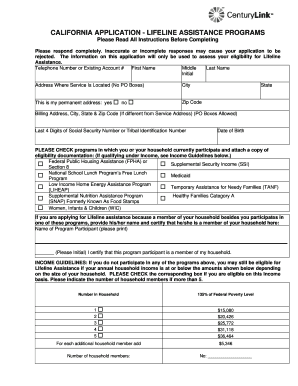
The Lifeline Program Application is a federal form used by eligible individuals in specific U.S. states to apply for assistance with telephone service costs.
pdfFiller scores top ratings on review platforms




Who needs Windstream Lifeline Program Application?
Explore how professionals across industries use pdfFiller.

Windstream Lifeline Program Application is needed by:
-
Low-income households needing phone service help
-
Individuals applying for government assistance programs
-
Residents of Alabama, Arkansas, Iowa, Kentucky, Mississippi, North Carolina, and South Carolina
-
Advocates assisting applicants in completing forms
-
Community organizations offering support for low-income residents
Comprehensive Guide to Windstream Lifeline Program Application
What is the Lifeline Program Application?
The Lifeline Program is a federal initiative aimed at providing telephone service discounts to low-income individuals. The Lifeline Program Application serves as the formal request to access these benefits, allowing eligible applicants to secure significantly reduced rates on their phone services. This government assistance application is essential for those seeking support in managing their communication costs.
Eligibility Criteria for the Lifeline Program Application
To qualify for the Lifeline Program, applicants must meet specific eligibility requirements. These include household income levels that fall below a certain threshold or participation in federal assistance programs such as Medicaid or Supplemental Nutrition Assistance Program (SNAP). Individuals who can apply include those who rely on low income phone service to maintain communication with family and friends.
-
Household income exceeds 135% of the federal poverty guidelines.
-
Enrollment in qualifying federal assistance programs.
-
Proof of residency in a participating state.
How to Fill Out the Lifeline Program Application Online
Completing the Lifeline Program Application online is convenient and straightforward, especially when using pdfFiller. Begin by creating an account on the platform, and then proceed with the following steps:
-
Access the Lifeline Program Application form.
-
Enter personal details, including your name and address.
-
Upload proof of eligibility, such as income documents or program participation evidence.
Field-by-Field Instructions for the Lifeline Program Application
Each section of the Lifeline Program Application requires specific information. Here’s a breakdown of essential fields:
-
Name: Enter your last name, first name, and middle initial.
-
Date of Birth: Provide your complete date of birth.
-
Social Security Number: Include the last four digits only for privacy.
-
Program Participation: Check appropriate boxes for program eligibility.
Required Documents and Supporting Materials
When submitting your Lifeline Program Application, it is crucial to include necessary documents that validate your eligibility. Ensure you manage sensitive information securely throughout the application process by following these guidelines:
-
Proof of income such as pay stubs or tax returns.
-
Government-issued identification for verification.
-
Documentation demonstrating residency, like utility bills.
Submission Methods and Delivery for the Lifeline Program Application
Applicants can submit the completed Lifeline Program Application online or by mail. If applying online through pdfFiller, you can track submission status conveniently. After submission, expect confirmation of receipt shortly. This process ensures that your application is promptly reviewed.
Common Errors to Avoid When Applying
Many applicants encounter frequent mistakes while completing the Lifeline Program Application, which can lead to delays in approval. To avoid these pitfalls:
-
Double-check personal information for accuracy.
-
Ensure all required fields are completed.
-
Verify proper documentation is included before submission.
What Happens After You Submit the Lifeline Program Application?
Once your Lifeline Program Application is submitted, it undergoes a review process. The timeframe for approval or denial typically ranges from a few weeks to a month. During this period, you can check your application status online or contact the program's support team if you experience delays.
Renewal Process for the Lifeline Program
To continue receiving assistance, it is essential to understand the renewal process for the Lifeline Program. This typically occurs annually, requiring you to submit updated documentation to confirm ongoing eligibility:
-
Renew your application before the expiration date.
-
Provide updated proof of income or program participation.
-
Stay informed about changes in eligibility criteria.
Get Started with the Lifeline Program Application Form Today
Utilizing pdfFiller to complete your Lifeline Program Application makes the process more secure and efficient. With features that allow easy editing, eSigning, and safe submission, pdfFiller ensures that your application is handled with the utmost care to protect sensitive information throughout the submission process.
How to fill out the Windstream Lifeline Program Application
-
1.To begin, access the Lifeline Program Application on pdfFiller by searching for the form name in the site’s search bar.
-
2.Once the form is open, familiarize yourself with the layout, which contains various fields and checkboxes.
-
3.Gather necessary information such as your full name, date of birth, Social Security number (last four digits), and income or program participation details before starting.
-
4.Use pdfFiller’s tools to fill in the blank fields clearly, ensuring that all required sections are completed accurately.
-
5.After filling in the form, carefully review each entry to confirm that all information is correct and complete.
-
6.Make sure to sign the application electronically using pdfFiller’s signature feature; this is mandatory for submission.
-
7.Once finalized, you can save your work as a PDF or choose to download it to your device.
-
8.If ready to submit, follow the instructions for your state regarding submission methods, and ensure to retain a copy for your records.

What are the eligibility requirements for the Lifeline Program?
To be eligible for the Lifeline Program, applicants must demonstrate low-income status, either through income level or participation in assistance programs such as Medicaid or SNAP. Each state may have specific criteria, so checking local guidelines is essential.
Are there deadlines for submitting the Lifeline Program Application?
Deadlines for submitting the Lifeline Program Application vary by state. It is important to submit your application as soon as possible to ensure you receive timely assistance with telephone service costs.
How do I submit the Lifeline Program Application?
Applicants can typically submit the Lifeline Program Application via mail or online, depending on the state’s requirements. Ensure you follow state-specific guidelines for submission to avoid delays.
What supporting documents are required for the application?
Supporting documents may include proof of identity, such as a driver's license or Social Security card, and proof of income or participation in assistance programs. Make sure to gather these documents before starting the application process.
What common mistakes should I avoid when filling out the form?
Common mistakes include providing incomplete information, failing to sign the form, and not including required supporting documents. It’s vital to double-check all entries and follow the instructions carefully.
How long does it take to process the Lifeline Program Application?
Processing times for the Lifeline Program Application can vary, but applicants typically receive a response within a few weeks. You may check with your state’s office for specific timelines.
What if my application is denied?
If your application for the Lifeline Program is denied, you will receive a notice explaining the reason. You may appeal the decision or reapply with updated information. Contact your state’s program office for guidance.
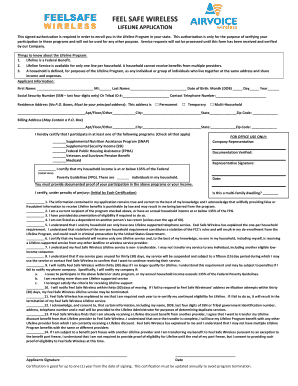
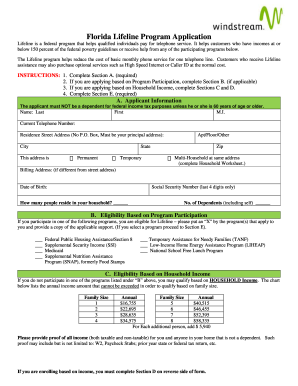
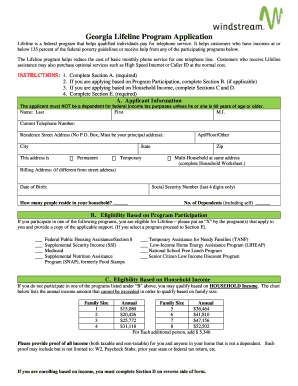
Windstream Lifeline Program Application Form Versions
Related Content
Related Forms



Get the latest insights from our blog


If you believe that this page should be taken down, please follow our DMCA take down process
here
.
This form may include fields for payment information. Data entered in these fields is not covered by PCI DSS compliance.