
Last updated on
Nov 7, 2026
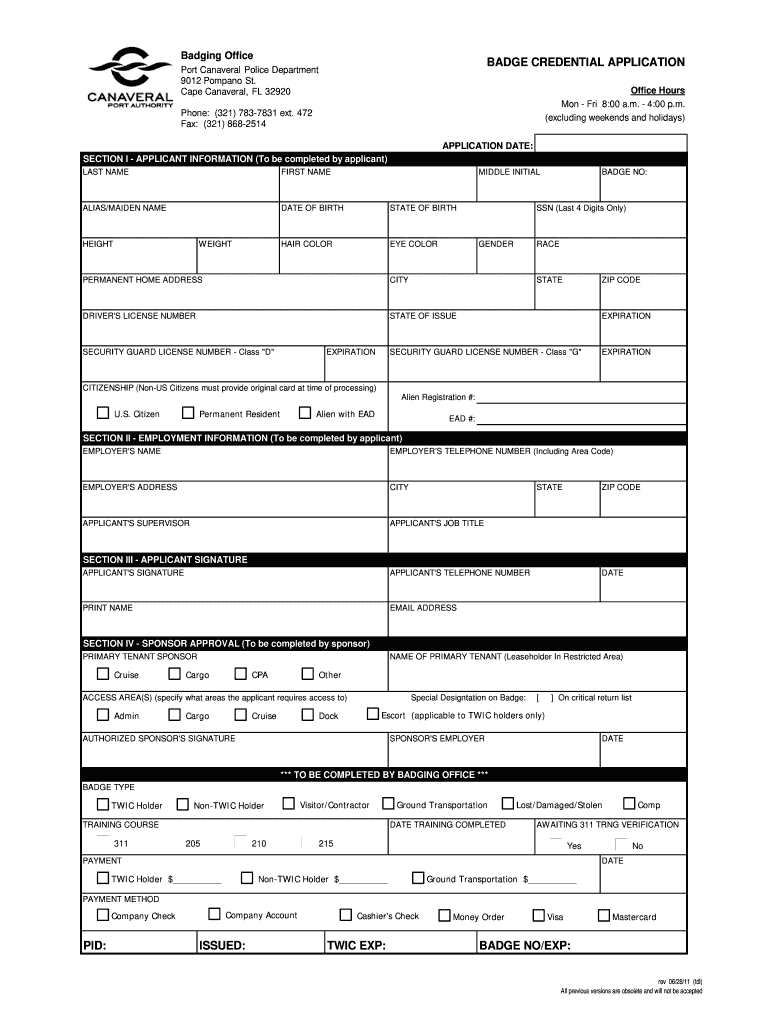
FL Badge Credential Application 2011 free printable template
We are not affiliated with any brand or entity on this form

Fill out
Complete the form online in a simple drag-and-drop editor.

eSign
Add your legally binding signature or send the form for signing.

Share
Share the form via a link, letting anyone fill it out from any device.

Export
Download, print, email, or move the form to your cloud storage.
Why pdfFiller is the best tool for your documents and forms


End-to-end document management
From editing and signing to collaboration and tracking, pdfFiller has everything you need to get your documents done quickly and efficiently.
Accessible from anywhere
pdfFiller is fully cloud-based. This means you can edit, sign, and share documents from anywhere using your computer, smartphone, or tablet.
Secure and compliant
pdfFiller lets you securely manage documents following global laws like ESIGN, CCPA, and GDPR. It's also HIPAA and SOC 2 compliant.
What is FL Badge Credential Application
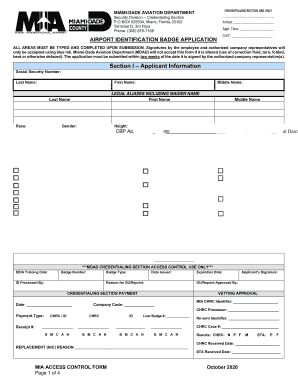
The Port Canaveral Police Badge Credential Application is a permit application form used by individuals to apply for access badges to restricted areas at Port Canaveral.
pdfFiller scores top ratings on review platforms




Who needs FL Badge Credential Application?
Explore how professionals across industries use pdfFiller.

FL Badge Credential Application is needed by:
-
Security personnel seeking access badges
-
Employers sponsoring security badge applications
-
Individuals applying for restricted area access
-
Law enforcement officers requiring credentials
-
Businesses operating in Port Canaveral
Comprehensive Guide to FL Badge Credential Application
What is the Port Canaveral Police Badge Credential Application?
The Port Canaveral Police Badge Credential Application is a critical form used to apply for access badges necessary to enter restricted areas at Port Canaveral. This application process ensures that only authorized personnel gain entry, which is crucial for maintaining security in this operational environment. It is essential to stay informed about any variations or updates related to the Port Canaveral badge application, as outdated versions will not be accepted.
-
The application process includes submitting personal information, employment details, and relevant signatures.
-
Obtaining this badge is vital for security, enhancing safety across Port Canaveral operations.
Purpose and Benefits of the Port Canaveral Police Badge Credential Application
Understanding the purpose and benefits of applying for the Port Canaveral Police Badge Credential Application helps potential applicants recognize its value. This application not only secures your ability to work in a sensitive environment but also strengthens the overall security framework of Port Canaveral.
-
The badge provides enhanced security for operations by regulating access to sensitive areas.
-
Authorized personnel can enter restricted areas, streamlining operational effectiveness.
-
Using pdfFiller simplifies the application process, reducing the effort required to fill out necessary forms.
Who Needs the Port Canaveral Police Badge Credential Application?
Identifying who needs the Port Canaveral Police Badge Credential Application is vital for targeted awareness. The application is designed for roles closely associated with security and law enforcement, emphasizing the importance of having a suitable sponsor during the process.
-
Applicants must be in roles that require proximity to restricted areas, such as security personnel and law enforcement officers.
-
Sponsors must be established professionals who can vouch for the applicant's need for access.
Eligibility Criteria for the Port Canaveral Police Badge Credential Application
Before applying, it's important to understand the eligibility criteria set for the Port Canaveral Police Badge Credential Application. These requirements ensure that only qualified individuals can access sensitive areas.
-
Applicants must meet basic requirements such as age, residency, and employment verification.
-
Necessary identification and additional documentation must be provided to support the application.
-
Previous versions of the application are now obsolete and will not be accepted, ensuring all applications meet current standards.
How to Fill Out the Port Canaveral Police Badge Credential Application Online (Step-by-Step)
Completing the Port Canaveral Police Badge Credential Application requires careful attention to detail. A step-by-step guide facilitates a smoother online experience through pdfFiller.
-
Begin by providing your personal information accurately, including your full name and contact details.
-
Include your employment details, specifying your role and related information.
-
Review each section thoroughly to prevent errors that could delay processing.
Common pitfalls include incomplete signature sections and missing required documents. Awareness of these can significantly improve application accuracy.
Required Documents and Supporting Materials
To successfully submit the Port Canaveral Police Badge Credential Application, certain documents are mandatory to accompany your submission. Proper preparation of these materials is non-negotiable for a smooth application process.
-
Identification documents must be current and valid, including your government-issued ID.
-
Proof of employment and residency documentation should be clearly presented.
-
Utilize pdfFiller's features to ensure documents are organized and compliant with submission guidelines.
Submission Methods and Delivery of the Port Canaveral Police Badge Credential Application
Understanding how to submit the completed Port Canaveral Police Badge Credential Application is essential for applicants. There are several submission methods available, ensuring flexibility based on the applicant’s preferences.
-
Applications can be submitted online through pdfFiller, by mail, or in person at designated locations.
-
Familiarize yourself with the processing timelines to adequately track your application status.
-
Contact information should be readily accessible for inquiries or issues that may arise regarding submission.
What Happens After You Submit the Port Canaveral Police Badge Credential Application?
Post-submission, applicants can expect a review process that determines the outcome of their application. Understanding this process can help set expectations and prepare for any necessary follow-ups.
-
The application undergoes a review process where eligibility is assessed based on submitted documents.
-
Common reasons for rejection include incomplete applications or insufficient supporting materials.
-
Be prepared for potential next steps, including providing additional information if requested by the authorities.
Security and Privacy Considerations When Applying for the Port Canaveral Badge
Maintaining security and privacy is vital throughout the application process for the Port Canaveral Badge. Applicants should be aware of best practices in handling sensitive information carefully.
-
pdfFiller employs advanced security measures, including 256-bit encryption, to safeguard your documents.
-
Compliance with privacy standards such as HIPAA and GDPR ensures your information remains protected.
-
Take proactive steps to ensure all personal information is securely transmitted and stored during the application process.
Explore Efficient Solutions with pdfFiller for Your Application Needs
Utilizing pdfFiller can significantly enhance your experience while filling out the Port Canaveral Police Badge Credential Application. The platform's features promote efficiency and ease of use, transforming traditionally cumbersome processes into simple tasks.
-
Directly fill out, sign, and submit the application online with user-friendly tools.
-
Additional features such as document tracking and secure storage support seamless application management.
-
Prioritize security and trustworthiness as pdfFiller ensures that all data handling respects user privacy.
How to fill out the FL Badge Credential Application
-
1.To access the Port Canaveral Police Badge Credential Application, visit the pdfFiller website and search for the form by its official name.
-
2.Once located, open the form in the pdfFiller editor, where you can easily navigate through the blank fields and checkboxes.
-
3.Before starting, gather all necessary information such as personal details, employment information, and the name and contact details of your authorized sponsor.
-
4.Fill in the required personal information, ensuring that you accurately input your last name, first name, and middle initial as prompted by the form.
-
5.Next, provide your employment details, specifying your role and the organization you are affiliated with.
-
6.Then, have your sponsor fill in their relevant information, ensuring they are ready to provide their signature where indicated.
-
7.Review the entire form carefully, checking each section for completeness and accuracy before finalizing.
-
8.Once satisfied with the filled form, save your changes within pdfFiller to ensure your progress is stored.
-
9.You can download the completed form as a PDF or submit it directly through pdfFiller as the platform may support electronic submissions.

Who is eligible to apply for the Port Canaveral Police Badge?
Individuals seeking to work or access restricted areas at Port Canaveral must fill out the application. Eligibility often requires a sponsor, typically from an employer or security organization.
What documents do I need to submit with the application?
Supporting documents generally include personal identification, proof of employment, and potentially a background check or other credentials mandated by the Port Canaveral authorities.
How do I submit the completed application?
After completing the application on pdfFiller, you can submit it electronically through the platform or download it and send it via mail to the designated Port Canaveral address.
Are there any fees associated with applying for this badge?
Yes, there are typically fees involved with applying for security badges at Port Canaveral. It’s best to check the latest fee schedule from the Port Authority.
How long does the processing take?
Processing times can vary, but applicants should expect a wait of several weeks. It’s advisable to submit your application well in advance of needing access.
What common mistakes should I avoid when filling out the form?
Common mistakes include incomplete fields, misspellings of names, and not securing the required signatures from both the applicant and sponsor.
Can I make changes to the application after submission?
Once submitted, changes are often not permitted. If adjustments are needed, you should contact the Port Authority directly for guidance on how to proceed.
FL Badge Credential Application Form Versions
Related Content
Related Forms


Related Catalogs
Get the latest insights from our blog


If you believe that this page should be taken down, please follow our DMCA take down process
here
.
This form may include fields for payment information. Data entered in these fields is not covered by PCI DSS compliance.