
Last updated on
Nov 9, 2026
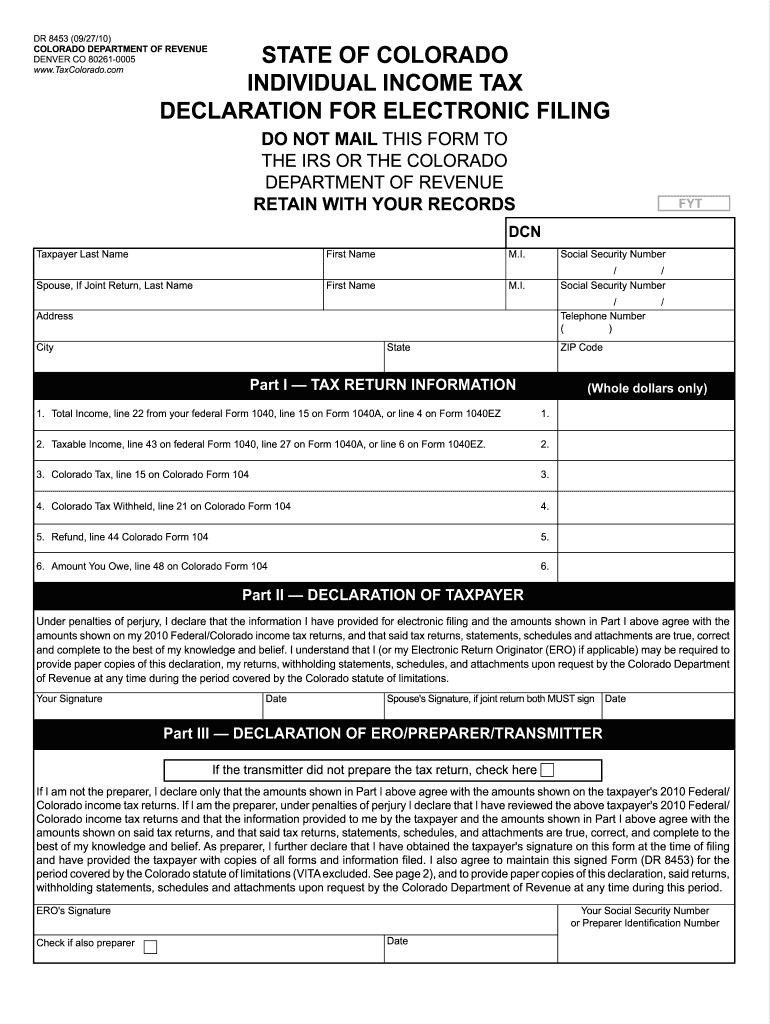
CO DR 8453 2010 free printable template
pdfFiller is not affiliated with any government organization

Fill out
Complete the form online in a simple drag-and-drop editor.

eSign
Add your legally binding signature or send the form for signing.

Share
Share the form via a link, letting anyone fill it out from any device.

Export
Download, print, email, or move the form to your cloud storage.
Why pdfFiller is the best tool for your documents and forms


End-to-end document management
From editing and signing to collaboration and tracking, pdfFiller has everything you need to get your documents done quickly and efficiently.
Accessible from anywhere
pdfFiller is fully cloud-based. This means you can edit, sign, and share documents from anywhere using your computer, smartphone, or tablet.
Secure and compliant
pdfFiller lets you securely manage documents following global laws like ESIGN, CCPA, and GDPR. It's also HIPAA and SOC 2 compliant.
What is CO DR 8453
The Colorado Individual Income Tax Declaration is a state tax form used by Colorado residents to declare their income tax information for electronic filing.
pdfFiller scores top ratings on review platforms




Who needs CO DR 8453?
Explore how professionals across industries use pdfFiller.

CO DR 8453 is needed by:
-
Colorado residents filing state income taxes
-
Tax preparers assisting clients with Colorado tax returns
-
Electronic return originators (EROs) submitting tax documents
-
Individuals seeking to declare income for the tax year 2010
-
Tax professionals familiar with state tax forms
-
Accounting firms handling Colorado state tax filings
Comprehensive Guide to CO DR 8453
Understanding the Colorado Individual Income Tax Declaration
The Colorado Individual Income Tax Declaration serves as a crucial state tax form for residents. This form is primarily designed to declare income for the appropriate tax year, ensuring compliance with Colorado’s tax regulations. Residents are required to provide personal and income details, which include their names, Social Security numbers, and the total income earned.
Filing this declaration is essential for residents who intend to submit their tax returns electronically. It streamlines the process and ensures that the state has accurate records of individual income declarations.
Purpose and Benefits of the Colorado Individual Income Tax Declaration
Using the Colorado Individual Income Tax Declaration offers numerous advantages for state tax filings. Firstly, accurately declaring income can help taxpayers avoid significant penalties that arise from discrepancies during audits. Filing compliance is vital, securing an individual's standing with the state tax authority.
This form is beneficial when used alongside electronic filing, which can simplify the entire tax process. Proper documentation enhances transparency and can be invaluable during financial assessments or audits.
Who Needs the Colorado Individual Income Tax Declaration?
Certain individuals and entities are required to submit the Colorado Individual Income Tax Declaration. Eligible taxpayers include residents of Colorado who earn income, alongside joint filers who must provide details for both spouses. Notably, the form applies to those utilizing tax professionals or Electronic Return Originators (EROs), who play a crucial role in the submission process.
Joint returns and other special situations can affect individuals' filing requirements, making it necessary to assess personal circumstances before submitting the declaration.
How to Fill Out the Colorado Individual Income Tax Declaration Online
Filling out the Colorado Individual Income Tax Declaration online can be seamless with tools like pdfFiller. Here’s a step-by-step guide on completing the form:
-
Access the form on pdfFiller’s platform.
-
Fill in the required taxpayer information, including names and Social Security numbers.
-
Enter income details accurately in the specified fields.
-
Review and edit as necessary before eSigning the document.
-
Submit electronically once all information is verified.
Additionally, pdfFiller provides features that make the editing and eSigning process easier, ensuring that users can efficiently complete their tax declarations.
Common Mistakes and How to Avoid Them When Filing the Colorado Individual Income Tax Declaration
To ensure a smooth filing experience, it is essential to avoid common mistakes when completing the Colorado Individual Income Tax Declaration. Frequent errors include:
-
Missing signatures from both the taxpayer and ERO.
-
Incorrect Social Security numbers, which can lead to processing delays.
-
Calculation errors in reported income or taxes due.
A validation checklist can assist in confirming completeness before submission. Double-checking all calculations and supporting documents is highly recommended to prevent potential issues.
Submission Methods and Important Deadlines for the Colorado Individual Income Tax Declaration
Submitting the Colorado Individual Income Tax Declaration can be accomplished through various methods. Taxpayers can choose electronic filing, often facilitated by tax software, or they can opt for direct submission to the state. It’s crucial to be aware of important filing deadlines to avoid late submission penalties.
Additionally, potential fees associated with electronic submissions should be considered to avoid unexpected costs during the filing process.
Security and Privacy with the Colorado Individual Income Tax Declaration
When handling sensitive information via the Colorado Individual Income Tax Declaration, security and privacy should be paramount. pdfFiller employs robust security measures, including 256-bit encryption and compliance with HIPAA and GDPR, to protect user data.
Safeguarding personal information during filing and eSigning processes ensures that taxpayers can submit their declarations with peace of mind.
Exploring Additional Resources and Support for the Colorado Individual Income Tax Declaration
For additional assistance when completing the Colorado Individual Income Tax Declaration, various resources are available. Taxpayers can refer to state tax resources or government websites for further information on filing requirements and updates.
Furthermore, pdfFiller provides customer support for any technical issues encountered during form completion, ensuring users have access to help when needed.
Get Started with Your Colorado Individual Income Tax Declaration Today
To efficiently complete the Colorado Individual Income Tax Declaration, consider utilizing pdfFiller. Its ease of use and comprehensive features assist in managing tax forms effectively. Accessing or creating the form on the pdfFiller platform can help ensure timely filing and reduce stress during tax season.
How to fill out the CO DR 8453
-
1.Access the Colorado Individual Income Tax Declaration by visiting pdfFiller's website and searching for the form in their document library.
-
2.Open the form on pdfFiller's platform. Familiarize yourself with the layout, including where to enter personal information and tax data.
-
3.Gather the necessary information before starting, including your Social Security Number, income details, and any deductions you plan to claim.
-
4.Navigate through the form using pdfFiller's intuitive interface. Click on each blank field to input your information.
-
5.Fill in personal information such as your name, address, and Social Security Number in the designated sections. Check each entry for accuracy.
-
6.If you're filing a joint return, enter your spouse's information in the provided fields. Review both entries for completion and correctness.
-
7.Complete the income details section by entering your total income, along with any applicable deductions or tax credits.
-
8.Review the completed form carefully. Double-check all the information entered to ensure that everything is accurate and complies with Colorado tax regulations.
-
9.Once the form is complete, click on the 'Save' option to store your filled form securely on pdfFiller.
-
10.To download or submit your form, select the 'Download' button for a PDF copy or follow instructions for electronic submission directly through pdfFiller.

Who needs to file the Colorado Individual Income Tax Declaration?
The Colorado Individual Income Tax Declaration is required for residents of Colorado who are filing their state income taxes, especially those seeking to declare their income for the tax year 2010.
What is the deadline for submitting this form?
The Colorado Individual Income Tax Declaration for the tax year 2010 typically follows the standard state income tax filing deadlines. Ensure you check the Colorado Department of Revenue for specific date requirements.
How do I submit the Colorado Individual Income Tax Declaration?
You can submit the Colorado Individual Income Tax Declaration electronically through authorized EROs or print the completed form to mail it to the Colorado Department of Revenue, ensuring you follow any specific submission guidelines.
What supporting documents are required for this form?
While the Colorado Individual Income Tax Declaration primarily requires taxpayer and income information, you may also need to include W-2 forms, 1099 statements, and any relevant documentation supporting tax deductions or credits claimed.
What are common mistakes to avoid while filling out this form?
Common mistakes include incorrect Social Security Numbers, miscalculating income and deductions, and forgetting to sign the form. Carefully review your information before submission to minimize errors.
How long does it take to process the Colorado Individual Income Tax Declaration?
Processing times for the Colorado Individual Income Tax Declaration can vary. Typically, electronic submissions are processed faster than those submitted by mail. Allow several weeks for processing time, especially close to tax deadlines.
Is notarization required for the Colorado Individual Income Tax Declaration?
No, notarization is not required for the Colorado Individual Income Tax Declaration. However, both the taxpayer and the ERO or preparer must sign the form before submission to validate the information provided.
CO DR 8453 Form Versions
Related Content
Related Forms



Related Catalogs
Get the latest insights from our blog


If you believe that this page should be taken down, please follow our DMCA take down process
here
.
This form may include fields for payment information. Data entered in these fields is not covered by PCI DSS compliance.