
Last updated on
Oct 19, 2026

Oshaguard HIPAA Privacy and Security Training free printable template
pdfFiller is not affiliated with any government organization

Fill out
Complete the form online in a simple drag-and-drop editor.

eSign
Add your legally binding signature or send the form for signing.

Share
Share the form via a link, letting anyone fill it out from any device.

Export
Download, print, email, or move the form to your cloud storage.
Why pdfFiller is the best tool for your documents and forms


End-to-end document management
From editing and signing to collaboration and tracking, pdfFiller has everything you need to get your documents done quickly and efficiently.
Accessible from anywhere
pdfFiller is fully cloud-based. This means you can edit, sign, and share documents from anywhere using your computer, smartphone, or tablet.
Secure and compliant
pdfFiller lets you securely manage documents following global laws like ESIGN, CCPA, and GDPR. It's also HIPAA and SOC 2 compliant.
What is Oshaguard HIPAA Privacy and Security Training
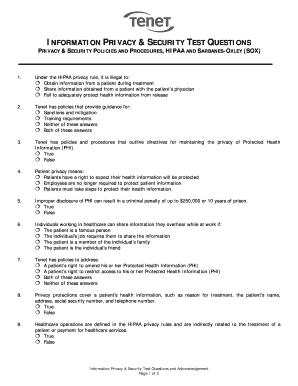
The HIPAA Privacy and Security Training Quiz is a healthcare compliance document used by healthcare professionals to assess understanding of HIPAA regulations.
pdfFiller scores top ratings on review platforms




Who needs Oshaguard HIPAA Privacy and Security Training?
Explore how professionals across industries use pdfFiller.

Oshaguard HIPAA Privacy and Security Training is needed by:
-
Healthcare professionals requiring HIPAA training
-
Covered entities responsible for compliance
-
Medical staff involved in handling PHI
-
Healthcare administrators overseeing training programs
-
Compliance officers managing policy adherence
Comprehensive Guide to Oshaguard HIPAA Privacy and Security Training
What is the HIPAA Privacy and Security Training Quiz?
The HIPAA Privacy and Security Training Quiz serves as a vital tool in assessing understanding of HIPAA regulations among healthcare professionals. This quiz plays a significant role in maintaining compliance by ensuring individuals are informed about the use and disclosure of protected health information (PHI).
It includes various formats such as true/false and multiple-choice questions, making it adaptable for different learning styles. By comprehending the HIPAA training quiz, healthcare providers can better protect patient information and meet compliance standards.
Why is HIPAA Compliance Important?
HIPAA compliance is crucial in the healthcare sector as it safeguards the confidentiality and security of PHI. Understanding HIPAA regulations helps healthcare organizations protect patient information from unauthorized access and potential breaches.
The consequences of non-compliance can be severe, including hefty fines and loss of trust from patients. Continuous training and assessment through tools like the healthcare compliance quiz are essential to maintain compliance in an ever-evolving regulatory landscape.
Key Features of the HIPAA Privacy and Security Training Quiz
This quiz boasts several key features that enhance its effectiveness as a training resource. It includes true/false and multiple-choice questions, allowing healthcare professionals to assess their knowledge comprehensively.
The quiz is designed to be user-friendly and fillable, promoting ease of use for participants. Furthermore, it incorporates security features that ensure the confidentiality of responses, thereby aligning with HIPAA standards.
Who Should Take the HIPAA Privacy and Security Training Quiz?
The target audience for this quiz includes healthcare professionals and covered entities who handle PHI. This encompasses a wide range of roles within healthcare settings, from administration to clinical staff.
Organizations that prioritize HIPAA compliance should implement the quiz as part of their employee training programs to reinforce the importance of understanding HIPAA regulations amongst their staff.
How to Fill Out the HIPAA Privacy and Security Training Quiz Online
To complete the online HIPAA Privacy and Security Training Quiz, follow these steps:
-
Access the quiz through the designated link provided by your organization.
-
Fill out each section, ensuring all required information is provided.
-
Review your answers for accuracy before submission.
By ensuring thorough and complete responses, participants can maximize their understanding of HIPAA regulations.
Why Use pdfFiller for the HIPAA Privacy and Security Training Quiz?
pdfFiller enhances the process of managing the HIPAA quiz form through its robust features. Users can edit, eSign, and share their quiz forms efficiently without the need for downloads.
Moreover, with its strong commitment to security, pdfFiller employs 256-bit encryption and complies with HIPAA guidelines, ensuring the protection of sensitive data throughout the quiz process.
Security and Privacy Considerations for Submitting the Quiz
When handling the HIPAA Privacy and Security Training Quiz, data protection is paramount. Organizations must prioritize security measures to safeguard PHI against breaches and unauthorized access.
pdfFiller's security protocols align with industry standards, providing compliance assurance. Best practices include using secure connections and regularly updating passwords to maintain confidentiality when submitting the quiz.
Next Steps After Completing the HIPAA Privacy and Security Training Quiz
After completing the quiz, it is crucial to review and validate your answers to ensure comprehension. Participants should follow the instructions for saving, downloading, or sharing their completed quizzes as required by their organization.
Additionally, ongoing training and compliance initiatives should be encouraged to reinforce the knowledge gained from the quiz and promote continuous improvement in handling PHI.
Maximize Your Compliance Efforts with pdfFiller
Using pdfFiller for the HIPAA Privacy and Security Training Quiz brings numerous advantages, including ease of use, enhanced security, and comprehensive editing tools. Organizations are encouraged to leverage pdfFiller for managing not only the HIPAA quiz but also other compliance-related documents.
By integrating pdfFiller into their workflows, healthcare organizations can efficiently ensure adherence to HIPAA regulations while maintaining high standards of data protection.
How to fill out the Oshaguard HIPAA Privacy and Security Training
-
1.Access the HIPAA Privacy and Security Training Quiz on pdfFiller by searching for its title in the pdfFiller search bar.
-
2.Open the form by clicking on it, which will load the document in the pdfFiller editing interface.
-
3.Before starting, gather necessary information, ensuring you understand the definitions of protected health information (PHI) and your responsibilities under HIPAA.
-
4.Navigate through the form using the provided tools, clicking on checkboxes for true/false questions and typing your written responses in the designated areas.
-
5.Review your answers carefully, checking your understanding of the HIPAA Privacy Rule and compliance obligations.
-
6.Once completed, finalize the form by ensuring all fields are filled out accurately and completely.
-
7.To save, download, or submit the form, use the options available in the top right corner of the pdfFiller interface, selecting your preferred format for downloaded copies.

What are the eligibility requirements to take the HIPAA Privacy and Security Training Quiz?
The quiz is intended for healthcare professionals and covered entities that handle protected health information (PHI) and must comply with HIPAA regulations.
Is there a deadline for completing the HIPAA training quiz?
While there is no specific deadline mentioned, it's recommended to complete the training promptly to stay compliant with HIPAA regulations.
What is the process for submitting the completed HIPAA training quiz?
After filling out the quiz, you can submit it through pdfFiller by using the generated options for electronic submission or by downloading it for your records.
Are there any required supporting documents for this quiz?
No additional supporting documents are required to complete the HIPAA Privacy and Security Training Quiz; it solely assesses your understanding of HIPAA regulations.
What common mistakes should I avoid while filling out the quiz?
Ensure clarity in your answers and read questions thoroughly to avoid misinterpretation. Double-check your work to prevent errors in your understanding of HIPAA rules.
How long does it take to process my quiz results?
Processing times may vary; typically, results should be available almost immediately if submitted electronically or after review if printed.
Do I need to notarize the HIPAA training quiz?
No, the completion of the HIPAA Privacy and Security Training Quiz does not require notarization or signature lines, as it is a self-assessment tool.
Related Forms




Related Catalogs
Get the latest insights from our blog


If you believe that this page should be taken down, please follow our DMCA take down process
here
.
This form may include fields for payment information. Data entered in these fields is not covered by PCI DSS compliance.