
Last updated on
Oct 15, 2026

WA F242-109-000 2006-2026 free printable template
pdfFiller is not affiliated with any government organization

Fill out
Complete the form online in a simple drag-and-drop editor.

eSign
Add your legally binding signature or send the form for signing.

Share
Share the form via a link, letting anyone fill it out from any device.

Export
Download, print, email, or move the form to your cloud storage.
Why pdfFiller is the best tool for your documents and forms


End-to-end document management
From editing and signing to collaboration and tracking, pdfFiller has everything you need to get your documents done quickly and efficiently.
Accessible from anywhere
pdfFiller is fully cloud-based. This means you can edit, sign, and share documents from anywhere using your computer, smartphone, or tablet.
Secure and compliant
pdfFiller lets you securely manage documents following global laws like ESIGN, CCPA, and GDPR. It's also HIPAA and SOC 2 compliant.
What is WA F242-109-000
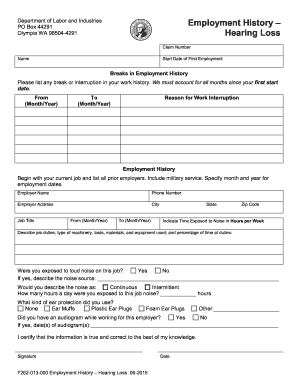
The Washington Employment History Form is a fillable document used by workers to report their employment history for the past three years.
pdfFiller scores top ratings on review platforms




Who needs WA F242-109-000?
Explore how professionals across industries use pdfFiller.

WA F242-109-000 is needed by:
-
Job applicants in Washington State
-
Employees seeking new job opportunities
-
Individuals applying for unemployment benefits
-
Human resources professionals managing employee records
-
Employers verifying applicant work history
-
Contractors needing to provide employment history
Comprehensive Guide to WA F242-109-000
What is the Washington Employment History Form?
The Washington Employment History Form serves as a critical document for workers who need to provide a comprehensive account of their employment history over the past three years. This form includes essential details such as employment positions, wages, and any interruptions in service. To ensure the accuracy of the information, workers are required to sign the form, certifying that all provided details are true and correct.
Purpose and Benefits of the Washington Employment History Form
This employment history form is vital in various situations, such as applying for unemployment benefits or during job applications. Keeping an accurate employment record benefits workers by ensuring they maintain eligibility for specific benefits and can streamline processes related to job hunting or claims. Utilizing this form simplifies the verification processes often required by employers or state agencies.
Key Features of the Washington Employment History Form
The Washington Employment History Form is designed with several user-friendly features:
-
Fillable fields for detailed employment history.
-
Checkboxes to easily indicate employment status and interruptions.
-
A requirement for a signature to confirm accuracy.
The convenience of filling out this form online enhances user experience, particularly with compatibility with pdfFiller’s editing and eSigning capabilities.
Who Needs the Washington Employment History Form?
Various individuals need to complete the Washington Employment History Form, including job seekers and those filing for unemployment claims. Specific industries, like healthcare or manufacturing, frequently require this documentation for verification purposes. In some cases, having this form completed may be essential for compliance with employer requirements during the hiring or claims process.
How to Fill Out the Washington Employment History Form Online
Following these steps will help you effectively complete the form using pdfFiller:
-
Gather necessary information, including employment dates, wages, and reasons for any employment gaps.
-
Access the pdfFiller platform and locate the Washington Employment History Form.
-
Fill out the form using the available fields and checkboxes.
-
Review the completed form for accuracy.
-
Sign the form digitally or via wet signature as required.
Be sure to familiarize yourself with the platform's features to enhance your form-filling experience.
Review and Validation Checklist for the Washington Employment History Form
Before submitting the Washington Employment History Form, follow these suggestions:
-
Double-check all employment details for accuracy.
-
Avoid common errors such as incorrect dates or inaccurate wage information.
-
Ensure the form is complete, including the required signature.
This review process is essential for preventing delays or issues during the submission phase.
How to Sign and Submit the Washington Employment History Form
Signing the Washington Employment History Form can be done in two ways: digitally or with a wet signature. After signing, there are several options for submission:
-
Submit the form online through pdfFiller.
-
Print the form and mail it to the appropriate agency.
Utilizing pdfFiller’s eSigning feature enhances security and ensures that sensitive information remains protected during the submission process.
What Happens After You Submit the Washington Employment History Form?
After submission, you can expect a processing timeline that varies based on the agency handling your form. Typically, you will receive a confirmation of your submission shortly thereafter. It is important to keep track of your form’s status to address any potential issues or follow-up actions that may be required.
Security and Privacy Considerations for the Washington Employment History Form
When completing the Washington Employment History Form, pdfFiller ensures the protection of sensitive user data through advanced security features. The platform is compliant with important regulations such as HIPAA and GDPR, emphasizing the confidentiality of the information provided within the form.
Get Started with Your Washington Employment History Form Today
Using pdfFiller, you can fill out the Washington Employment History Form easily and securely. The platform's user-friendly features, including editing and sharing tools, significantly enhance the form-filling experience. Maintaining an accurate employment history is crucial for both personal and professional growth.
How to fill out the WA F242-109-000
-
1.To access the Washington Employment History Form on pdfFiller, visit the pdfFiller homepage and use the search bar to enter 'Washington Employment History Form'.
-
2.Once you locate the form, click on it to open it in the pdfFiller interface. This will allow you to fill out the form electronically.
-
3.Before you start completing the form, gather your employment details for the past three years. Consider job titles, employer names, dates of employment, and any interruptions in your work history.
-
4.Navigate through the form using your mouse or touchpad to click on each field. Click on the textboxes to enter information and use checkboxes where applicable.
-
5.Ensure that you fill in all required fields correctly, providing accurate and truthful information about your employment history.
-
6.After completing the form, review all entries for accuracy. Make use of pdfFiller’s proofreading tools if necessary to minimize errors.
-
7.When you are satisfied with the filled form, use the 'Save' function to store your work. You can also choose to download the file to your device.
-
8.To submit your completed form, look for the option to submit via email or through an online portal, if required. Follow the prompts to finalize your submission.

Who needs to fill out the Washington Employment History Form?
Anyone seeking employment in Washington, including job applicants, workers applying for unemployment, and HR professionals, should fill out this form to provide a verified account of their work history.
What details are needed to complete the form?
You will need specifics such as job titles, employer names, dates of employment, wages, and reasons for any breaks in employment during the past three years.
How do I submit the completed form?
Once your form is completed and reviewed, you can submit it through pdfFiller via email or directly through an online portal, depending on the requirements of your employer or agency.
Is there a deadline for submitting the Washington Employment History Form?
While there is no universal deadline, you should submit your employment history promptly as part of your job application or for benefits processing to avoid delays in your application.
Do I need to notarize the Washington Employment History Form?
No, notarization is not required for the Washington Employment History Form. However, you must sign the form to certify the accuracy of your information.
What common mistakes should I avoid when filling this form?
Ensure that you do not leave required fields blank, provide only accurate information, and avoid submitting the form without a final review to catch any errors.
How long does it take to process the Washington Employment History Form?
Processing times can vary depending on the employer or agency reviewing the form; however, typically it may take a few days to a week for them to verify your employment history.
Related Forms


Get the latest insights from our blog


If you believe that this page should be taken down, please follow our DMCA take down process
here
.
This form may include fields for payment information. Data entered in these fields is not covered by PCI DSS compliance.