
Last updated on
Oct 2, 2026

Get the free Ryerson Undergraduate Change Form
We are not affiliated with any brand or entity on this form

Fill out
Complete the form online in a simple drag-and-drop editor.

eSign
Add your legally binding signature or send the form for signing.

Share
Share the form via a link, letting anyone fill it out from any device.

Export
Download, print, email, or move the form to your cloud storage.
Why pdfFiller is the best tool for your documents and forms


End-to-end document management
From editing and signing to collaboration and tracking, pdfFiller has everything you need to get your documents done quickly and efficiently.
Accessible from anywhere
pdfFiller is fully cloud-based. This means you can edit, sign, and share documents from anywhere using your computer, smartphone, or tablet.
Secure and compliant
pdfFiller lets you securely manage documents following global laws like ESIGN, CCPA, and GDPR. It's also HIPAA and SOC 2 compliant.
What is Ryerson Change Form
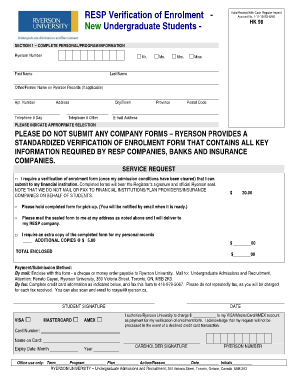
The Ryerson Undergraduate Change Form is a document used by students to update or change their submitted Ryerson University application.
pdfFiller scores top ratings on review platforms




Who needs Ryerson Change Form?
Explore how professionals across industries use pdfFiller.

Ryerson Change Form is needed by:
-
Prospective Ryerson University undergraduate students
-
Current Ryerson University students wishing to update their application
-
Administrative staff at Ryerson University
-
Academic advisors assisting students with application changes
-
Transfer students looking to change their program
-
Students seeking to provide updated contact information
Comprehensive Guide to Ryerson Change Form
What is the Ryerson Undergraduate Change Form?
The Ryerson Undergraduate Change Form is a critical document for students who wish to update their Ryerson University applications. This fillable form defines the necessary changes in personal or academic information and is essential for maintaining accurate application records. Additionally, it requires a signature to validate the submitted changes.
Purpose and Benefits of the Ryerson Undergraduate Change Form
Students may need to use the Ryerson Undergraduate Change Form for various reasons, including program selection changes or updates to personal contact information. This form helps ensure that the university has the most current records, facilitating better communication between students and university services. By submitting this form, students can efficiently manage their application status and enhance their educational experience.
Who Needs the Ryerson Undergraduate Change Form?
The Ryerson Undergraduate Change Form is relevant for multiple categories of students. Current applicants, transfer students, and prospective students may all find the need to utilize this document. Eligibility criteria for filling out the form include being an applicant with a submitted application or a previously accepted student wishing to make updates. Timely submission of the form is particularly crucial for prospective students to ensure a smooth application process.
How to Fill Out the Ryerson Undergraduate Change Form Online (Step-by-Step)
Completing the Ryerson Undergraduate Change Form electronically is a straightforward process. Follow these steps to ensure proper submission:
-
Access the fillable Ryerson Undergraduate Change Form through the university's official website.
-
Fill in each required field, including personal information and program choices.
-
Carefully review the information entered for accuracy and completeness.
-
Sign the document where indicated to ensure your submission is valid.
-
Submit the completed form electronically as per the university’s guidelines.
Ensure you understand the signature requirements before submitting the form to complete the process correctly.
Common Errors and How to Avoid Them
While filling out the Ryerson Undergraduate Change Form, students often make mistakes that can delay processing. Here are common errors to be aware of:
-
Missing signatures on the form.
-
Incorrect program codes or details.
-
Filling out sections incorrectly or omitting required information.
To avoid these issues, always double-check your form before submitting it, ensuring all fields are accurately completed and signed.
Submission Methods for the Ryerson Undergraduate Change Form
Once the Ryerson Undergraduate Change Form is completed, students have several submission options. They can submit the form online through the designated portal or send a physical copy to the appropriate office. Below are some specifics about submission:
-
Online submissions are encouraged for immediate processing.
-
Physical submissions should be sent to the Undergraduate Admissions and Recruitment office in Toronto, Ontario.
-
Be aware of any associated deadlines for submission to ensure your updates are processed in time.
Confirmation and Tracking Your Submission
After submitting the Ryerson Undergraduate Change Form, students should verify their submission status. The process usually involves checking for an email confirmation or logging into the application portal. If no confirmation is received, students can follow up directly with the university for clarity. Some universities may provide tracking tools or dedicated contacts for this purpose.
Security and Compliance for the Ryerson Undergraduate Change Form
When submitting sensitive personal information through the Ryerson Undergraduate Change Form, data security is paramount. Ryerson University ensures that appropriate security measures are in place to protect student information during submission. The university complies with data protection regulations such as GDPR, ensuring that personal data is handled responsibly and securely.
Experience Effortless Form Filling with pdfFiller
Using pdfFiller offers students a seamless experience when filling out and submitting the Ryerson Undergraduate Change Form. The platform simplifies document handling with features that include digital signatures, secure document management, and easy sharing options. By choosing pdfFiller, students can reduce stress and ensure that their forms are submitted accurately and efficiently.
How to fill out the Ryerson Change Form
-
1.Access the Ryerson Undergraduate Change Form on pdfFiller by searching for it in the template library or using a direct link provided by the university.
-
2.Open the form within pdfFiller to view the fillable fields and instructions.
-
3.Prepare the necessary personal information, including your full name, student ID, and current program details.
-
4.Use the cursor to click on each blank field and input your updated information accurately.
-
5.Ensure to read any provided instructions carefully to fill out any checkboxes or select options correctly.
-
6.Review your completed form thoroughly to ensure all information is correct and all required sections are filled.
-
7.Once you have finalized your form, use the options in pdfFiller to save your work or download a copy in PDF format.
-
8.If ready for submission, follow the prompts to submit the form electronically to Undergraduate Admissions and Recruitment at Ryerson University.

Who is eligible to use the Ryerson Undergraduate Change Form?
The Ryerson Undergraduate Change Form is intended for current and prospective undergraduate students of Ryerson University who wish to amend their submitted application.
What are the deadlines for submitting this form?
Submission deadlines for the Ryerson Undergraduate Change Form vary by program and admission cycle. It's advisable to check the university's admissions page for the most current deadlines.
How do I submit the Ryerson Undergraduate Change Form?
After completing the form on pdfFiller, you can submit it electronically by following the instructions on pdfFiller or by emailing it directly to the Undergraduate Admissions office.
What supporting documents do I need to attach?
Generally, you may need to attach a proof of identity or any documents supporting your application changes, such as transcripts or letters of recommendation. Make sure to check specific requirements on the university's website.
What common mistakes should I avoid when filling out the form?
Ensure you carefully fill in all required fields, double-check your information for accuracy, and avoid omitting signatures or necessary documents, as these can delay processing.
How long does it take to process the Ryerson Undergraduate Change Form?
Processing times can vary based on the volume of requests and the specific changes being made, but you can typically expect to wait a few weeks. Check the admissions page for specific processing times.
Is there a fee associated with submitting this form?
The Ryerson Undergraduate Change Form does not typically require a submission fee; however, it's best to verify the latest information on the university's website or admissions office.
Related Forms




Get the latest insights from our blog



If you believe that this page should be taken down, please follow our DMCA take down process
here
.
This form may include fields for payment information. Data entered in these fields is not covered by PCI DSS compliance.