
Last updated on
Nov 10, 2026
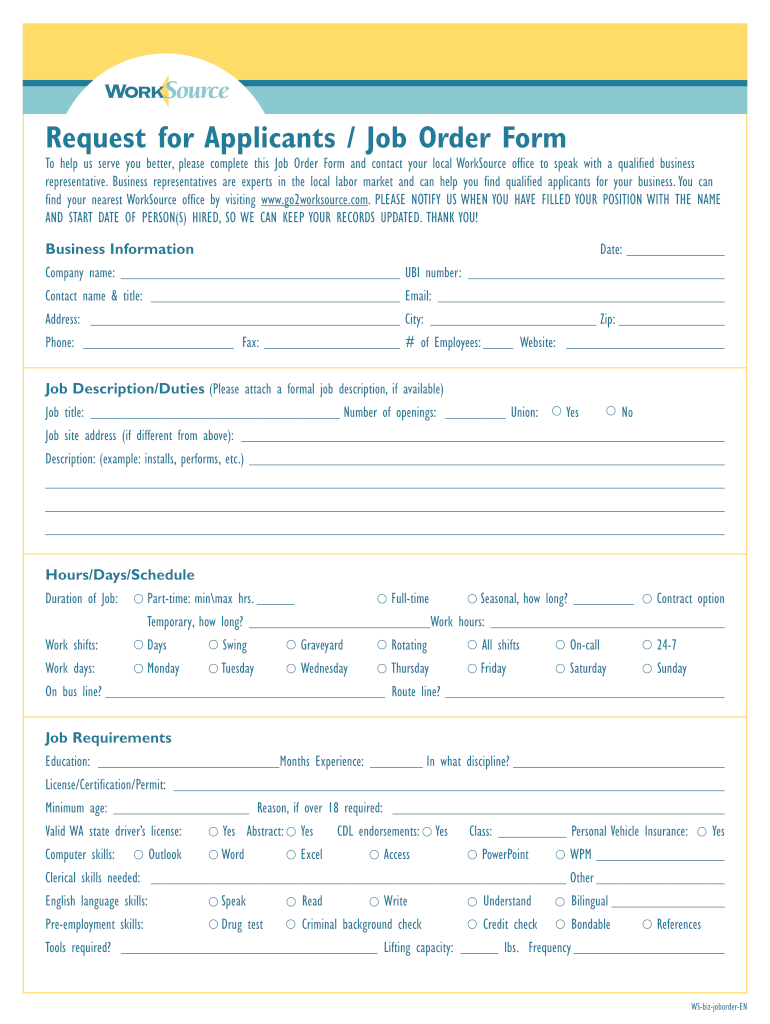
WA WS-biz-joborder-EN free printable template
pdfFiller is not affiliated with any government organization

Fill out
Complete the form online in a simple drag-and-drop editor.

eSign
Add your legally binding signature or send the form for signing.

Share
Share the form via a link, letting anyone fill it out from any device.

Export
Download, print, email, or move the form to your cloud storage.
Why pdfFiller is the best tool for your documents and forms


End-to-end document management
From editing and signing to collaboration and tracking, pdfFiller has everything you need to get your documents done quickly and efficiently.
Accessible from anywhere
pdfFiller is fully cloud-based. This means you can edit, sign, and share documents from anywhere using your computer, smartphone, or tablet.
Secure and compliant
pdfFiller lets you securely manage documents following global laws like ESIGN, CCPA, and GDPR. It's also HIPAA and SOC 2 compliant.
What is WA WS-biz-joborder-EN
The Job Order Form is an employment document used by businesses to request assistance from WorkSource in finding qualified applicants.
pdfFiller scores top ratings on review platforms




Who needs WA WS-biz-joborder-EN?
Explore how professionals across industries use pdfFiller.

WA WS-biz-joborder-EN is needed by:
-
Businesses looking to fill job vacancies
-
Recruiters seeking qualified candidates
-
Nonprofit organizations offering job placement services
-
HR professionals managing hiring processes
-
Job boards and employment agencies
-
WorkSource staff needing job details for assistance
Comprehensive Guide to WA WS-biz-joborder-EN
What is the Job Order Form?
The Job Order Form is a critical document used by businesses to facilitate the hiring process. This form serves as a bridge between companies and potential candidates, ensuring that businesses can connect with qualified applicants effectively. In Washington and other relevant areas, the Job Order Form streamlines recruitment by providing a structured approach to job postings. With this form, employers can clearly outline their needs, which assists in attracting the right talent.
Purpose and Benefits of the Job Order Form
There are several compelling reasons for businesses to utilize the Job Order Form during their recruitment efforts. This form significantly streamlines the process of hiring by meeting compliance with local and federal employment regulations. By using the Job Order Form, companies can ensure they are providing detailed information about job requirements, which enhances the overall recruitment experience. Additionally, it aids in clarifying expectations for both employers and job seekers.
Key Features of the Job Order Form
The Job Order Form boasts multiple user-friendly features that enhance its usability. It includes fillable fields and checkboxes that make the completion process straightforward for employers. Furthermore, clear instructions are provided with the form to help users navigate through each section. These features ensure that even those unfamiliar with the form can fill it out accurately and efficiently.
Who Needs the Job Order Form?
Various types of businesses benefit from using the Job Order Form. Companies in diverse industries, particularly those based in Washington, find this form essential for recruiting employees. Whether a business is large or small, this form assists in standardizing the hiring process and helps to manage what can often be a complex task effectively.
How to Fill Out the Job Order Form Online (Step-by-Step)
Filling out the Job Order Form online is a simple process that can be done in just a few steps. Follow this guide to ensure a smooth experience:
-
Access the form through pdfFiller's platform.
-
Fill in all required fields with accurate information about the job and business.
-
Utilize checkboxes and drop-down menus for ease of filling out the form.
-
Review the information entered to avoid common mistakes.
-
Submit the completed form following the provided instructions.
Gathering necessary information beforehand can help streamline this process. Be sure to avoid common pitfalls such as incomplete sections or inaccurate data.
Submission Methods and Where to Submit the Job Order Form
After completing the Job Order Form, users have several submission options available:
-
Online submission via pdfFiller.
-
In-person delivery to the local WorkSource office.
-
Mailing the form directly to the designated office.
Contact your local WorkSource office for specific submission details and routing information.
What Happens After You Submit the Job Order Form?
Once the Job Order Form has been submitted, it undergoes a review process designed to verify the information provided. Applicants can expect some follow-up communications regarding their submissions, with potential timelines for feedback outlined by the local WorkSource office. Users may receive confirmation of submission or tracking details for monitoring progress.
Common Errors and How to Avoid Them
To ensure a flawless submission of the Job Order Form, users should be aware of common errors that often occur. Key mistakes include leaving required fields blank or providing inconsistent information. To avoid these pitfalls, consider the following recommendations:
-
Double-check all entries for accuracy and completeness.
-
Utilize pdfFiller’s editing features to make corrections easily.
-
Have a colleague review the form before submission.
A thorough review can prevent unnecessary delays in the hiring process.
Security and Compliance for the Job Order Form
When using pdfFiller to complete the Job Order Form, users can rest assured that their sensitive information is protected. The platform employs advanced security features, including 256-bit encryption and compliance with regulations such as HIPAA and GDPR. This ensures that all data is handled securely, maintaining the confidentiality of job applications.
Discover How pdfFiller Can Simplify Your Job Order Form Experience
pdfFiller offers a range of tools to enhance the experience of completing the Job Order Form. Users can edit, complete, and electronically sign documents seamlessly using the platform. Success stories and testimonials highlight the positive impact of utilizing pdfFiller for streamlined hiring processes, making it a valuable resource for businesses.
How to fill out the WA WS-biz-joborder-EN
-
1.Access the Job Order Form on pdfFiller by searching for 'Job Order Form' in the document library or using a direct link if available.
-
2.Open the form to view its fillable fields which include sections for business and job information.
-
3.Before you fill out the form, gather necessary information such as your business name, job title, job description, requirements, and application process details.
-
4.Start by entering your business information in the designated fields, ensuring correct spelling and accurate contact details.
-
5.Next, complete the job description section with a clear outline of job duties and any necessary qualifications.
-
6.Utilize checkboxes where applicable, making sure to select all relevant options related to the job position.
-
7.Use the notes or comments section to add any additional information that may clarify the job posting for applicants.
-
8.After completing all fields, review the form for any errors or missing information, ensuring compliance with WorkSource requirements.
-
9.Finalize your form on pdfFiller by saving your changes. Choose to download or submit the form directly to your local WorkSource office through the provided submission options.

Who is eligible to use the Job Order Form?
Any business or organization seeking to fill job vacancies can use the Job Order Form, including recruitment agencies, nonprofits, and HR departments.
What is the submission method for the Job Order Form?
The form can be submitted electronically through pdfFiller directly to the local WorkSource office or downloaded for physical submission.
Are there specific deadlines for submitting the Job Order Form?
While no specific deadlines are stated, it is advisable to submit the form promptly to ensure timely assistance in filling job vacancies.
What supporting documents are required with the Job Order Form?
Typically, no additional documents are required when submitting the Job Order Form, but having a job description and qualifications ready is beneficial.
What common mistakes should I avoid when completing the form?
Common mistakes include incomplete sections, typos in business information, and not providing a detailed job description. Ensure all fields are filled out accurately.
How long does it take to process the Job Order Form?
Processing times can vary; however, generally, you should expect feedback within a week after submission, depending on the workload of the local WorkSource office.
What if I need to change my submission after it is submitted?
If you need to make changes after submission, contact your local WorkSource office as soon as possible to discuss the necessary updates or corrections.
Related Forms




Get the latest insights from our blog


If you believe that this page should be taken down, please follow our DMCA take down process
here
.
This form may include fields for payment information. Data entered in these fields is not covered by PCI DSS compliance.