
Last updated on
Oct 2, 2026

Canada TSTG Student Transportation Application 2014 free printable template
We are not affiliated with any brand or entity on this form

Fill out
Complete the form online in a simple drag-and-drop editor.

eSign
Add your legally binding signature or send the form for signing.

Share
Share the form via a link, letting anyone fill it out from any device.

Export
Download, print, email, or move the form to your cloud storage.
Why pdfFiller is the best tool for your documents and forms


End-to-end document management
From editing and signing to collaboration and tracking, pdfFiller has everything you need to get your documents done quickly and efficiently.
Accessible from anywhere
pdfFiller is fully cloud-based. This means you can edit, sign, and share documents from anywhere using your computer, smartphone, or tablet.
Secure and compliant
pdfFiller lets you securely manage documents following global laws like ESIGN, CCPA, and GDPR. It's also HIPAA and SOC 2 compliant.
What is Canada TSTG Student Transportation Application
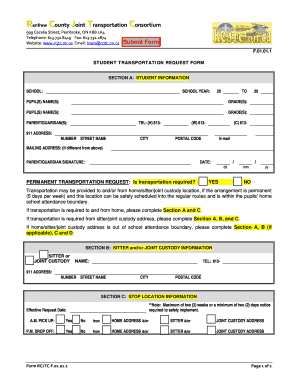
The Student Transportation Application is an education form used by parents or guardians in Ontario to request transportation services for their children to and from school.
pdfFiller scores top ratings on review platforms




Who needs Canada TSTG Student Transportation Application?
Explore how professionals across industries use pdfFiller.

Canada TSTG Student Transportation Application is needed by:
-
Parents or guardians seeking school transportation for their children
-
Transportation supervisors responsible for reviewing transportation requests
-
School administrators managing student transportation services
-
Families with special education needs requiring specific transport arrangements
-
Individuals needing to verify transportation eligibility for enrollment
-
Caregivers assisting with school-related logistics
Comprehensive Guide to Canada TSTG Student Transportation Application
What is the Student Transportation Application?
The Student Transportation Application is a vital form used by parents or guardians in Ontario's educational system to request transportation services for their children. It plays a significant role in ensuring that all students, particularly those with special needs, have access to safe and reliable transportation to and from school. This application addresses the essential requirement for student mobility, fostering a supportive learning environment.
Purpose and Benefits of the Student Transportation Application
The primary purpose of the Student Transportation Application is to facilitate safe transportation for children attending school. By filling out this form, parents and guardians help meet both legal and administrative requirements for educational institutions. This application provides several benefits, including ensuring that children arrive at school on time and have a reliable means of getting home, which is particularly crucial for students with special needs.
Who Needs the Student Transportation Application?
This application is designed for parents and guardians who seek transportation for their children. Individuals responsible for a child's education and welfare must fill out the form. The transportation supervisor plays a critical role in reviewing these applications to ensure all necessary information is submitted and eligibility criteria are met.
Eligibility Criteria for the Student Transportation Application
To submit the Student Transportation Application, applicants must adhere to specific eligibility criteria. Key requirements include providing detailed information that demonstrates a child's need for transportation services. This may involve factors such as age, disabilities, or other unique circumstances that affect a student's transportation requirements, ensuring each application is tailored to individual needs.
How to Fill Out the Student Transportation Application Online (Step-by-Step)
Completing the Student Transportation Application online can be done efficiently by following these steps:
-
Access the Student Transportation Application form through the appropriate online platform.
-
Fill out the 'Student Surname' field with the last name of the child.
-
Enter the 'Date of Birth' in the format of day/month/year.
-
Complete all required fields, ensuring accuracy in each section.
-
Review the form for any errors or missing information.
-
Submit the completed application for review.
Field-by-Field Instructions for the Student Transportation Application
Understanding each part of the application is critical to its successful completion. Here are some key fields to pay attention to:
-
Ensure the 'Student Surname' is spelled correctly to avoid any identification issues.
-
The 'Date of Birth' must match official records to confirm eligibility.
-
Be aware of additional fields that may require context, such as the medical eligibility form, which can detail any specific needs related to transportation.
How to Sign and Submit the Student Transportation Application
Submitting the application involves understanding the signing process. Applicants can choose between digital signatures or traditional handwritten ones. After signing the form, submission can be done through various methods, including online platforms like pdfFiller, which offers an easy and secure process for application management.
What Happens After You Submit the Student Transportation Application?
Once the Student Transportation Application is submitted, it enters a review process managed by the transportation supervisor. Applicants can expect to receive communication regarding the status of their application, which may include confirmations or requests for additional information. Keeping track of the submission helps ensure timely follow-up on any required actions.
Common Issues and Solutions with the Student Transportation Application
While filling out the application, applicants may encounter some common issues. These can include incomplete information or incorrect signatures. To address these challenges:
-
Double-check all fields before submission to minimize errors.
-
If an application is rejected, review the provided feedback and address any areas of concern before resubmitting.
Secure Your Student Transportation Application with pdfFiller
Using pdfFiller enhances the experience of filling out the Student Transportation Application. The platform provides robust features that simplify the process of editing, signing, and managing applications securely. With strict security protocols and data protection practices, users can trust that sensitive student information is handled with care throughout the entire application process.
How to fill out the Canada TSTG Student Transportation Application
-
1.Begin by accessing pdfFiller and searching for the 'Student Transportation Application' form. Make sure you have a pdfFiller account to edit the document online.
-
2.Once you open the form, familiarize yourself with the fillable fields. The form will contain sections such as 'Student Surname', 'Date of Birth', and 'Parent/Guardian Signature.'
-
3.Before filling out the form, gather essential information. This includes your child's full name, date of birth, emergency contact details, and any specific transportation needs, such as medical requirements.
-
4.Navigate through the form, filling in each section carefully. Use pdfFiller's text box tool to enter information clearly in the designated fields. Make sure all entries are accurate and legible.
-
5.For each section needing a signature, ensure the appropriate individual signs the form. This may be the parent/guardian or a transportation supervisor, as required.
-
6.Once you have completed the entire form, review all entries for accuracy and completeness. Look out for any required fields that may have been missed.
-
7.After finalizing your form, use pdfFiller’s options to save your work. You can choose to download the completed form in PDF format or submit it as instructed, based on the submission guidelines provided by your school or educational authority.

Who is eligible to complete the Student Transportation Application?
The Student Transportation Application is designed for parents or guardians of students enrolled in schools in Ontario. They must complete the form to request necessary transportation services for their children.
What information do I need to complete the form?
You will need your child's name, date of birth, school details, emergency contacts, and any specific transportation requirements, including medical considerations, to accurately complete the form.
How do I submit the completed application?
Once completed, you can submit the application by following the submission guidelines provided by your school or district. Typically, this may include uploading the form through a portal or sending it via email to the transportation office.
Are there any deadlines for submitting the Student Transportation Application?
Yes, it is important to check with your school’s transportation office for any specific deadlines. Submissions are often time-sensitive, particularly before the start of the school year, to ensure allocation of bus services.
What should I do if I made a mistake on the form?
If you notice a mistake after completing the form, you can edit it directly in pdfFiller. Ensure all corrections are made before saving and resubmitting the application.
How long does it take to process the application?
Processing times for the Student Transportation Application can vary. Typically, it can take anywhere from a few days to a few weeks. It’s best to contact the transportation office for specific time frames.
Do I need to provide any supporting documents with the application?
Depending on your child's needs, you may need to provide additional documentation, such as medical forms or proof of enrollment at the school. Check with your school’s transportation office for specific requirements.
Canada TSTG Student Transportation Application Form Versions
Related Forms




Get the latest insights from our blog


If you believe that this page should be taken down, please follow our DMCA take down process
here
.
This form may include fields for payment information. Data entered in these fields is not covered by PCI DSS compliance.