
Last updated on
Oct 23, 2026

ALB Form 76 free printable template
We are not affiliated with any brand or entity on this form

Fill out
Complete the form online in a simple drag-and-drop editor.

eSign
Add your legally binding signature or send the form for signing.

Share
Share the form via a link, letting anyone fill it out from any device.

Export
Download, print, email, or move the form to your cloud storage.
Why pdfFiller is the best tool for your documents and forms


End-to-end document management
From editing and signing to collaboration and tracking, pdfFiller has everything you need to get your documents done quickly and efficiently.
Accessible from anywhere
pdfFiller is fully cloud-based. This means you can edit, sign, and share documents from anywhere using your computer, smartphone, or tablet.
Secure and compliant
pdfFiller lets you securely manage documents following global laws like ESIGN, CCPA, and GDPR. It's also HIPAA and SOC 2 compliant.
What is ALB Form 76
The American Legion Baseball Player Transfer Form is an official document used by players to transfer from one American Legion Baseball team to another.
pdfFiller scores top ratings on review platforms




Who needs ALB Form 76?
Explore how professionals across industries use pdfFiller.

ALB Form 76 is needed by:
-
Players looking to transfer teams
-
Parents of baseball players
-
Team managers of old teams
-
Managers of potential new teams
-
Department baseball chairmen
Comprehensive Guide to ALB Form 76
What is the American Legion Baseball Player Transfer Form?
The American Legion Baseball Player Transfer Form is a critical document within the American Legion Baseball community. It facilitates the transfer of players from one team to another, ensuring that transitions are handled efficiently and correctly. This form is primarily used by players who are transitioning between teams and is essential for compliance with organizational policies.
This transfer form is required in various situations, such as when a player is released from their current team and seeks to join a different one. By using the american legion baseball transfer form, players, parents, and teams can manage transfers smoothly and with minimal disruption.
Purpose and Benefits of the American Legion Baseball Player Transfer Form
The primary purpose of the American Legion Baseball Player Transfer Form is to streamline the process of moving players between teams. When utilizing this form, teams ensure that all relevant parties are informed and that proper procedures are followed. This reduces confusion and potential disputes that might arise during team transitions.
The benefits of using this form extend to players, parents, and teams alike. For players, it provides a structured way to transition into a new environment, while parents gain peace of mind knowing that all necessary steps are being taken for their child's transfer. Teams can also benefit from the form by ensuring they adhere to league rules and prevent any eligibility issues.
Key Features of the American Legion Baseball Player Transfer Form
The American Legion Baseball Player Transfer Form includes several key sections designed to capture important information. Notable features of this sports transfer form consist of:
-
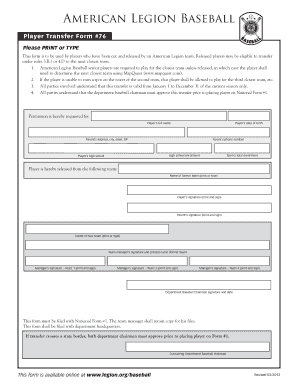
Player information, such as name, address, date of birth, and high school.
-
Details about the old team and potential new teams.
-
Designated fields for manager signatures, ensuring all voices are acknowledged in the transfer process.
Each required signature plays a vital role in validating the transfer and ensuring all stakeholders are onboard with the player's move.
Who Needs the American Legion Baseball Player Transfer Form?
The American Legion Baseball Player Transfer Form is essential for various stakeholders, including players, parents, and team managers. Specifically, this form needs to be completed by:
-
Players who are changing teams.
-
Parents supporting their child's transfer.
-
Managers from both the old and new teams, ensuring all managerial responsibilities are met.
This form is typically used in situations where a player is released from their current team and seeks to join another, making it a crucial part of the baseball team transfer process.
How to Fill Out the American Legion Baseball Player Transfer Form Online
Filling out the American Legion Baseball Player Transfer Form online is a straightforward process. Follow these steps on pdfFiller's platform:
-
Access the form on pdfFiller.
-
Enter the player's personal information accurately.
-
Ensure that all necessary signatures and approvals are included.
-
Review the filled form to avoid common mistakes, such as missing fields or incorrect entries.
Paying close attention to required fields can prevent delays in processing the transfer. Utilizing pdfFiller simplifies this experience by providing an intuitive interface designed to guide users through each step.
Signing and Submitting the American Legion Baseball Player Transfer Form
After filling out the American Legion Baseball Player Transfer Form, it’s crucial to properly sign and submit the document. Signatures are required from multiple parties, including the player, parent, and team managers. Depending on preferences and circumstances, both digital and wet signature options are available.
When it comes to submission methods, once all signatures are acquired, the completed form must be sent to the necessary department for processing. Ensuring you adhere to submission guidelines helps maintain the integrity of the process.
Important Considerations & Timeline for the American Legion Baseball Player Transfer Form
Timeliness is a significant factor when handling the American Legion Baseball Player Transfer Form. Be aware of filing deadlines and processing times as they can impact a player’s eligibility to participate in games. Late submissions may result in consequences that could affect players and teams alike.
For a seamless transfer experience, ensure that the form is filled out and submitted as early as possible, and make any necessary corrections promptly to avoid delays.
Security and Privacy in Handling the American Legion Baseball Player Transfer Form
Security is paramount when it comes to sensitive documents like the American Legion Baseball Player Transfer Form. pdfFiller employs 256-bit encryption and adheres to regulations such as HIPAA and GDPR to protect user data throughout the form-filling process.
Users can trust that their information will be handled with utmost confidentiality, making pdfFiller a secure choice for managing the legion baseball form.
How to Use pdfFiller for Your American Legion Baseball Player Transfer Form
pdfFiller offers a range of features designed to enhance the experience of filling out the American Legion Baseball Player Transfer Form. Users can edit text, create fillable fields, and securely eSign documents without the need for downloads.
This cloud-based platform not only simplifies the process but also provides convenient access from any browser, ensuring that you can manage your sports transfer form efficiently and effectively.
Get Started with Your American Legion Baseball Player Transfer Form
To begin your American Legion Baseball Player Transfer Form, utilize pdfFiller for an effortless and manageable process. Leveraging a cloud-based platform like pdfFiller for document management allows you to fill out, sign, and securely store important forms without hassle.
Experience greater efficiency and peace of mind as you navigate the baseball team transfer process.
How to fill out the ALB Form 76
-
1.To begin, access the American Legion Baseball Player Transfer Form through pdfFiller by searching for the document in the search bar or by directly entering the URL provided by your organization.
-
2.Once you have opened the form, use pdfFiller's interface to navigate through the document. Locate the required fields for player and parent information, including the player's name, address, date of birth, and high school.
-
3.Gather all necessary information before filling out the form. This includes details from the player, parent's identity, and the names of the old team and potential new team managers.
-
4.Start completing the fields in the form. Ensure that you correctly enter all relevant information. Fields requiring signatures from the player, parent, and team managers should not be left empty.
-
5.After filling out the required information, carefully review the document for any missing details or errors. This is important to ensure that all parts of the form are completed correctly.
-
6.Once you have confirmed that the form is accurately filled out, use pdfFiller's options to save your changes. You can either download the form or submit it directly through the platform, following any specific submission guidelines provided.

Who is eligible to use the American Legion Baseball Player Transfer Form?
The form is intended for baseball players who have been released from their local teams and wish to transfer to another American Legion Baseball team. Parents and team managers also need to sign.
Are there any deadlines for submitting the transfer form?
While the specific deadlines may vary by department, players should submit the form as soon as they wish to transfer. Ensure timely submission to facilitate a smooth transition.
How do I submit the completed transfer form?
Once completed, you can submit the transfer form through pdfFiller by following the submission options available in the platform. Alternatively, you can print, sign, and mail it to the appropriate department.
What supporting documents are required with the transfer form?
Typically, no additional documents are required. However, it is essential to provide any necessary signatures and ensure that all fields in the form are fully completed.
What mistakes should I avoid when filling out the form?
Ensure all signatures are obtained and that the form is filled out completely. Double-check for any missing information or typos, as these can delay processing.
How long does it take for the transfer form to be processed?
Processing times can vary depending on the department's workload. It's advisable to follow up with the department baseball chairman after submitting the form to check on the status.
Is notarization required for the American Legion Baseball Player Transfer Form?
No, notarization is not required for this transfer form. However, all necessary signatures from relevant parties must be included.
Related Forms





Get the latest insights from our blog


If you believe that this page should be taken down, please follow our DMCA take down process
here
.
This form may include fields for payment information. Data entered in these fields is not covered by PCI DSS compliance.