
Last updated on
Nov 9, 2026
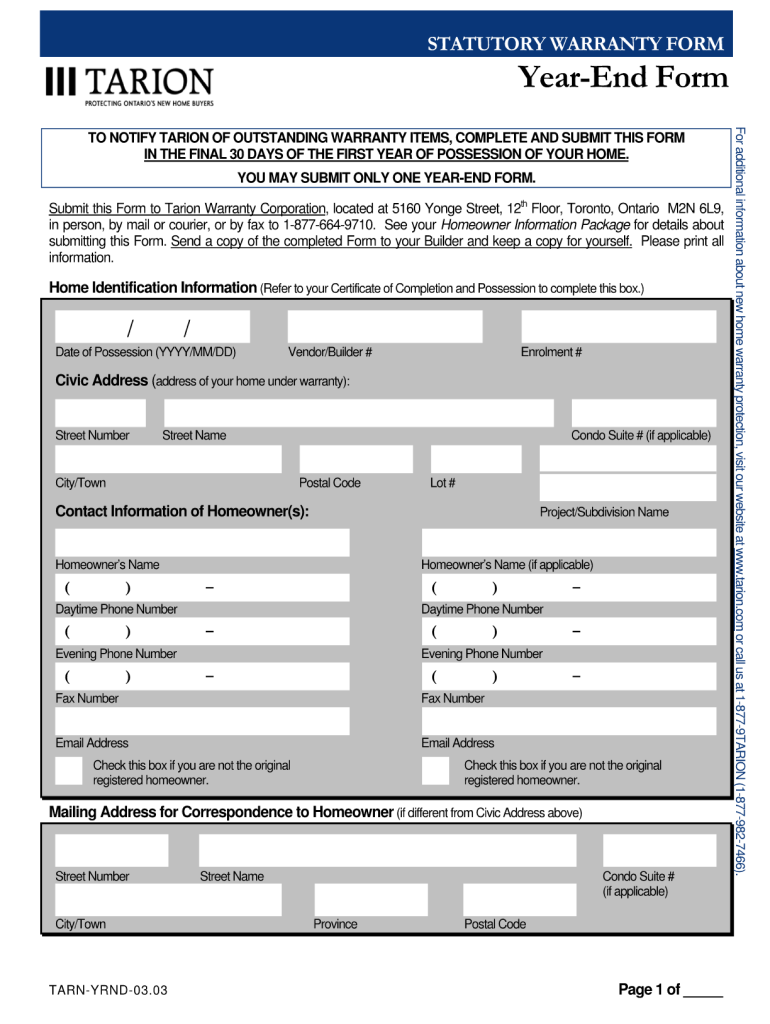
Tarion Year-End Form 2003 free printable template
We are not affiliated with any brand or entity on this form

Fill out
Complete the form online in a simple drag-and-drop editor.

eSign
Add your legally binding signature or send the form for signing.

Share
Share the form via a link, letting anyone fill it out from any device.

Export
Download, print, email, or move the form to your cloud storage.
Why pdfFiller is the best tool for your documents and forms


End-to-end document management
From editing and signing to collaboration and tracking, pdfFiller has everything you need to get your documents done quickly and efficiently.
Accessible from anywhere
pdfFiller is fully cloud-based. This means you can edit, sign, and share documents from anywhere using your computer, smartphone, or tablet.
Secure and compliant
pdfFiller lets you securely manage documents following global laws like ESIGN, CCPA, and GDPR. It's also HIPAA and SOC 2 compliant.
What is Tarion Year-End Form
The Tarion Year-End Form is a document used by homeowners to report deficiencies in newly built homes before the warranty period ends.
pdfFiller scores top ratings on review platforms




Who needs Tarion Year-End Form?
Explore how professionals across industries use pdfFiller.

Tarion Year-End Form is needed by:
-
New homeowners looking to report construction issues
-
Real estate agents advising clients on warranty processes
-
Home builders seeking to address warranty claims
-
Home warranty providers assessing submitted claims
-
Construction inspectors reviewing defects
Comprehensive Guide to Tarion Year-End Form
What is the Tarion Year-End Form?
The Tarion Year-End Form is a crucial document for homeowners and builders in Ontario, designed to clarify warranty claims. This form provides an overview of the issues encountered in new homes, ensuring that they are documented appropriately at the year's end. Homeowners can utilize it to communicate effectively with Tarion and their builders, facilitating the warranty process.
Purpose and Benefits of the Tarion Year-End Form
The primary purpose of the Tarion Year-End Form is to streamline the warranty claims process for new homeowners. This form helps identify and document any issues present in the home before the warranty expires, making it easier for homeowners to ensure that all claims are submitted correctly. Additionally, it facilitates better communication between homeowners, builders, and Tarion, leading to a smoother resolution of any warranty-related concerns.
Who Needs to Complete the Tarion Year-End Form?
The Tarion Year-End Form must be completed by homeowners who possess Tarion warranty coverage. Builders are also required to submit this form on behalf of the homeowners, especially as the warranty period nears its expiration. Situations such as unresolved issues in the home or nearing warranty expiry necessitate the completion of the form to ensure that all relevant problems are reported.
How to Fill Out the Tarion Year-End Form Online
To fill out the Tarion Year-End Form online, follow these step-by-step instructions:
-
Access the Tarion Year-End Form through the pdfFiller platform.
-
Complete the required fields, paying special attention to sections where issues should be described in detail.
-
Utilize tips provided by pdfFiller for a smoother digital completion process.
Common Errors and How to Avoid Them
When completing the Tarion Year-End Form, several common errors can arise. These may include:
-
Submitting incomplete information.
-
Failing to document issues thoroughly.
To avoid mistakes, it is crucial to review all entries carefully and use the validation checklist provided by pdfFiller to ensure accuracy before submission.
How to Submit the Tarion Year-End Form
Submitting the Tarion Year-End Form can be done electronically or via mail. Here’s how to proceed with each method:
-
Submit electronically through pdfFiller by following the prompts after filling in the form.
-
For traditional submission, print the completed form and send it via mail.
Be mindful of key deadlines associated with submission and any essential fees that may apply.
After Submission: What Happens Next?
Once the Tarion Year-End Form is submitted, tracking the submission status is essential. Users can expect to receive responses within specified timelines. If additional information is requested, follow the outlined steps to provide the necessary details promptly. Possible outcomes after submission may include approval of claims or a follow-up for further clarification.
Security and Privacy Considerations for the Tarion Year-End Form
When handling the Tarion Year-End Form through pdfFiller, security and privacy are paramount. The platform uses 256-bit encryption to safeguard sensitive information. Users can also rest assured that pdfFiller adheres to GDPR and HIPAA compliance, ensuring personal data is handled securely.
Helpful Tools and Resources for the Tarion Year-End Form
pdfFiller offers a variety of tools and resources that enhance the completion of the Tarion Year-End Form. These include:
-
e-Signature capabilities that streamline document signing.
-
Form templates that simplify the submission process.
Exploring additional resources can provide further assistance and support throughout the form submission process.
Get Started with the Tarion Year-End Form Today
Explore pdfFiller’s services to facilitate your form-handling needs. Utilizing pdfFiller for filling out and editing the Tarion Year-End Form can significantly ease the process and help ensure that all necessary details are accurately captured before submission. Proactivity in completing this form is key to managing your warranty claims effectively.
How to fill out the Tarion Year-End Form
-
1.To access the Tarion Year-End Form on pdfFiller, visit the pdfFiller website and use the search bar to locate the form by its name.
-
2.Once located, click on the form to open it in the pdfFiller editor interface.
-
3.Before you begin filling out the form, gather all necessary information, such as details of the reported deficiency, dates of occurrence, and photographs if applicable.
-
4.In the pdfFiller interface, navigate to each field and enter the required information accurately. Take your time to ensure all details are correct.
-
5.If you need to make any changes, utilize the editing tools available in pdfFiller to modify any field as needed.
-
6.Once the form is completely filled out, carefully review all entries to ensure accuracy and completeness, checking for any missing information.
-
7.After reviewing the form, save your progress by clicking the save option, or if ready to submit, proceed to the submission options provided.
-
8.You can choose to download a copy of the completed form to your device or submit it to the specified address directly through pdfFiller.

Who is eligible to submit the Tarion Year-End Form?
Any homeowner within the warranty period of their new home is eligible to submit the Tarion Year-End Form to report construction deficiencies.
What is the deadline for submitting the Tarion Year-End Form?
The form should be submitted before the end of the warranty period specified in your Tarion documentation, usually within the first year of occupancy.
How do I submit the completed Tarion Year-End Form?
You can submit the completed form electronically through pdfFiller or print it out and mail it to the appropriate address as indicated in the form instructions.
Are there any documents required when submitting the Tarion Year-End Form?
It is recommended to include any supporting documents, such as photographs of deficiencies or previous correspondence related to the issues, along with your submission.
What common mistakes should I avoid when filling out the Tarion Year-End Form?
Ensure you do not leave any fields blank, double-check spellings, and make sure all listed deficiencies are described accurately to avoid delays in processing.
How long does it take for Tarion to process the Year-End Form?
Processing times may vary, but generally, you can expect a response within a few weeks, depending on their workload and the complexity of your submission.
What should I do if I have questions about the Tarion Year-End Form?
For inquiries, you can contact Tarion directly through their customer service channels or refer to their website for additional resources and guidance.
Tarion Year-End Form Form Versions
Related Content
Related Forms





Related Catalogs
Get the latest insights from our blog


If you believe that this page should be taken down, please follow our DMCA take down process
here
.
This form may include fields for payment information. Data entered in these fields is not covered by PCI DSS compliance.