
Last updated on
Oct 31, 2026

FL Funplex of Gulf Breeze Birthday Party Invitation 2015-2026 free printable template
pdfFiller is not affiliated with any government organization

Fill out
Complete the form online in a simple drag-and-drop editor.

eSign
Add your legally binding signature or send the form for signing.

Share
Share the form via a link, letting anyone fill it out from any device.

Export
Download, print, email, or move the form to your cloud storage.
Why pdfFiller is the best tool for your documents and forms


End-to-end document management
From editing and signing to collaboration and tracking, pdfFiller has everything you need to get your documents done quickly and efficiently.
Accessible from anywhere
pdfFiller is fully cloud-based. This means you can edit, sign, and share documents from anywhere using your computer, smartphone, or tablet.
Secure and compliant
pdfFiller lets you securely manage documents following global laws like ESIGN, CCPA, and GDPR. It's also HIPAA and SOC 2 compliant.
What is FL Funplex of Gulf Breeze Birthday Party Invitation
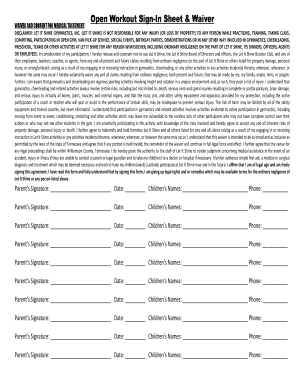
The Gulf Breeze Gymnastics Waiver of Liability is a legal document used by parents or guardians to release the facility from liability for injuries during activities.
pdfFiller scores top ratings on review platforms




Who needs FL Funplex of Gulf Breeze Birthday Party Invitation?
Explore how professionals across industries use pdfFiller.

FL Funplex of Gulf Breeze Birthday Party Invitation is needed by:
-
Parents or guardians of minor participants
-
Gulf Breeze Gymnastics and Cheer, LLC clients
-
Individuals hosting birthday parties at the facility
-
Cheerleading or gymnastics activity organizers
-
Legal representatives for minors
Comprehensive Guide to FL Funplex of Gulf Breeze Birthday Party Invitation
What is the Gulf Breeze Gymnastics Waiver of Liability?
The Gulf Breeze Gymnastics Waiver of Liability serves as a critical document for participants at Gulf Breeze Gymnastics and Cheer, LLC. Its primary purpose is to inform participants about potential risks associated with gymnastics and cheer activities. By signing this document, participants release the facility from liability for any injuries or damages that may occur during these activities. This waiver is essential for protecting both the participants and the facility.
Furthermore, the waiver outlines the legal responsibilities participants accept, thereby safeguarding Gulf Breeze Gymnastics from potential litigation. Key terms included in the waiver, such as "gulf breeze gymnastics waiver" and "activity release agreement pdf," emphasize its importance in the context of gymnastics-related activities.
Purpose and Benefits of the Gulf Breeze Gymnastics Waiver of Liability
The Gulf Breeze Gymnastics Waiver of Liability plays a crucial role in acknowledging the inherent risks involved in participating in gymnastics and cheer activities. By signing the waiver, parents and guardians recognize these risks, which is vital for informed participation. Moreover, this waiver provides several benefits, including peace of mind for parents, knowing their child’s participation is acknowledged in a legal context.
Additionally, the waiver offers legal protection for Gulf Breeze Gymnastics, ensuring compliance with necessary regulations. Utilizing documents like the "florida cheer waiver form" and a "parental consent form template" streamlines the process for both participants and the facility.
Key Features of the Gulf Breeze Gymnastics Waiver of Liability
The Gulf Breeze Gymnastics Waiver of Liability includes several key components essential for its validity. Both the participant and the parent or guardian must provide necessary signatures and complete specific information fields, which typically include names, contact details, and emergency information.
The legal language within the waiver carefully outlines the terms and conditions, including potential risks involved and the overarching protective measures for the facility. Important sections of the waiver should not be overlooked, particularly those related to indemnification and liability release, relevant to both "gulf breeze gymnastics waiver" and "birthday party liability waiver."
Who Needs the Gulf Breeze Gymnastics Waiver of Liability?
The primary users of the Gulf Breeze Gymnastics Waiver of Liability are parents or guardians of minor participants. It is critical for these individuals to understand that the waiver is a prerequisite for their children’s participation in activities at the facility.
The conditions under which this waiver is required include participation in classes, events, or birthday parties held at Gulf Breeze Gymnastics. Utilizing a "parental consent form template" ensures that all necessary information is captured accurately, which is crucial for compliance and safety.
How to Fill Out the Gulf Breeze Gymnastics Waiver of Liability Online (Step-by-Step)
Filling out the Gulf Breeze Gymnastics Waiver of Liability online via pdfFiller is straightforward. Follow these steps to ensure accurate completion:
-
Access the waiver on the pdfFiller platform.
-
Fill in the required fields, including participant and parent/guardian information.
-
Review each section for accuracy, especially highlighting emergency contact fields.
-
Sign the waiver electronically where indicated.
-
Save a copy for your records and submit as directed.
Pay attention to ensuring accuracy in filling out the "activity release agreement pdf" to expedite processing and avoid delays in participation.
Common Errors to Avoid When Filling Out the Gulf Breeze Gymnastics Waiver of Liability
Participants often make common mistakes when completing the Gulf Breeze Gymnastics Waiver of Liability. To avoid these pitfalls, consider the following tips:
-
Double-check all personal information for typos or missing details.
-
Ensure that both the participant and guardian signatures are present, where required.
-
Do not overlook any required fields, such as emergency contact information.
-
Read the waiver carefully to understand the risks and terms before signing.
Avoiding these errors promotes a smoother experience for all involved, leading to faster participation in gymnastics activities and ensuring compliance with the "gulf breeze gymnastics waiver" requirements.
How to Sign the Gulf Breeze Gymnastics Waiver of Liability
Signing the Gulf Breeze Gymnastics Waiver of Liability can be done using various methods, including digital signatures through pdfFiller. When signing electronically, ensure you follow the specific requirements for valid signatures.
Additionally, participants should be aware of any considerations that may apply, such as notarization requirements when applicable. Understanding the "how to sign waiver" process is essential for ensuring the document's validity and acceptance.
Where to Submit the Gulf Breeze Gymnastics Waiver of Liability
Once the Gulf Breeze Gymnastics Waiver of Liability is completed, submission can occur through several options. Participants may choose to submit the waiver online via pdfFiller or deliver a physical copy to the facility.
It is important to note the potential deadlines for submission, as they may impact participation in activities. Ensuring timely submission is crucial for compliance with "where to submit waiver" guidelines.
Security and Compliance of the Gulf Breeze Gymnastics Waiver of Liability
When handling the Gulf Breeze Gymnastics Waiver of Liability, data protection and information security are of utmost importance. pdfFiller ensures that all documents are secured using 256-bit encryption, adhering to stringent compliance standards including HIPAA and GDPR.
By prioritizing the "security of documents," pdfFiller provides users with peace of mind regarding the privacy and safety of their information while managing sensitive documents like the waiver.
Start Using pdfFiller for the Gulf Breeze Gymnastics Waiver of Liability Today!
pdfFiller offers an efficient solution for users looking to complete, sign, and store the Gulf Breeze Gymnastics Waiver of Liability. With features such as cloud storage, ease of use, and document tracking, users can efficiently manage their waivers.
Utilizing the capabilities of pdfFiller enhances the overall experience for participants, making the process of handling waivers smoother and more secure. Take advantage of this user-friendly platform to effectively manage the "gulf breeze gymnastics waiver."
How to fill out the FL Funplex of Gulf Breeze Birthday Party Invitation
-
1.Access the Gulf Breeze Gymnastics Waiver of Liability form on pdfFiller by searching for the document title in the search bar.
-
2.Once located, click on the form to open it in the pdfFiller interface.
-
3.Before starting, gather necessary information such as the participant's name, emergency contact details, and your own identification information.
-
4.Begin filling out the form by clicking on each blank field. Use pdfFiller's autofill feature if available for quickly entering your information.
-
5.Carefully read the instructions and any disclaimers that accompany the form to ensure all fields are correctly filled.
-
6.After entering the participant and guardian information, locate the signature lines. Use your mouse or touchpad to create your signature in the designated field.
-
7.Enter the date of signing in the designated field to confirm the form's validity.
-
8.Once all required fields are filled, review the form for accuracy. Check that all names, dates, and signatures are correct.
-
9.After completing your review, you can save the form to your pdfFiller account. Click the 'Save' button located at the top right corner.
-
10.To download a copy of your completed form, click on the 'Download' option, ensuring you select the desired file format.
-
11.If instructed by the facility, submit the completed form through email or in person as required.

Who is required to sign the Gulf Breeze Gymnastics Waiver of Liability?
The waiver must be signed by a parent or guardian of any minor participant involved in activities at Gulf Breeze Gymnastics, ensuring liability is acknowledged.
What happens if the waiver is not signed?
Without a signed waiver, a minor participant will not be permitted to participate in any activities at Gulf Breeze Gymnastics. Proper documentation is necessary for safety and legal compliance.
Are there any deadlines for submitting this waiver?
While there may not be a strict deadline, it is recommended to submit the waiver before the scheduled activity or event to avoid any participation issues.
Can I fill out the waiver on my phone?
Yes, the Gulf Breeze Gymnastics Waiver of Liability can be accessed and completed on mobile devices through pdfFiller, allowing ease of access and flexibility.
What should I do if I made a mistake on the waiver?
If you find an error after completing the waiver, you can edit the fields in pdfFiller. Make sure to review the document again before saving or submitting.
Is notarization required for this waiver?
No, the Gulf Breeze Gymnastics Waiver of Liability does not require notarization. Completing and signing the document is sufficient for its intended legal purpose.
How can I ensure my completed waiver is valid?
To ensure validation, confirm that all required fields are completed accurately, that there is a signature, and the date is filled out properly prior to submission.
Related Forms





Related Catalogs
Get the latest insights from our blog


If you believe that this page should be taken down, please follow our DMCA take down process
here
.
This form may include fields for payment information. Data entered in these fields is not covered by PCI DSS compliance.