
Last updated on
Nov 6, 2026

Get the free CARBON Manuscript Submission Checklist
We are not affiliated with any brand or entity on this form

Fill out
Complete the form online in a simple drag-and-drop editor.

eSign
Add your legally binding signature or send the form for signing.

Share
Share the form via a link, letting anyone fill it out from any device.

Export
Download, print, email, or move the form to your cloud storage.
Why pdfFiller is the best tool for your documents and forms


End-to-end document management
From editing and signing to collaboration and tracking, pdfFiller has everything you need to get your documents done quickly and efficiently.
Accessible from anywhere
pdfFiller is fully cloud-based. This means you can edit, sign, and share documents from anywhere using your computer, smartphone, or tablet.
Secure and compliant
pdfFiller lets you securely manage documents following global laws like ESIGN, CCPA, and GDPR. It's also HIPAA and SOC 2 compliant.
What is CARBON Checklist
The CARBON Manuscript Submission Checklist is a document used by authors to ensure their manuscript meets submission requirements for the CARBON journal.
pdfFiller scores top ratings on review platforms




Great for a small volume rental business.
PDF FIller was an answer to many questions.
Our business is an industrial maintenance business. We have had to use PDF filler several times with applications and insurance documents. PDF filler made it easier.
We liked how they explained everything we needed to know to fill in applications and other papers online without having to scan and download everything separately. I always thought it was my computer that was the problem, but with PDF filler, it doesn't matter what software is already on your laptop, you can work with any documents.
Sometimes I would go duplicate a step in saving the document, but after a couple of documents, it was easy to figure out what I should do.
Who needs CARBON Checklist?
Explore how professionals across industries use pdfFiller.

CARBON Checklist is needed by:
-
Authors preparing to submit manuscripts to the CARBON journal
-
Academics seeking to ensure compliance with journal guidelines
-
Research teams coordinating manuscript submissions
-
Editors reviewing submissions for formatting
-
Students submitting academic work to journals
Comprehensive Guide to CARBON Checklist
What is the CARBON Manuscript Submission Checklist?
The CARBON Manuscript Submission Checklist is an essential tool for authors preparing to submit their work to the CARBON journal. This checklist serves to define the necessary steps and requirements that ensure a streamlined manuscript submission process. It is crucial for authors, especially those new to the submission landscape, to utilize this resource to verify their readiness before submission.
The importance of the CARBON manuscript submission checklist cannot be overstated. It aids authors in understanding the journal's submission guidelines, avoiding common pitfalls, and addressing types of questions that confirm their manuscript's compliance and readiness.
Purpose and Benefits of Using the CARBON Manuscript Submission Checklist
Using the CARBON Manuscript Submission Checklist significantly augments the submission process for authors. This tool helps eliminate errors that could result in delays or rejections. By ensuring compliance with formatting standards and content requirements specific to the CARBON journal, authors can submit well-prepared manuscripts.
Furthermore, it saves valuable time during the submission process, allowing authors to focus more on their research and less on technicalities.
Key Features of the CARBON Manuscript Submission Checklist
The CARBON Manuscript Submission Checklist incorporates several key features that enhance its effectiveness:
-
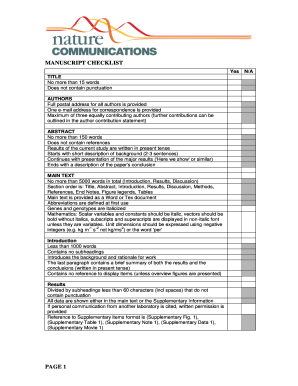
Categories covered include author information, abstract requirements, and figure presentation.
-
A yes/no question format facilitates easy verification, enabling authors to quickly identify necessary revisions.
-
Unique features such as checkboxes improve usability, allowing for efficient tracking of completed items.
Who Needs the CARBON Manuscript Submission Checklist?
The primary users of the CARBON Manuscript Submission Checklist are authors intending to submit their work to the CARBON journal. It is particularly beneficial for those in fields related to the journal's focus areas.
This checklist holds particular significance for first-time authors. It not only guides them through the complexities of manuscript preparation and submission but also serves as a learning tool for future submissions.
How to Fill Out the CARBON Manuscript Submission Checklist Online
To fill out the CARBON Manuscript Submission Checklist online, follow these steps:
-
Access the checklist through the designated online portal.
-
Begin by entering your author information in the specified fields.
-
Proceed to address each section, answering the yes/no questions thoroughly.
-
Review your responses for completeness and accuracy before finalizing.
-
Submit the checklist as instructed within the portal.
Authors should break down the checklist into manageable sections to avoid feeling overwhelmed and to ensure that all elements are addressed. Additionally, being mindful of common errors can help streamline the process.
Common Errors and How to Avoid Them When Submitting
Some common errors that authors encounter while submitting using the checklist include:
-
Incomplete author information that may lead to processing delays.
-
Failure to adhere to formatting guidelines that could result in rejection.
-
Lack of required figures or references that can detract from the manuscript's professionalism.
To mitigate these issues, authors should conduct thorough reviews of their checklist entries before submission, ensuring that all information is correct and complete.
Where and When to Submit the CARBON Manuscript Submission Checklist
Authors can submit the CARBON Manuscript Submission Checklist through various methods, including online portals and designated email addresses. It is crucial to choose the optimal submission time, particularly if the journal sets seasonal deadlines or has specific submission windows.
Missing deadlines can lead to complications, including delays in publication or outright rejections, emphasizing the importance of adhering to the set timeline.
Security and Compliance when Using the CARBON Manuscript Submission Checklist
When using the CARBON Manuscript Submission Checklist, it is imperative to consider the security of sensitive information. The platform employs robust security measures that include 256-bit encryption to safeguard user data.
The checklist also complies with essential regulations such as HIPAA and GDPR, ensuring that authors' intellectual property and personal information are adequately protected throughout the submission process.
Examples and Resources for Completing the CARBON Manuscript Submission Checklist
For additional support in completing the CARBON Manuscript Submission Checklist, authors can refer to sample completed checklists that provide valuable insights into successful submissions. Furthermore, the platform offers links to numerous resources and guides related to the submission process.
When additional assistance is required, authors can easily find support through pdfFiller, ensuring they have the tools they need for a successful submission.
Transform Your Submission Experience with pdfFiller
Utilizing pdfFiller for completing the CARBON Manuscript Submission Checklist can significantly enhance the submission experience. The cloud-based platform offers editing and signing features that simplify the form-filling process while ensuring security.
With pdfFiller, authors can efficiently prepare their manuscript submissions, contributing to a smoother and more effective submission journey.
How to fill out the CARBON Checklist
-
1.To access the CARBON Manuscript Submission Checklist, go to pdfFiller and search for the form using its name.
-
2.Once you find it, click on the form to open it within the pdfFiller interface.
-
3.Before filling out the form, gather all necessary information such as author details, manuscript title, and reference list.
-
4.Begin completing the form by answering the yes/no questions related to formatting and content requirements.
-
5.Utilize the toolbar options within pdfFiller to add text or checkboxes as needed based on the instructions provided.
-
6.Ensure you fill in all required fields and attach any necessary additional documents that support your submission.
-
7.Once all sections are completed, carefully review the checklist for any missed questions or entries.
-
8.Finalizing your form includes saving any changes made in pdfFiller to ensure your responses are stored securely.
-
9.To submit the form, either download the completed checklist to your device or follow submission instructions provided by the CARBON journal.

Who should use the CARBON Manuscript Submission Checklist?
The checklist is designed for authors submitting manuscripts to the CARBON journal, helping ensure that all submission requirements are met. It is also useful for researchers and students involved in the submission process.
What are the main components of this checklist?
The CARBON Manuscript Submission Checklist includes sections for formatting, author information, abstract requirements, references, figures, and other essential details that authors must verify before submission.
Are there any deadlines for submitting the checklist?
Deadlines typically align with the manuscript submission deadlines set by the CARBON journal. Authors should refer to the journal's guidelines for specific dates to ensure timely submissions.
What should I do if I make a mistake on the checklist?
If you identify an error after submission, review the journal's correction policy. It's important to rectify mistakes prior to final submission to avoid delays or rejection.
Can I submit the checklist without supporting documents?
The checklist may require certain supporting documents depending on the journal's guidelines. Ensure you include any documents specified in the submission instructions for your manuscript.
How can I check the status of my submission?
Once submitted, authors should receive confirmation from the CARBON journal. To check the status, contact the journal's editorial office or track your submission through the publisher's submission system, if available.
Will I need to notarize the checklist?
No, notarization is not required for the CARBON Manuscript Submission Checklist. Simply complete and submit the form as per the journal's requirements.
Related Forms




Related Catalogs
Get the latest insights from our blog


If you believe that this page should be taken down, please follow our DMCA take down process
here
.
This form may include fields for payment information. Data entered in these fields is not covered by PCI DSS compliance.