
Last updated on
Nov 4, 2026

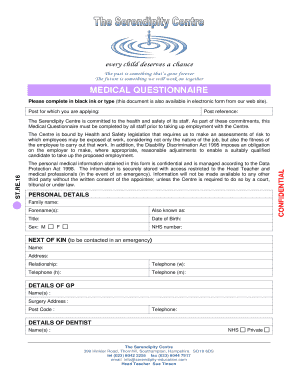
UK Scutum Pre-employment Medical Questionnaire 2006-2026 free printable template
We are not affiliated with any brand or entity on this form

Fill out
Complete the form online in a simple drag-and-drop editor.

eSign
Add your legally binding signature or send the form for signing.

Share
Share the form via a link, letting anyone fill it out from any device.

Export
Download, print, email, or move the form to your cloud storage.
Why pdfFiller is the best tool for your documents and forms


End-to-end document management
From editing and signing to collaboration and tracking, pdfFiller has everything you need to get your documents done quickly and efficiently.
Accessible from anywhere
pdfFiller is fully cloud-based. This means you can edit, sign, and share documents from anywhere using your computer, smartphone, or tablet.
Secure and compliant
pdfFiller lets you securely manage documents following global laws like ESIGN, CCPA, and GDPR. It's also HIPAA and SOC 2 compliant.
What is UK Scutum Pre-employment Medical Questionnaire
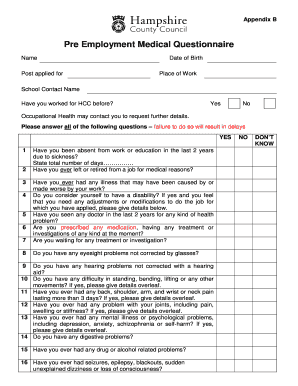
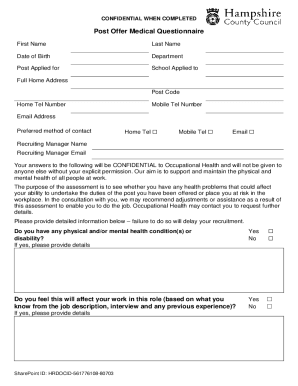
The Pre-Employment Medical Questionnaire is a document used by employers to assess the health status of job applicants, ensuring they meet necessary health standards for their role.
pdfFiller scores top ratings on review platforms




Who needs UK Scutum Pre-employment Medical Questionnaire?
Explore how professionals across industries use pdfFiller.

UK Scutum Pre-employment Medical Questionnaire is needed by:
-
Job applicants seeking employment
-
HR personnel involved in hiring processes
-
Employers requiring health assessments
-
Recruiters managing new hires
-
Occupational health professionals evaluating candidates
Comprehensive Guide to UK Scutum Pre-employment Medical Questionnaire
What is the Pre-Employment Medical Questionnaire?
The Pre-Employment Medical Questionnaire serves as a vital tool for evaluating the health status of job applicants. This form collects essential personal details and a comprehensive medical history to help employers assess whether candidates meet the physical requirements for specific positions. Job applicants are required to complete this questionnaire as part of the employment process.
Purpose and Benefits of the Pre-Employment Medical Questionnaire
This employment health form provides employers with critical support in their hiring decisions. By evaluating an applicant's health information, employers ensure compliance with workplace safety and health regulations. For applicants, sharing their medical history fosters transparency and builds trust with potential employers.
Key Features of the Pre-Employment Medical Questionnaire
The Pre-Employment Medical Questionnaire is designed with user-friendly features to facilitate smooth completion. Key elements include:
-
Fillable fields for easy data entry
-
Checkboxes to streamline selections
-
A signature line to verify accuracy
Instructions are included to guide applicants on filling out the form accurately, emphasizing its accessibility as an online resource.
Who Needs the Pre-Employment Medical Questionnaire?
This form is typically required for candidates applying for roles in fields where health and fitness are paramount. Industries such as healthcare, construction, and roles involving physical labor often necessitate this questionnaire. It is the applicant's responsibility to provide accurate and complete information, particularly for positions with specific health requirements.
How to Fill Out the Pre-Employment Medical Questionnaire Online
Filling out the Pre-Employment Medical Questionnaire online involves several straightforward steps:
-
Access the online form through the designated platform.
-
Fill in the required personal and occupational information.
-
Provide comprehensive medical history as prompted.
-
Review all entered information for accuracy.
-
Submit the form as instructed.
Special attention should be paid to fields requesting medical history to ensure completeness.
Common Errors and How to Avoid Them
Recognizing common missteps can help applicants complete the questionnaire accurately. Frequent mistakes include:
-
Omitting essential medical history details
-
Misunderstanding instructions for specific fields
To validate the information provided, applicants should proofread their responses carefully before submission, ensuring the accuracy of all details.
How to Sign the Pre-Employment Medical Questionnaire
Signing the Pre-Employment Medical Questionnaire is a critical final step in the process. Applicants can choose between digital and wet signatures, depending on submission requirements. When signing online, follow the provided instructions to securely authenticate the document. This signature affirms the accuracy of the information disclosed.
Where to Submit the Pre-Employment Medical Questionnaire
Applicants can submit the Pre-Employment Medical Questionnaire through various methods, including:
-
Online submission via the employer's designated portal
-
Emailing the completed form to the hiring manager
-
Delivering a physical copy in person
Be mindful of any deadlines for submissions specified by the employer to ensure timely processing.
Security and Privacy of Your Information
Maintaining the confidentiality of sensitive information is a priority. pdfFiller employs robust data protection measures, including encryption and compliance with relevant standards. Safeguarding personal health information ensures that applicants can complete the questionnaire with confidence in their data privacy.
Simplify Your Pre-Employment Medical Questionnaire Experience with pdfFiller
Utilizing pdfFiller can streamline the experience of completing the Pre-Employment Medical Questionnaire. The platform offers user-friendly features such as the ability to edit, save, and securely submit forms directly online. With tools for eSigning and document management, pdfFiller simplifies the overall process, making it more efficient for applicants.
How to fill out the UK Scutum Pre-employment Medical Questionnaire
-
1.To begin, access pdfFiller and search for the Pre-Employment Medical Questionnaire form in the templates section. Open the form to start editing.
-
2.Once the form is open, navigate through the fillable fields using your mouse or keyboard. Click on each field to enter your information.
-
3.Before filling in the form, gather your personal details including full name, address, contact information, and any previous employment history.
-
4.Ensure you have your medical history ready, specifically concerning any existing conditions or habits that require disclosure. This will help in accurately completing the health questions.
-
5.As you fill out the form, utilize checkboxes for yes/no answers and complete all required sections thoroughly to avoid missing information.
-
6.Once you have filled all the fields, review the form carefully to ensure that all information is accurate and complete. Check for any spelling errors or incomplete sections.
-
7.After reviewing, locate the signature line. Use pdfFiller’s tools to add your signature, confirming that the information is true and accurate.
-
8.Finally, save your completed form. You can download it in your preferred format or submit it directly through pdfFiller if required by your employer.

Who is required to complete the Pre-Employment Medical Questionnaire?
All job applicants who are selected for roles that require a health assessment must complete the Pre-Employment Medical Questionnaire as part of the hiring process.
What information do I need before starting the form?
Before filling out the Pre-Employment Medical Questionnaire, gather personal details, occupational history, and comprehensive medical history, including any previous conditions and habits.
How do I submit the completed questionnaire?
You can submit the completed Pre-Employment Medical Questionnaire by downloading it directly from pdfFiller and sending it to your employer via email or any designated method they specify.
What are common mistakes to avoid when filling out this form?
Common mistakes include leaving required fields blank, providing inaccurate information, or forgetting to sign the document. Be sure to double-check all entries before submission.
Is there a deadline for submitting the Pre-Employment Medical Questionnaire?
Deadlines for submission vary by employer. Check with your hiring manager or HR department to ensure you submit the form within their specified timeline.
How long does it take to process the information from the questionnaire?
Processing times can vary depending on the employer's internal procedures. Typically, it may take a few days to review and assess health information once submitted.
Do I need to notarize the Pre-Employment Medical Questionnaire?
No, notarization is not required for the Pre-Employment Medical Questionnaire. You just need to provide a signature confirming the accuracy of the information.
Related Forms





Related Catalogs
Get the latest insights from our blog


If you believe that this page should be taken down, please follow our DMCA take down process
here
.
This form may include fields for payment information. Data entered in these fields is not covered by PCI DSS compliance.