
Last updated on
Nov 5, 2026
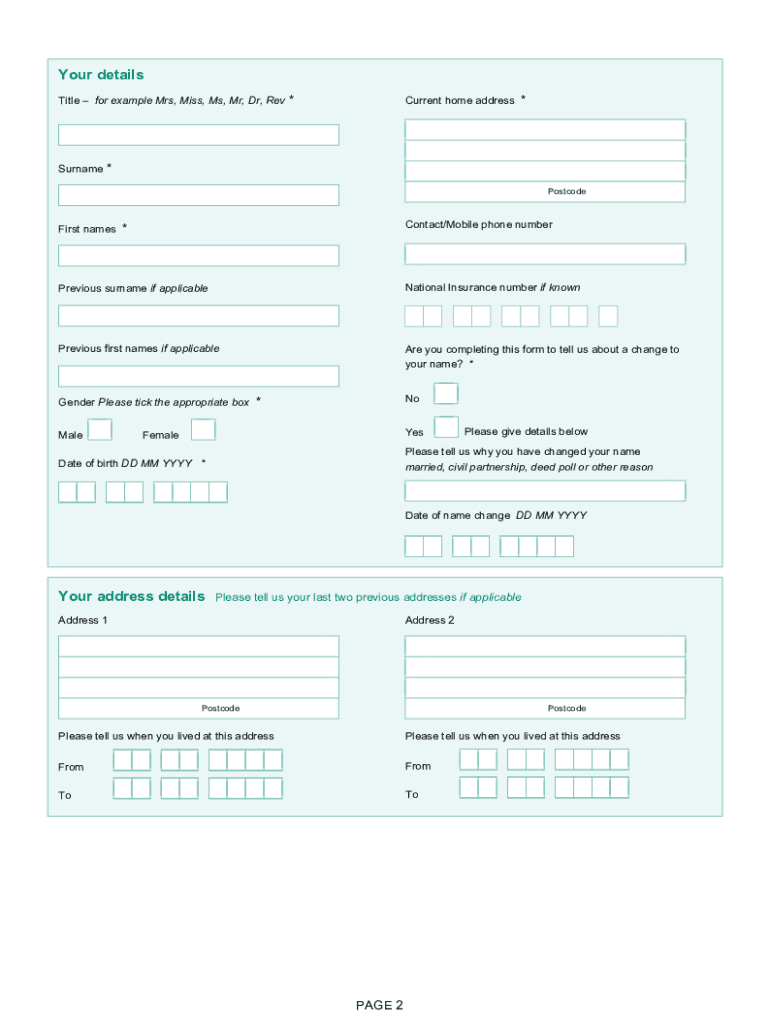
UK CA5403 2013 free printable template
pdfFiller is not affiliated with any government organization

Fill out
Complete the form online in a simple drag-and-drop editor.

eSign
Add your legally binding signature or send the form for signing.

Share
Share the form via a link, letting anyone fill it out from any device.

Export
Download, print, email, or move the form to your cloud storage.
Why pdfFiller is the best tool for your documents and forms


End-to-end document management
From editing and signing to collaboration and tracking, pdfFiller has everything you need to get your documents done quickly and efficiently.
Accessible from anywhere
pdfFiller is fully cloud-based. This means you can edit, sign, and share documents from anywhere using your computer, smartphone, or tablet.
Secure and compliant
pdfFiller lets you securely manage documents following global laws like ESIGN, CCPA, and GDPR. It's also HIPAA and SOC 2 compliant.
What is UK CA5403
The UK National Insurance Number Confirmation Form is a government document used by individuals to request written confirmation of their National Insurance number (NINO) or to update personal details.
pdfFiller scores top ratings on review platforms




I'm loving everything and I like how I can do so much without printing, then write your info, then scan to your pc, then email to an individual or group. This is way, way faster.
This site is great for filing VA forms. You can also fill out other forms.
Thank you,
John
Who needs UK CA5403?
Explore how professionals across industries use pdfFiller.

UK CA5403 is needed by:
-
Individuals needing written confirmation of their National Insurance number.
-
People updating personal information linked to their NINO.
-
UK citizens applying for benefits requiring NINO verification.
-
Personnel involved in tax or employment verification.
-
Citizens needing to register for national insurance.
Comprehensive Guide to UK CA5403
What is the UK National Insurance Number Confirmation Form?
The UK National Insurance Number Confirmation Form is a crucial document used to request written confirmation of a National Insurance number (NINO). This form serves as an essential tool for verifying NINO details, making it a significant resource for individuals who need formal documentation of their National Insurance status.
Understanding the significance of this form is vital, as it ensures that personal information linked to a National Insurance number is accurate and up to date.
Purpose and Benefits of the UK National Insurance Number Confirmation Form
Individuals often require a written confirmation of their National Insurance number for various reasons, including employment verification and governmental processes. This form is essential for maintaining accurate records with HMRC and ensures that one’s contributions to the National Insurance system are properly accounted for.
Updating personal information associated with a NINO not only streamlines interactions with governmental bodies but also enhances the accuracy of one’s National Insurance record.
Who Needs the UK National Insurance Number Confirmation Form?
The UK National Insurance Number Confirmation Form is necessary for anyone who has a National Insurance number and requires written confirmation. Common situations that necessitate this form include starting a new job, applying for benefits, or resolving discrepancies related to personal records.
It is particularly important for those engaging with HMRC for tax purposes or those registering for pension schemes.
How to Fill Out the UK National Insurance Number Confirmation Form Online (Step-by-Step)
Filling out the UK National Insurance Number Confirmation Form online is a straightforward process. Follow these steps to complete the form:
-
Access the online form through an authorized platform.
-
Fill in your title, surname, and first names accurately.
-
Enter your National Insurance number in the designated field.
-
Provide your date of birth.
-
Review all entered information for accuracy.
-
Submit the completed form as per instructions provided online.
Field-by-Field Instructions for the UK National Insurance Number Confirmation Form
Each field in the UK National Insurance Number Confirmation Form requires specific information to ensure accurate processing. Here’s what to include in each section:
-
Title: Select your appropriate title (e.g., Mr., Ms., Dr.).
-
Surname: Enter your last name as it appears on your legal documents.
-
First Names: Provide your full first names as used in official records.
-
National Insurance Number: Input your NINO correctly to avoid delays.
-
Date of Birth: Fill in your date of birth in the specified format.
Ensuring the accuracy of this information is crucial for a smooth verification process.
Common Errors and How to Avoid Them
Many applicants encounter errors when filling out the UK National Insurance Number Confirmation Form. Some frequent mistakes include:
-
Incorrectly entering the National Insurance number, leading to mismatches.
-
Omitting mandatory fields like surname or date of birth.
-
Using an outdated version of the form, causing delays.
To prevent such issues, double-check all entries and ensure you are using the most recent version of the form.
How to Sign the UK National Insurance Number Confirmation Form
Signing the UK National Insurance Number Confirmation Form is a critical step in the submission process. Applicants must comply with specific signing requirements, which may include providing either a wet signature or a digital signature, depending on the submission method.
Properly signing the form ensures that the application is valid and ready for processing by HMRC.
Submission Methods and Delivery of the UK National Insurance Number Confirmation Form
Once the UK National Insurance Number Confirmation Form is completed, the applicant can choose from several submission methods to send it to HMRC. The delivery options include:
-
Mailing the form directly to HMRC’s designated address.
-
Submitting electronically, if applicable, through an online platform.
Consideration should be given to delivery methods to ensure timely processing and confirmation of receipt.
What Happens After You Submit the UK National Insurance Number Confirmation Form?
After submitting the UK National Insurance Number Confirmation Form, applicants can expect a confirmation process that typically includes receiving a notification from HMRC. Understanding the timeline for confirmation can help manage expectations and facilitate follow-ups if necessary.
It's advisable to keep track of the application status through official channels, as this can provide updates on any further steps required.
Utilizing pdfFiller for Your UK National Insurance Number Confirmation Form
pdfFiller is an excellent tool for simplifying the process of completing the UK National Insurance Number Confirmation Form. The platform offers a variety of features designed to enhance your form-filling experience, including editing capabilities and eSigning options.
Choosing pdfFiller for your form handling ensures a secure and efficient method to manage sensitive documents while adhering to best practices for data security.
How to fill out the UK CA5403
-
1.To access the UK National Insurance Number Confirmation Form on pdfFiller, visit pdfFiller's website and use the search function to find the form by its name.
-
2.Once you locate the form, click on it to open it in pdfFiller's editing interface where you can fill in the required fields.
-
3.Before filling out the form, gather necessary personal information such as your title, surname, first names, address, National Insurance number, and date of birth.
-
4.As you navigate through the form, click on each field to enter your details. Use pdfFiller's helpful tools to ensure all information is filled out correctly.
-
5.Review your entries carefully, ensuring all fields are completed as per the instructions provided on the form.
-
6.Once your form is fully filled, you can save it as a draft or finalize it for submission. Follow prompts to apply any changes you need.
-
7.To submit the completed form, use pdfFiller’s download feature to save it to your device or choose to send it electronically to HM Revenue & Customs as required.

Who is eligible to use the UK National Insurance Number Confirmation Form?
Any individual who possesses a National Insurance number and needs to confirm it in writing or update their personal details can use the UK National Insurance Number Confirmation Form.
What supporting documents do I need to submit with the form?
Typically, supporting documents may include proof of identity, such as a passport or driver's license, along with any relevant correspondence you might have regarding your National Insurance number.
How do I submit the UK National Insurance Number Confirmation Form?
Once completed, the form should be submitted to HM Revenue & Customs. You can do this by mailing the signed form or utilizing electronic submission through services like pdfFiller.
Are there any deadlines for submitting the form?
While there aren't strict deadlines for submitting the form, it's advisable to complete and send it as soon as possible to avoid delays in receiving your National Insurance confirmation or updating your details.
How long does it take to process the form?
Processing times for the UK National Insurance Number Confirmation Form can vary, but typically it takes several weeks. It's recommended to check the HMRC website for the latest information on processing times.
What are common mistakes to avoid when filling out this form?
Common mistakes include incorrect or missing information, failing to sign the declaration, and sending the form without the necessary supporting documents. Always double-check before submitting.
Can I fill out this form on my computer?
Yes, you can fill out the UK National Insurance Number Confirmation Form digitally using pdfFiller, which provides an intuitive interface for completing and submitting forms online.
UK CA5403 Form Versions
Related Content
Related Forms




Get the latest insights from our blog


If you believe that this page should be taken down, please follow our DMCA take down process
here
.
This form may include fields for payment information. Data entered in these fields is not covered by PCI DSS compliance.