
Last updated on
Oct 16, 2026

Get the free wps dde access request
We are not affiliated with any brand or entity on this form

Fill out
Complete the form online in a simple drag-and-drop editor.

eSign
Add your legally binding signature or send the form for signing.

Share
Share the form via a link, letting anyone fill it out from any device.

Export
Download, print, email, or move the form to your cloud storage.
Why pdfFiller is the best tool for your documents and forms


End-to-end document management
From editing and signing to collaboration and tracking, pdfFiller has everything you need to get your documents done quickly and efficiently.
Accessible from anywhere
pdfFiller is fully cloud-based. This means you can edit, sign, and share documents from anywhere using your computer, smartphone, or tablet.
Secure and compliant
pdfFiller lets you securely manage documents following global laws like ESIGN, CCPA, and GDPR. It's also HIPAA and SOC 2 compliant.
What is DDE Access Form
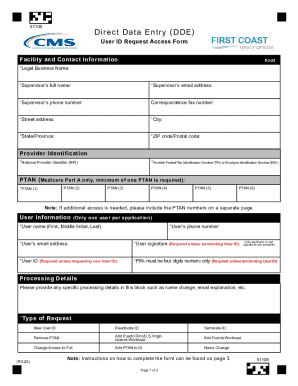
The wps dde access request is a document used by individuals seeking access to the WPS DDE system for data management and retrieval.
pdfFiller scores top ratings on review platforms




Who needs DDE Access Form?
Explore how professionals across industries use pdfFiller.

DDE Access Form is needed by:
-
Data managers requiring access to WPS DDE functionalities
-
IT professionals overseeing data systems
-
Compliance officers ensuring data governance
-
Research teams needing data for analysis
-
Administrative personnel managing user access
Comprehensive Guide to DDE Access Form
What is the WPS DDE Access Request?
The WPS DDE Access Request form is designed to facilitate data access requests for users needing to obtain specific information. This form serves as a formal mechanism for individuals and organizations seeking permission to access necessary documents and data.
Primarily utilized by healthcare providers, legal entities, and various stakeholders, this form is essential for systematically requesting access to vital records. Its significance lies in streamlining the data access process, ensuring transparency and accountability in information retrieval.
Purpose and Benefits of the WPS DDE Access Request
The main purpose of submitting the WPS DDE Access Request is to gain authorized access to data necessary for operational or compliance purposes. By using this form, applicants can efficiently manage their documentation needs.
Some of the benefits include:
-
Facilitating faster responses from authorities regarding data requests.
-
Ensuring that requests are submitted in a structured manner, enhancing clarity.
-
Potential outcomes from successful submissions may include approval for access to required documents or data.
Who Needs the WPS DDE Access Request?
The WPS DDE Access Request is pertinent to various stakeholders, including healthcare professionals, researchers, and legal advisors seeking specific records. Scenarios for filing this request may include accessing patient data, legal documentation, or compliance records.
Typically, those eligible include:
-
Healthcare providers needing patient history or treatment records.
-
Legal professionals requiring documentation for casework.
-
Researchers who need data for analysis purposes.
Eligibility Criteria for the WPS DDE Access Request
To successfully submit the WPS DDE Access Request, applicants must meet specific eligibility criteria. Certain prerequisites and documentation will be required alongside the form.
Key eligibility requirements include:
-
Proof of identity or professional certification.
-
Specific details about the data or documents being requested.
-
Compliance with data protection regulations.
Common pitfalls that could lead to disqualification include insufficient detail about the request or failure to attach necessary documentation.
How to Fill Out the WPS DDE Access Request Online (Step-by-Step)
Filling out the WPS DDE Access Request online using pdfFiller is straightforward. Follow these steps to ensure accuracy:
-
Access the WPS DDE form on the pdfFiller platform.
-
Fill out essential fields, ensuring all required information is complete.
-
Review your inputs for any inconsistencies or errors.
-
Once complete, save the form for submission.
Focusing on key fields will help streamline your submission process.
Review and Validation Checklist for the WPS DDE Access Request
Before submitting the WPS DDE Access Request, it’s prudent to perform a thorough review. This validation checklist will guide you:
-
Ensure all necessary fields are filled correctly, including contact information.
-
Verify that attached documents meet stated prerequisites.
-
Check compliance with any specified guidelines provided by the issuing authority.
Common Errors and How to Avoid Them
When completing the WPS DDE Access Request, applicants often encounter several common errors. Identifying these issues can prevent submission setbacks.
Common mistakes include:
-
Omitting required information or documentation.
-
Incorrectly filling out personal or organizational details.
To avoid these mistakes, double-check all sections of the form before submission. Real examples of issues to avoid include submitting forms with blank fields or illegible handwriting.
How to Sign and Submit the WPS DDE Access Request
Once the WPS DDE Access Request is completed, signing and submission are the final steps. Applicants may choose between digital signatures or traditional wet signatures.
To complete the submission:
-
Select your preferred signing method, ensuring it complies with the requirements.
-
Submit the completed form through the designated channel.
-
Confirm the submission by checking for a confirmation email or receipt.
What Happens After You Submit the WPS DDE Access Request?
After submitting the WPS DDE Access Request, applicants can expect a processing timeline based on the jurisdiction and nature of the request. Tracking the status can be done via official channels provided during the submission.
Possible responses from authorities include:
-
Approval of the access request, accompanied by further instructions.
-
Requests for additional information to process the request.
Understanding these next steps will help manage expectations and guide follow-up actions.
Enhance Your Experience Using pdfFiller for the WPS DDE Access Request
Using pdfFiller for completing the WPS DDE Access Request significantly enhances the experience. The platform offers several features tailored for efficient form management.
Expect benefits such as:
-
Advanced security measures, including 256-bit encryption for sensitive data.
-
Ease of use for editing, signing, and organizing documents.
These capabilities contribute to a seamless document management experience, allowing users to focus on their data access needs.
How to fill out the DDE Access Form
-
1.Begin by accessing pdfFiller on your device and searching for the 'wps dde access request' form in the search bar.
-
2.Once you find the form, click to open it. You may also be required to sign in or create an account if you're a new user.
-
3.Take a moment to gather all necessary information, such as your personal details, the specific data access you’re requesting, and any relevant identification documents.
-
4.Navigate the form using pdfFiller’s user-friendly interface. Click on each field to enter your details, making sure to fill in all required sections accurately.
-
5.If you are unsure about what information to input, refer to any guidelines provided alongside the form or consult with relevant authorities.
-
6.After completing the form, review all the entered data to ensure it is accurate and complete. Double-check every section and note any highlighted fields that may require correction.
-
7.Once you confirm that the form is correctly filled out, look for buttons on the pdfFiller interface to save your progress, allowing you to revisit if needed.
-
8.When satisfied with your final version, choose the submit option or download the completed form based on your intended submission method.
-
9.If submitting electronically, follow the prompts for online submission. If opting to mail or deliver it, print the form from pdfFiller and attach any required supporting documents.

Who is eligible to request access using this form?
Typically, any individual or organization that requires access to the WPS DDE system for data management, including data managers, IT personnel, or research teams, can use this form.
Is there a deadline for submitting the wps dde access request form?
While the specific deadline may vary based on your organization’s policies, it is essential to submit the form as soon as possible to avoid delays in accessing the required data.
What are the acceptable submission methods for this form?
You can submit the completed wps dde access request form electronically via pdfFiller or print it out for mailing or in-person delivery as per your organization’s submission guidelines.
Are there any supporting documents required with this form?
Generally, you may need to provide identification or proof of your role within the organization requesting access. Check your organization's requirements for specific documentation.
What common mistakes should I avoid when completing this form?
Common mistakes include overlooking required fields, providing incorrect personal information, and failing to attach necessary supporting documents. Always double-check your entries.
How long does it typically take for the request to be processed?
Processing times can vary based on the organization’s policies. Generally, you should allow several business days to weeks for a response after submission.
What should I do if I encounter issues while filling out the form?
If you face difficulties, consult pdfFiller’s support resources or contact your organization’s IT department for assistance with the form or submission process.
Related Content
Related Forms



Related Catalogs
Get the latest insights from our blog


If you believe that this page should be taken down, please follow our DMCA take down process
here
.
This form may include fields for payment information. Data entered in these fields is not covered by PCI DSS compliance.