
Last updated on
Oct 24, 2026

University of Connecticut Double Major Declaration Form 2006 free printable template
pdfFiller is not affiliated with any government organization

Fill out
Complete the form online in a simple drag-and-drop editor.

eSign
Add your legally binding signature or send the form for signing.

Share
Share the form via a link, letting anyone fill it out from any device.

Export
Download, print, email, or move the form to your cloud storage.
Why pdfFiller is the best tool for your documents and forms


End-to-end document management
From editing and signing to collaboration and tracking, pdfFiller has everything you need to get your documents done quickly and efficiently.
Accessible from anywhere
pdfFiller is fully cloud-based. This means you can edit, sign, and share documents from anywhere using your computer, smartphone, or tablet.
Secure and compliant
pdfFiller lets you securely manage documents following global laws like ESIGN, CCPA, and GDPR. It's also HIPAA and SOC 2 compliant.
What is University of Connecticut Double Major Declaration Form
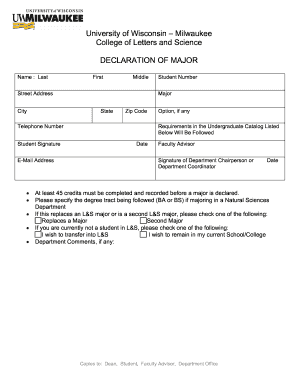
The Double Major Declaration Form is an educational document used by students at the University of Connecticut to officially declare two majors within the College of Liberal Arts & Sciences.
pdfFiller scores top ratings on review platforms




Who needs University of Connecticut Double Major Declaration Form?
Explore how professionals across industries use pdfFiller.

University of Connecticut Double Major Declaration Form is needed by:
-
Students at the University of Connecticut
-
Academic advisors for primary and secondary majors
-
CLAS Dean's office for final processing
-
Department heads for major approval
-
Registrar's office for record-keeping
Comprehensive Guide to University of Connecticut Double Major Declaration Form
What is the Double Major Declaration Form?
The Double Major Declaration Form at the University of Connecticut is a critical document for students aiming to declare two majors within the College of Liberal Arts & Sciences. This form outlines the importance of officially declaring multiple areas of study, helping students achieve their academic goals. To ensure a smooth process, students must obtain signatures from their primary and secondary major advisors, as well as from the CLAS Dean.
Purpose and Benefits of the Double Major Declaration Form
Utilizing the Double Major Declaration Form offers numerous benefits to students pursuing dual degrees. Firstly, it ensures compliance with major requirements and academic regulations. Additionally, students often find that having a double major can enhance their career prospects and broaden their academic horizons. The form also plays a vital role in preventing credit overlap, which is essential for fulfilling the requirements of both majors without conflicts.
Who Needs to Complete the Double Major Declaration Form?
Students who intend to pursue a double major are required to complete the Double Major Declaration Form. This includes obtaining necessary approvals from their Primary Major Advisor, Secondary Major Advisor, and the CLAS Dean. It’s crucial for students to understand when the form should be submitted, as this may vary based on their specific circumstances and academic timelines.
Eligibility Criteria for Declaring a Double Major
Before declaring a double major, students must meet certain eligibility criteria. These include maintaining a specified academic performance level and adhering to advisement requirements. Furthermore, each department may have its unique policies that influence eligibility. Timely declaration within the stipulated academic timelines is also essential for ensuring a smooth transition into dual studies.
How to Fill Out the Double Major Declaration Form Online (Step-by-Step)
To complete the Double Major Declaration Form online, follow these steps:
-
Access the form on the pdfFiller website.
-
Fill in the required personal information, including your name and student ID.
-
Obtain the necessary signatures from both major advisors.
-
Complete the form by checking all required fields and ensuring accuracy.
-
Submit the form electronically as directed.
Common Errors and How to Avoid Them
When filling out the Double Major Declaration Form, students may encounter several common errors. Frequent mistakes can include incomplete fields, missing signatures, or incorrect information. To prevent issues during submission, students should:
-
Double-check all entries for accuracy before submission.
-
Ensure all required signatures are obtained.
-
Review guidelines provided with the form for any specific instructions.
How to Submit the Double Major Declaration Form
After successfully completing the Double Major Declaration Form, the next step is submission. Students should submit the form to the CLAS Academic Services Center. It's important to be aware of submission deadlines and processing times to avoid any delays. Keeping a personal copy of the submitted form for future reference is also highly advisable.
What Happens After You Submit the Double Major Declaration Form?
Once the Double Major Declaration Form is submitted, students can expect a confirmation and the ability to track their submission status. Possible outcomes may include acceptance of the declaration, requests for amendments, or additional information. Timelines for approval and notification can vary, so students should remain patient while awaiting a response from the CLAS Dean.
Security and Compliance When Filling Out the Form
Students can feel reassured about the security of their data when using pdfFiller to complete the Double Major Declaration Form. The platform employs several security features to enhance document safety and privacy, ensuring compliance with regulations like HIPAA and GDPR. This enables users to confidently navigate their form-filling needs while safeguarding sensitive information.
Effortlessly Fill Out Your Double Major Declaration Form with pdfFiller
pdfFiller simplifies the process of completing your Double Major Declaration Form efficiently. Users can take advantage of features that streamline form completion, such as pre-designed templates and easy cloud access. Start your application journey today by utilizing pdfFiller to facilitate your form filling and eSigning process.
How to fill out the University of Connecticut Double Major Declaration Form
-
1.Access the Double Major Declaration Form on pdfFiller by searching for the form name in the platform’s search bar.
-
2.Once the form is open, navigate through the document using the scroll bar or arrows to review all sections.
-
3.Before starting, gather your personal information, including your student ID, names of your advisors, and details of both majors.
-
4.Use the text fields to input your name and other personal data in the designated areas, ensuring all boxes are filled accurately.
-
5.Seek your primary major advisor's signature by scheduling a meeting or sending the form electronically for them to sign.
-
6.Repeat the signature process for your secondary major advisor, ensuring both advisors have approved your double major declaration.
-
7.Submit the completed form to the CLAS Academic Services Center for the dean’s signature and final processing.
-
8.Prior to submission, review all filled-in details and signatures to confirm there are no errors.
-
9.Once reviewed, save the final version of the form on pdfFiller and ensure you download a copy for your records.
-
10.To submit the form, either upload it through the designated channels on pdfFiller or print and deliver it in person to the CLAS office.

Who is eligible to fill out the Double Major Declaration Form?
Any undergraduate student at the University of Connecticut wishing to declare a double major within the College of Liberal Arts & Sciences can fill out this form.
What are the deadlines for submitting this form?
Deadlines for submitting the Double Major Declaration Form typically align with the academic calendar, specifically during the add/drop period of each semester. Check with the academic office for precise dates.
What steps should I follow to submit the form?
Complete the form, collect the necessary signatures from your advisors and submit it to the CLAS Academic Services Center. You can submit in person or electronically via pdfFiller.
Do I need to provide additional documents with this form?
Generally, no additional documents are required. However, you may need to provide any approval forms if there are overlapping courses, as per your department's policies.
What common mistakes should I avoid when filling out the form?
Ensure all fields are filled correctly, avoid leaving any blank sections, and double-check the signatures from your advisors to prevent processing delays.
How long does it take to process the form?
Processing times can vary; typically, you should expect a response within a few weeks following submission. Contact the CLAS office for specific timelines.
Can I make changes after submitting the form?
Once submitted, changes can be complex. It's best to contact your academic advisor or the CLAS office directly to inquire about the necessary steps for amendments to your declaration.
University of Connecticut Double Major Declaration Form Form Versions
Related Forms




Get the latest insights from our blog


If you believe that this page should be taken down, please follow our DMCA take down process
here
.
This form may include fields for payment information. Data entered in these fields is not covered by PCI DSS compliance.