
Last updated on
Nov 6, 2026

Patient Hospitalization Form/Flow Sheet 2003-2026 free printable template
pdfFiller is not affiliated with any government organization

Fill out
Complete the form online in a simple drag-and-drop editor.

eSign
Add your legally binding signature or send the form for signing.

Share
Share the form via a link, letting anyone fill it out from any device.

Export
Download, print, email, or move the form to your cloud storage.
Why pdfFiller is the best tool for your documents and forms


End-to-end document management
From editing and signing to collaboration and tracking, pdfFiller has everything you need to get your documents done quickly and efficiently.
Accessible from anywhere
pdfFiller is fully cloud-based. This means you can edit, sign, and share documents from anywhere using your computer, smartphone, or tablet.
Secure and compliant
pdfFiller lets you securely manage documents following global laws like ESIGN, CCPA, and GDPR. It's also HIPAA and SOC 2 compliant.
What is Patient Hospitalization Form/Flow Sheet
The Patient Hospitalization Flow Sheet is a medical history form used by healthcare professionals to track and record patient data during hospitalization.
pdfFiller scores top ratings on review platforms




Who needs Patient Hospitalization Form/Flow Sheet?
Explore how professionals across industries use pdfFiller.

Patient Hospitalization Form/Flow Sheet is needed by:
-
Healthcare providers tracking patient hospitalization
-
Nurses monitoring patient status
-
Medical staff documenting daily weight
-
Admins managing patient data
-
Veterinary professionals for pet hospitalization
-
Researchers analyzing hospitalization trends
Comprehensive Guide to Patient Hospitalization Form/Flow Sheet
What is the Patient Hospitalization Flow Sheet?
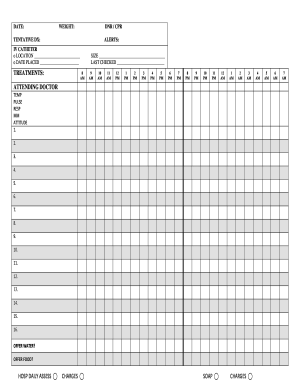
The Patient Hospitalization Flow Sheet is a crucial medical form designed to assist healthcare professionals in tracking and recording essential patient data during hospitalization. It encompasses a variety of fields for patient identification, CPR status, IV catheter placement, daily weight, and various medical observations.
This flow sheet plays a vital role in ensuring accurate monitoring of patient conditions. By collecting important information such as daily weight and fluid intake, healthcare providers can improve patient outcomes. Types of information gathered include patient identification, medical history, and critical care documentation, aiding in cohesive treatment plans.
Purpose and Benefits of the Patient Hospitalization Flow Sheet
This form is fundamental for healthcare professionals as it enhances communication among medical staff, facilitating seamless data exchange. By streamlining patient data collection, the flow sheet ensures quick access to vital information, thus improving productivity in medical settings.
The benefits also extend to patient care. Accurate tracking of daily weight, fluid intake, and medication leads to enhanced monitoring of patient progress and timely interventions. This ensures better decision-making in clinical environments.
Key Features of the Patient Hospitalization Flow Sheet
The flow sheet boasts several key features that enhance its effectiveness in patient care. It includes various fillable fields such as patient identification and daily weight, which are critical for comprehensive monitoring.
-
Checkboxes and tables for efficient data recording
-
Customizable fields to adapt to individual patient needs
-
Streamlined sections for easy navigation during data entry
These elements combine to create a user-friendly design that supports meticulous data management.
Who Needs the Patient Hospitalization Flow Sheet?
The Patient Hospitalization Flow Sheet is essential for a broad range of healthcare professionals, including doctors, nurses, and hospital staff. Any facility that requires meticulous tracking of patient information during hospitalization benefits greatly from implementing this form.
-
Healthcare facilities for inpatient care
-
Outpatient clinics for follow-up services
-
Home care environments to ensure continuity of care
Its relevance spans various settings where patient data tracking is paramount.
How to Fill Out the Patient Hospitalization Flow Sheet Online
Filling out the flow sheet digitally is a straightforward process. Begin by accessing the form through pdfFiller, a user-friendly online platform for form management.
-
Open the Patient Hospitalization Flow Sheet on pdfFiller.
-
Accurately fill in each section, including CPR status and daily weight.
-
Review entries to ensure accuracy before submission.
Adhering to these steps will help in maintaining the integrity of the patient data recorded.
Common Errors When Filling Out the Patient Hospitalization Flow Sheet
When completing the flow sheet, several common mistakes can occur. Pay attention to critical fields that are frequently filled out incorrectly to minimize data inaccuracies.
-
Incorrect entries in patient identification fields
-
Omissions in daily weight or fluid intake
-
Failing to double-check CPR status
Double-checking data entries and understanding the importance of each section can prevent these issues.
How to Sign and Submit the Patient Hospitalization Flow Sheet
After filling out the form, signing and submitting it is simple. pdfFiller offers digital signing options that ensure the legality and acceptance of the document.
-
Choose to sign digitally through the pdfFiller interface.
-
Select from available submission methods, such as printing or emailing.
-
Ensure the confidentiality and security of the submitted form.
Following these guidelines ensures the proper handling of sensitive patient information.
Ensuring Security and Compliance with the Patient Hospitalization Flow Sheet
Handling sensitive patient data necessitates strict security measures. pdfFiller implements robust protocols, including 256-bit encryption, to protect user information during data handling.
Additionally, compliance with HIPAA and GDPR regulations is crucial. Safe storage and sharing practices for completed forms must be followed to safeguard patient privacy.
Utilizing pdfFiller for Your Patient Hospitalization Flow Sheet Needs
Using pdfFiller enhances the entire experience of filling out and managing the Patient Hospitalization Flow Sheet. The platform provides various features that simplify form management.
-
Convenient editing options to adjust patient details as needed
-
User-friendly layout that promotes efficiency and accuracy
-
Support for encrypted document sharing to maintain data integrity
Choosing pdfFiller facilitates a more organized approach to healthcare documentation.
How to fill out the Patient Hospitalization Form/Flow Sheet
-
1.Access the Patient Hospitalization Flow Sheet on pdfFiller by visiting their website and using the search feature to locate the form.
-
2.Once open, familiarize yourself with the layout, noting the fillable fields such as patient identification, CPR status, and daily weight trackers.
-
3.Gather all necessary patient information, including client name, hospitalization details, and any medical observations prior to filling out the form.
-
4.Begin completing each field systematically, ensuring accurate entry of the patient identification and checkboxes for CPR status, fluid intake, and medication.
-
5.Use the 'Add Text' tool in pdfFiller to input specific data into the form. Be sure to check your entries for accuracy as you proceed.
-
6.Review the completed form thoroughly, ensuring that all relevant data is filled in and no fields are left blank.
-
7.Once satisfied with the accuracy of the information, save your completed form by clicking on the 'Save' button.
-
8.You can also choose to download a copy of the form or submit it electronically through pdfFiller's built-in submission options.

Who can use the Patient Hospitalization Flow Sheet?
The Patient Hospitalization Flow Sheet can be used by healthcare professionals, including nurses, doctors, and veterinary staff, to effectively record and track patient data during hospitalization.
What information is required to fill out this form?
To complete the Patient Hospitalization Flow Sheet, you will need patient identification details, observation data including weight and medical history, and recordings of CPR status and fluid intake.
Do I need to notarize this form?
No, the Patient Hospitalization Flow Sheet does not require notarization, allowing healthcare professionals to fill it out directly without additional legal steps.
What should I do if I make a mistake on the form?
If you discover a mistake while filling out the Patient Hospitalization Flow Sheet, use pdfFiller's editing tools to delete incorrect information and input the correct data before finalizing.
How can I submit this form once it's completed?
After finalizing the Patient Hospitalization Flow Sheet, you can submit it directly through pdfFiller. Alternatively, you can download it and send it via email or fax, depending on your healthcare facility's requirements.
Is there a specific deadline for submitting the form?
The submission deadline for the Patient Hospitalization Flow Sheet generally depends on your healthcare facility’s policy, so it is advisable to check with your supervisor or administrator for their specific requirements.
How do I save the form after filling it out?
To save the Patient Hospitalization Flow Sheet on pdfFiller, click on the 'Save' icon located at the top of the interface, and follow the prompts to choose your desired format for downloading.
Related Forms




Related Catalogs
Get the latest insights from our blog



If you believe that this page should be taken down, please follow our DMCA take down process
here
.
This form may include fields for payment information. Data entered in these fields is not covered by PCI DSS compliance.