
Last updated on
Oct 31, 2026

Get the free Authorized Signers List Form
We are not affiliated with any brand or entity on this form

Fill out
Complete the form online in a simple drag-and-drop editor.

eSign
Add your legally binding signature or send the form for signing.

Share
Share the form via a link, letting anyone fill it out from any device.

Export
Download, print, email, or move the form to your cloud storage.
Why pdfFiller is the best tool for your documents and forms


End-to-end document management
From editing and signing to collaboration and tracking, pdfFiller has everything you need to get your documents done quickly and efficiently.
Accessible from anywhere
pdfFiller is fully cloud-based. This means you can edit, sign, and share documents from anywhere using your computer, smartphone, or tablet.
Secure and compliant
pdfFiller lets you securely manage documents following global laws like ESIGN, CCPA, and GDPR. It's also HIPAA and SOC 2 compliant.
What is Signers List
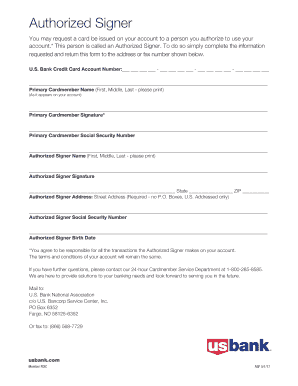
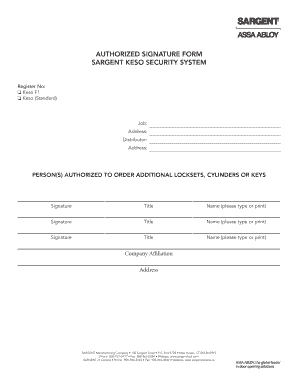
The Authorized Signers List Form is a business document used by companies to specify individuals authorized to make purchases on their account.
pdfFiller scores top ratings on review platforms




Who needs Signers List?
Explore how professionals across industries use pdfFiller.

Signers List is needed by:
-
Small business owners requiring an authorized signers list.
-
Finance managers needing to update purchasing authority.
-
HR departments managing employee access to account resources.
-
Business partners establishing a vendor contract.
-
Corporate administrators overseeing account management.
Comprehensive Guide to Signers List
What is the Authorized Signers List Form?
The Authorized Signers List Form is essential for businesses to specify which individuals are authorized to make purchases on their accounts. This form plays a critical role in authorizing signers, ensuring accountability in financial transactions. It holds significant importance for businesses, as it helps manage financial responsibilities effectively.
Purpose and Benefits of the Authorized Signers List Form
This form streamlines the process of authorizing individuals for business purchases, reducing delays and enhancing efficiency. By providing a clear record of authorized personnel, businesses ensure compliance and transparency for both internal and external audits. Utilizing a business purchase authorization form can effectively mitigate risks associated with unauthorized transactions.
Key Features of the Authorized Signers List Form
The Authorized Signers List Form includes multiple fields for up to ten authorized signers, detailing names and contact information. Users benefit from included instructions that simplify the process of adding or removing signers. This functionality is crucial for maintaining an up-to-date account signers list template, promoting organizational integrity.
Who Needs the Authorized Signers List Form?
The target audience for this form encompasses small businesses, large corporations, and freelancers. Scenarios such as vendor contracts or financial audits illustrate where this form is indispensable. Implementing the Authorized Signers List Form can significantly enhance operational control and compliance in diverse business environments.
How to Fill Out the Authorized Signers List Form Online
To fill out the Authorized Signers List Form online using pdfFiller, follow these steps:
-
Access the form through the pdfFiller platform.
-
Complete each section carefully, ensuring all fields are filled accurately.
-
Review the form for completeness before submission.
Accurate and complete submissions are vital for effective document management.
Common Errors and How to Avoid Them
Several common mistakes can occur while completing the Authorized Signers List Form. Users often overlook specific fields or provide incorrect information. To avoid these errors, consider the following tips:
-
Double-check all entries before submission.
-
Ensure all required fields are filled out completely.
How to Save, Print, and Submit the Authorized Signers List Form
After completing the Authorized Signers List Form, follow these instructions:
-
Download the finished PDF to your device.
-
Print the form for signatures or record-keeping purposes.
-
Submit the form via your chosen method, whether online or by mail.
Security and Compliance for the Authorized Signers List Form
When using pdfFiller, users can feel assured about the safety of their information. The platform employs 256-bit encryption and adheres to compliance standards such as HIPAA and GDPR. These measures are crucial for ensuring security when handling sensitive documents, providing peace of mind for all users.
Why Choose pdfFiller for Your Authorized Signers List Form?
pdfFiller simplifies form management with an easy-to-use interface and powerful editing features. The convenience of cloud-based access allows for seamless collaboration, making it an ideal choice for your Authorized Signers List Form needs.
Next Steps After Using the Authorized Signers List Form
After submission, users may need to track the status of their form or make amendments if necessary. Keeping records of all submissions is encouraged to ensure effective follow-up and compliance with business protocols.
How to fill out the Signers List
-
1.Start by accessing pdfFiller and search for the 'Authorized Signers List Form'. You can find it by using the search bar located at the top of the homepage.
-
2.Once you locate the form, click on the 'Open' button to begin filling it out.
-
3.Gather the necessary information about the authorized signers, including their first and last names as well as their contact information.
-
4.Begin filling in the fields by clicking on the blank spaces provided. Use the text box to enter each signer's name and contact details.
-
5.If you need to add more signers, use the provided instructions to ensure you are maintaining the correct format.
-
6.After you've completed entering all necessary information, take a moment to review each entry for any typographical errors or omissions.
-
7.Once you are satisfied with the information on the form, utilize the 'Save' or 'Download' options to store it on your device. Alternatively, you can submit directly from pdfFiller.

Who needs to fill out the Authorized Signers List Form?
Typically, small business owners, finance managers, and HR departments require this form to identify individuals authorized to conduct purchases on behalf of the company.
Are there deadlines for submitting the Authorized Signers List Form?
While there are no specific deadlines mentioned, it is advisable to submit the form promptly, especially before making any major purchases or contract agreements.
What methods can I use to submit the Authorized Signers List Form?
You can submit the form electronically via pdfFiller or print it out to send it manually to relevant parties as per your business practices.
What supporting documents do I need when completing this form?
You generally do not need additional documents, but having identification and any required business documents may be helpful for reference.
What are common mistakes to avoid when filling out this form?
Common mistakes include forgetting to sign the form, entering incorrect information for authorized signers, or neglecting to review the form before submission.
How long does it take to process the Authorized Signers List Form?
Processing times can vary, but if submitted electronically, you can expect a quicker turnaround than physical submissions.
Can I make changes to the Authorized Signers List Form after submission?
Yes, changes can be made by resubmitting an updated form. Be sure to follow deletion and addition instructions provided within the form.
Related Forms




Related Catalogs
Get the latest insights from our blog


If you believe that this page should be taken down, please follow our DMCA take down process
here
.
This form may include fields for payment information. Data entered in these fields is not covered by PCI DSS compliance.