
Last updated on
Oct 31, 2026

Mcdonalds Restaurant Safety Inspection Checklist (Worker Injury Prevention) 2011-2026 free print...
pdfFiller is not affiliated with any government organization

Fill out
Complete the form online in a simple drag-and-drop editor.

eSign
Add your legally binding signature or send the form for signing.

Share
Share the form via a link, letting anyone fill it out from any device.

Export
Download, print, email, or move the form to your cloud storage.
Why pdfFiller is the best tool for your documents and forms


End-to-end document management
From editing and signing to collaboration and tracking, pdfFiller has everything you need to get your documents done quickly and efficiently.
Accessible from anywhere
pdfFiller is fully cloud-based. This means you can edit, sign, and share documents from anywhere using your computer, smartphone, or tablet.
Secure and compliant
pdfFiller lets you securely manage documents following global laws like ESIGN, CCPA, and GDPR. It's also HIPAA and SOC 2 compliant.
What is Mcdonalds Restaurant Safety Inspection Checklist (Worker Injury Prevention)
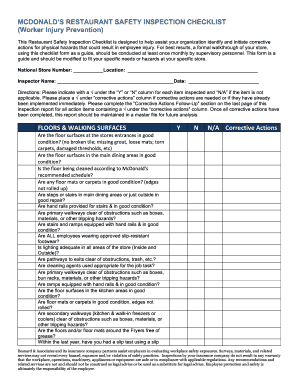
The McDonald's Restaurant Safety Inspection Checklist is a business form used by supervisory personnel to identify and manage physical hazards that may lead to employee injuries.
pdfFiller scores top ratings on review platforms




Love
Love, love, love this program. It saves me hours every week.
Awesome
They were kind and took immediate action upon request. Cannot recommend them enough!
Who needs Mcdonalds Restaurant Safety Inspection Checklist (Worker Injury Prevention)?
Explore how professionals across industries use pdfFiller.

Mcdonalds Restaurant Safety Inspection Checklist (Worker Injury Prevention) is needed by:
-
Restaurant managers overseeing safety compliance
-
Safety officers conducting regular inspections
-
Employees responsible for workplace safety
-
Regulatory inspectors assessing safety standards
-
Human resources personnel managing employee safety
-
Franchise owners ensuring operational compliance
Comprehensive Guide to Mcdonalds Restaurant Safety Inspection Checklist (Worker Injury Prevention)
What is the McDonald's Restaurant Safety Inspection Checklist?
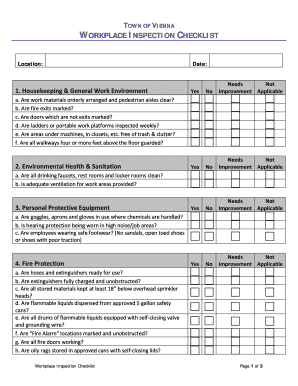
The McDonald's Restaurant Safety Inspection Checklist serves as a vital tool for conducting safety inspections in McDonald’s establishments. This checklist is essential for maintaining a safe work environment, contributing to both employee health and operational efficiency. Key sections covered include floors, ladder safety, and equipment inspections, ensuring comprehensive safety assessments. Using this restaurant safety checklist template helps standardize safety protocols across locations.
Purpose and Benefits of the McDonald's Restaurant Safety Inspection Checklist
The primary role of the McDonald's Restaurant Safety Inspection Checklist revolves around employee injury prevention and the identification of potential hazards. By conducting checks monthly, restaurants not only comply with safety standards but also significantly enhance overall safety and employee well-being. The proactive approach of utilizing this checklist results in safer working conditions, reducing the likelihood of accidents and improving staff morale.
Key Features of the McDonald's Restaurant Safety Inspection Checklist
This checklist is structured with a user-friendly layout that includes Yes/No/Not Applicable columns. Specific sections address critical areas such as chemical safety, fire and life safety, and required corrective actions, promoting thorough inspections. These features facilitate an organized and efficient evaluation process that is crucial in commercial kitchen environments.
Who Needs the McDonald's Restaurant Safety Inspection Checklist?
Supervisory personnel and safety inspectors are the primary users of the McDonald's Restaurant Safety Inspection Checklist. Additionally, restaurant managers and staff members responsible for workplace safety find this checklist relevant for ensuring compliance with safety regulations. Its design caters to various roles within the organization, fostering a culture of safety.
How to Fill Out the McDonald's Restaurant Safety Inspection Checklist Online
Follow these steps to complete the checklist online:
-
Access the checklist and ensure you have the necessary permissions.
-
Fill out all required fields, including Store Number and Inspector Name.
-
Indicate findings using the Yes, No, or Not Applicable options for each item.
-
Document any hazardous conditions and outline corrective actions in the designated sections.
-
Review the form for accuracy before submission.
Accurate reporting of hazardous conditions and corrective actions is crucial for maintaining safety standards. Consider the advantages of digital form filling over traditional methods for efficiency and ease of access.
Common Errors and How to Avoid Them
Common mistakes when filling out the checklist can lead to compliance issues. Some pitfalls include leaving sections incomplete or misclassifying hazard categories. To avoid these errors, adhere to the following best practices:
-
Thoroughly review each section before submitting the checklist.
-
Maintain clear and consistent documentation of all findings.
Ensuring every section is accurately completed minimizes the risk of overlooking critical safety measures.
Security and Compliance for the McDonald's Restaurant Safety Inspection Checklist
Handling safety inspection forms securely is paramount in mitigating risks associated with data breaches. It's vital to utilize platforms like pdfFiller, which implement stringent security measures, including 256-bit encryption. Compliance with relevant regulations, such as HIPAA and GDPR, further enhances data protection and ensures peace of mind when managing sensitive information.
Sample or Example of a Completed McDonald's Restaurant Safety Inspection Checklist
To provide clear guidance, a visual example of a completed checklist can be beneficial. Key fields to include are:
-
National Store Number
-
Inspector Name
-
Date of Inspection
Completing these fields accurately based on real scenarios can improve understanding and adherence to inspection protocols.
How to Download and Save the McDonald's Restaurant Safety Inspection Checklist PDF
To download and save the checklist, follow these instructions:
-
Navigate to the checklist webpage.
-
Select the download option to save a PDF version of the checklist to your device.
-
Organize the downloaded document for easy reference and access.
Utilizing features offered by pdfFiller can enhance document management and ensure all forms are readily available when needed.
Get Started with pdfFiller for Your McDonald's Safety Inspection Checklist
Utilizing pdfFiller for managing your McDonald's Safety Inspection Checklist streamlines the process of form filling and management. Key benefits of using this platform include:
-
Easily fill out forms with a user-friendly interface.
-
Enhance document sharing and eSigning capabilities.
-
Access customer support for any inquiries related to form usage.
Engaging with pdfFiller maximizes efficiency and accuracy in maintaining safety standards.
How to fill out the Mcdonalds Restaurant Safety Inspection Checklist (Worker Injury Prevention)
-
1.To access the McDonald's Restaurant Safety Inspection Checklist on pdfFiller, visit the pdfFiller website and log in or create an account if you do not have one.
-
2.Search for the checklist by entering its name in the search bar or browse through relevant categories until you locate the form.
-
3.Once you find the form, click on it to open it in the pdfFiller interface, where you can start filling it out.
-
4.Before you begin completing the checklist, gather necessary information such as the National Store Number, the name of the inspector, and the date of the inspection.
-
5.Navigate through the form by clicking on each field to enter information. Use the dedicated checkboxes to indicate whether each safety item meets the required standard by marking 'Y' for Yes, 'N' for No, or 'N/A' if the item is not applicable.
-
6.Make sure to document any corrective actions needed on the last page of the inspection report. Provide clear descriptions of actions taken to address identified hazards.
-
7.After completing the form, review all entries for accuracy, ensuring each section is filled out completely and correctly.
-
8.To save the form, click the save button. You can download or print the completed checklist using the download option, or share it directly from pdfFiller by selecting the share icon.

Who is required to complete the McDonald's Restaurant Safety Inspection Checklist?
Supervisory personnel, safety officers, and any designated employees responsible for ensuring workplace safety should complete this checklist to assess and manage potential hazards effectively.
How often should this safety inspection be conducted?
The checklist should be completed at least once monthly to ensure ongoing awareness and management of safety hazards in the workplace.
What should I do if an item on the checklist does not apply?
If an item on the checklist does not apply to your inspection, mark it as 'N/A' to indicate it is not relevant to the current scenario.
What are the common mistakes to avoid when filling out this form?
Avoid leaving fields blank or marking incorrect items. Always double-check the completed checklist for accuracy and ensure corrective actions are clearly documented.
What happens after the inspection checklist is completed?
After filling out the checklist, make sure to follow up on any noted corrective actions and store the completed form securely for compliance and future reference.
Are there any specific requirements for using this checklist?
While there are no notarization requirements, the form must be completed accurately by qualified personnel, with clear documentation of observations and corrective actions taken.
Can I fill out this checklist digitally?
Yes, you can complete the McDonald's Restaurant Safety Inspection Checklist digitally using pdfFiller, which provides an easy-to-use interface for filling and managing forms.
Related Forms




Related Catalogs
Get the latest insights from our blog


If you believe that this page should be taken down, please follow our DMCA take down process
here
.
This form may include fields for payment information. Data entered in these fields is not covered by PCI DSS compliance.