
Last updated on
Oct 19, 2026
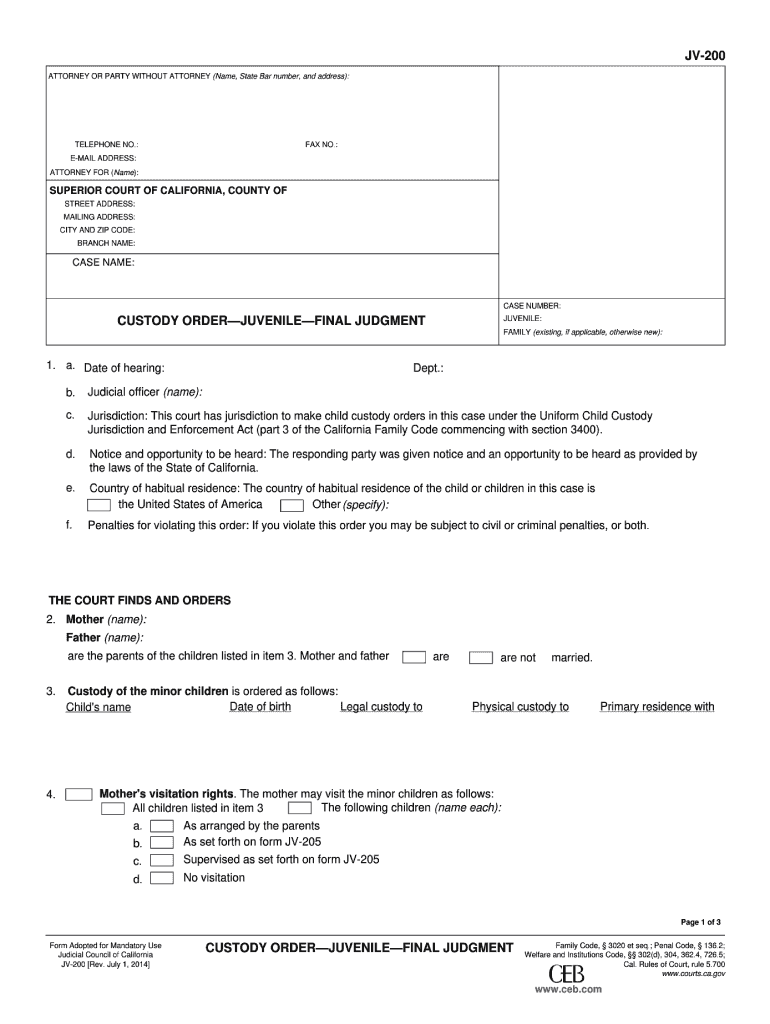
CA JV-200 2014 free printable template
pdfFiller is not affiliated with any government organization

Fill out
Complete the form online in a simple drag-and-drop editor.

eSign
Add your legally binding signature or send the form for signing.

Share
Share the form via a link, letting anyone fill it out from any device.

Export
Download, print, email, or move the form to your cloud storage.
Why pdfFiller is the best tool for your documents and forms


End-to-end document management
From editing and signing to collaboration and tracking, pdfFiller has everything you need to get your documents done quickly and efficiently.
Accessible from anywhere
pdfFiller is fully cloud-based. This means you can edit, sign, and share documents from anywhere using your computer, smartphone, or tablet.
Secure and compliant
pdfFiller lets you securely manage documents following global laws like ESIGN, CCPA, and GDPR. It's also HIPAA and SOC 2 compliant.
What is CA JV-200
The CA JV-200 is a legal form used by courts in California to facilitate the appointment of a minor's guardian.
pdfFiller scores top ratings on review platforms




Who needs CA JV-200?
Explore how professionals across industries use pdfFiller.

CA JV-200 is needed by:
-
Parents seeking a guardian for their child
-
Legal guardians applying for guardianship of a minor
-
Family members involved in minor's custody arrangements
-
Attorneys representing guardianship cases
-
Social workers overseeing child welfare cases
Comprehensive Guide to CA JV-200
What is the CA JV-200?
The CA JV-200 is a significant legal form primarily used in California to report changes in custodial arrangements for minors. Its importance lies in ensuring proper documentation of legal and financial transitions in child custody cases, which is crucial for maintaining transparency and compliance with state regulations. The CA JV-200 stands out from similar forms due to its specific focus on custody matters and the unique processes it entails in legal proceedings.
Purpose and Benefits of the CA JV-200
The primary purpose of filing the CA JV-200 is to officially document changes related to a child's custody. This form not only facilitates clarity in legal matters but also protects the rights of all parties involved, including potential impacts on child support and visitation rights. Individuals and businesses involved in related legal processes can benefit substantially from its use, as it aids in ensuring compliance with court orders and mitigates the risks of future disputes.
Furthermore, filing the CA JV-200 can have a positive impact on tax compliance, especially in cases where custody affects tax benefits or responsibilities.
Who Needs the CA JV-200?
The CA JV-200 is essential for various individuals, particularly those involved in custody cases, such as parents or guardians seeking changes to existing custody arrangements. Legal professionals representing clients in custody disputes may also require this form. Additionally, cases involving child welfare agencies or family law practitioners may mandate its completion.
Eligibility for filling out the CA JV-200 typically includes any parties directly involved in the custody of a minor, ensuring that they can advocate for their rights and those of the child in question.
How to Fill Out the CA JV-200 Online
To complete the CA JV-200 online, follow these steps:
-
Access the pdfFiller platform and locate the CA JV-200 form.
-
Fill in the required information in all relevant sections, including your personal details and specifics regarding custody arrangements.
-
Ensure to check for any highlighted fields that require specific attention.
-
Gather any necessary documentation before starting to facilitate accurate completion.
-
Review your entries for any errors before submitting the form.
This step-by-step guide can help ensure an efficient and error-free filing process.
Common Errors and How to Avoid Them
When completing the CA JV-200, users may encounter common pitfalls, including incomplete sections and inaccuracies in personal information. To prevent these errors, consider the following suggestions:
-
Double-check all entries against your documentation.
-
Pay special attention to deadlines to ensure timely submission.
-
Consult with a legal professional if unsure about certain sections.
-
Use the error-checking features available in pdfFiller before submission.
Taking these precautions can help ensure a smooth filing process.
Submission Methods and Where to Submit the CA JV-200
The CA JV-200 can be submitted through various methods, including online portals and physical submissions to relevant legal offices. Here’s a summary of options available:
-
Online submission via the pdfFiller platform.
-
Mailing the completed form to your local family court.
-
Hand-delivering it to designated court offices.
-
Consulting your attorney for guidance on specific submission locations.
Timely submission is critical to avoid penalties or delays in processing custody changes.
Tracking Your Submission and What Happens Next
After submitting the CA JV-200, users can track their submission status through pdfFiller’s online tracking tools. Typically, the next steps involve the court reviewing the submitted form and possibly reaching out for additional information or clarification. It’s important to stay informed about the status and be prepared for any follow-up actions, such as attending court hearings or responding to court notices.
Security and Compliance When Handling the CA JV-200
Filing the CA JV-200 involves handling sensitive information, making security paramount. When using pdfFiller, security measures include:
-
Utilizing 256-bit encryption to protect your data.
-
Adhering to compliance regulations such as HIPAA and GDPR.
-
Ensuring that all personal information is handled with the utmost confidentiality.
These measures help safeguard against unauthorized access while maintaining compliance with legal standards.
How pdfFiller Can Help with the CA JV-200
pdfFiller serves as an excellent solution for managing the CA JV-200 due to its user-friendly features. Key capabilities include:
-
The ability to edit and fill out the form seamlessly.
-
Options for securely eSigning the document.
-
Assistance with converting documents for easy sharing and filing.
Using pdfFiller ensures a streamlined process while prioritizing security and compliance with all relevant laws.
Get Started with Your CA JV-200 Today
With pdfFiller, users can conveniently start filling out their CA JV-200 form online, experiencing a hassle-free process that simplifies document management. The platform's user-friendly interface and robust features make it an ideal choice for both individual and professional use. Don’t delay—begin your CA JV-200 filing today to ensure compliance with custody requirements.
How to fill out the CA JV-200
-
1.Access pdfFiller and use the search function to find the CA JV-200 form.
-
2.Open the form on pdfFiller to begin filling it out directly online.
-
3.Review the required information for the form, including details about the minor and potential guardian.
-
4.Use pdfFiller's text fields to enter the necessary information accurately, ensuring all parts of the form are filled.
-
5.Take advantage of the toolbar to modify, add, or delete any sections as needed for clarity and accuracy.
-
6.After completing the form, double-check all entries for errors and ensure the form is fully filled.
-
7.Proceed to pdfFiller's review section to finalize the completed form and make any last-minute adjustments.
-
8.Once reviewed, use the options to save your work, download the document as a PDF, or submit it directly online.

Who is eligible to use the CA JV-200 form?
The CA JV-200 form is intended for use by parents, legal guardians, and family members who are involved in seeking guardianship of a minor in California.
Are there any deadlines for submitting the CA JV-200 form?
Deadlines can vary based on individual circumstances and court requirements. It is advisable to check with the relevant court for specific submission timelines.
What methods can I use to submit the completed CA JV-200 form?
You can submit the completed CA JV-200 form either in person at the local courthouse or, in some cases, via mail or online submission through a designated court portal.
What supporting documents are needed with the CA JV-200 form?
Generally, you may need to provide identification, proof of residency, and any pertinent court documents related to custody or guardianship cases along with the CA JV-200 form.
What are common mistakes to avoid when filling out the CA JV-200?
Common mistakes include leaving required fields blank, incorrect information about the minor or guardian, and failing to sign or date the form where necessary.
How long does it take for the CA JV-200 form to be processed?
Processing times can vary significantly by county and court workload. Generally, expect a few weeks, but it's best to check with your local court for specific timelines.
How can I ensure my CA JV-200 form is completed correctly?
To ensure accuracy, thoroughly review the form after filling it out, consult with legal professionals if needed, and verify that all necessary documents are included before submission.
CA JV-200 Form Versions
Related Content
Related Forms





Related Catalogs
Get the latest insights from our blog


If you believe that this page should be taken down, please follow our DMCA take down process
here
.
This form may include fields for payment information. Data entered in these fields is not covered by PCI DSS compliance.