
Last updated on
Oct 31, 2026

Get the free 7-Eleven Employment Application Form
We are not affiliated with any brand or entity on this form

Fill out
Complete the form online in a simple drag-and-drop editor.

eSign
Add your legally binding signature or send the form for signing.

Share
Share the form via a link, letting anyone fill it out from any device.

Export
Download, print, email, or move the form to your cloud storage.
Why pdfFiller is the best tool for your documents and forms


End-to-end document management
From editing and signing to collaboration and tracking, pdfFiller has everything you need to get your documents done quickly and efficiently.
Accessible from anywhere
pdfFiller is fully cloud-based. This means you can edit, sign, and share documents from anywhere using your computer, smartphone, or tablet.
Secure and compliant
pdfFiller lets you securely manage documents following global laws like ESIGN, CCPA, and GDPR. It's also HIPAA and SOC 2 compliant.
What is 7-Eleven Job Application
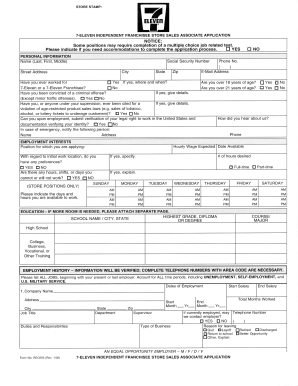
The 7-Eleven Employment Application Form is a document used by job seekers to apply for employment at 7-Eleven in Hawaii. It gathers essential personal and work-related information from applicants.
pdfFiller scores top ratings on review platforms




Who needs 7-Eleven Job Application?
Explore how professionals across industries use pdfFiller.

7-Eleven Job Application is needed by:
-
Job seekers interested in working at 7-Eleven
-
Individuals residing in Hawaii seeking employment opportunities
-
Students or recent graduates looking for part-time work
-
People transitioning between jobs requiring application forms
-
Career changers wanting to explore retail positions
-
Local residents seeking flexible hours in a convenience store
Comprehensive Guide to 7-Eleven Job Application
What is the 7-Eleven Employment Application Form?
The 7-Eleven Employment Application Form is a crucial document for individuals seeking employment at 7-Eleven in Hawaii. This form serves multiple purposes, including capturing the applicant's personal information, employment history, and educational background. By providing this necessary information, candidates can streamline their potential hiring process.
Completing the 7-Eleven employment application is essential for ensuring that all applicants are evaluated fairly. It includes sections that require details such as previous employer names, dates of employment, and positions held. This comprehensive approach to gathering information helps 7-Eleven assess the qualifications of its future employees.
Purpose and Benefits of the 7-Eleven Employment Application Form
The primary role of the 7-Eleven job application form is to facilitate the hiring process by ensuring that all applicants provide consistent and complete information. Completing the form accurately and in a timely manner yields numerous benefits, including improved chances of being considered for an interview.
-
Enhances the clarity of submissions for hiring managers.
-
Increases the likelihood of timely processing and feedback.
-
Valid for submission within a 90-day period, ensuring up-to-date evaluations.
Who Should Use the 7-Eleven Employment Application Form?
This employment application form is designed for potential applicants aiming to join the 7-Eleven workforce. It caters to a diverse audience, from first-time job seekers to experienced candidates looking for new opportunities.
Eligibility requirements for completing the form typically include age restrictions and work eligibility criteria. By clearly outlining these prerequisites, 7-Eleven ensures that all applicants meet the necessary standards for employment.
Key Features of the 7-Eleven Employment Application Form
The application form includes various sections designed to collect comprehensive information. Key features consist of:
-
Personal information fields for full name, address, and contact details.
-
Sections for educational background and work history, capturing essential qualifications.
-
An electronic signature area, allowing applicants to verify their information digitally.
The fillable template is user-friendly, making it easy for candidates to complete their applications through platforms like pdfFiller.
How to Fill Out the 7-Eleven Employment Application Form Online
Accessing and completing the 7-Eleven job application form online is straightforward. Here are the steps to follow:
-
Visit the pdfFiller website to access the application form.
-
Fill in each required section, ensuring all information is accurate.
-
Review your details carefully before submission to catch any potential errors.
Utilizing tips for accuracy, such as validating your contact details and reviewing your signature, can significantly enhance the quality of your application.
Common Mistakes and How to Avoid Them When Completing the Form
Many applicants encounter common errors when filling out the application, which can hinder their chances of successful submission. These frequent mistakes include:
-
Omitting required information, such as previous employment details.
-
Issues with the electronic signature, leading to rejection of the application.
To minimize mistakes, consider using a review and validation checklist prior to submitting your application. This checklist should focus on completeness and accuracy of all sections.
Submitting the 7-Eleven Employment Application Form
Once the application is complete, it's essential to understand the submission methods available. Applicants can choose to submit their completed forms through:
-
Online submission via pdfFiller for quick processing.
-
Mail options for those who prefer physical submission methods.
After submission, candidates should expect to receive confirmation of receipt, informing them about the next steps in the hiring process.
Security and Privacy When Using the 7-Eleven Employment Application Form
Data safety is a significant concern for applicants filling out personal information. pdfFiller ensures a secure experience with measures such as:
-
256-bit encryption protecting sensitive data during transmission.
-
Compliance with data protection regulations, including HIPAA and GDPR.
Applicants should feel confident submitting their personal information securely through this platform.
Using pdfFiller for a Smooth Application Process
Leveraging pdfFiller’s services can greatly enhance the application experience. Benefits include:
-
Ease of filling, editing, and eSigning the 7-Eleven application form.
-
Accessibility from any browser, providing flexibility for applicants.
pdfFiller also offers additional features like document management and eSigning, making the application process more efficient.
Final Thoughts and Next Steps
Completing the 7-Eleven Employment Application Form is a critical step for anyone aspiring to join the 7-Eleven team. A proactive approach to starting your application using pdfFiller can pave the way for a successful job search.
Begin your application process today to explore the employment opportunities available at 7-Eleven.
How to fill out the 7-Eleven Job Application
-
1.Access the 7-Eleven Employment Application Form on pdfFiller by visiting their website and using the search feature to locate the form.
-
2.Once you find the form, click on it to open it in the pdfFiller interface, where you can easily fill in the required information.
-
3.Before you start filling out the form, gather necessary information such as your personal details, employment history, education background, and work availability.
-
4.Begin completing the form by entering your name, date, and other personal information in the designated fields provided.
-
5.Utilize pdfFiller’s navigation tools to move between fields effortlessly, making use of checkboxes where applicable to indicate preferences or qualifications.
-
6.Review all entries for accuracy, ensuring that each section is filled out completely, including the electronic signature section, if required.
-
7.Once satisfied with the information entered, finalize the form by following the prompts in pdfFiller to save your progress.
-
8.You can download the completed form to your device or utilize pdfFiller’s submission options to send it directly to 7-Eleven for processing.

What are the eligibility requirements for the 7-Eleven Employment Application?
Applicants must be legally eligible to work in the US and meet any specified age requirements set by local laws. It is essential to have a valid ID and other supporting documents ready.
Is there a deadline for submitting the 7-Eleven job application?
While there is generally no strict deadline, it’s advisable to submit your application as soon as possible to increase your chances of securing a position. Applications are valid for 90 days from submission.
How can I submit my completed 7-Eleven Employment Application?
You can submit the completed application through pdfFiller's online submission feature or download it and submit it directly to a 7-Eleven location or through email based on the provided instructions.
What supporting documents are needed for the application process?
Typically, applicants may need to provide a valid government-issued ID, a resume if applicable, and any relevant certifications or references that would support their application.
What common mistakes should I avoid when filling out the application?
Ensure all fields are filled accurately, avoid leaving any required sections blank, and double-check for spelling errors in contact information to prevent delays in processing.
How long does it take to process the 7-Eleven Employment Application?
Processing times may vary but generally take a few weeks. It is important to follow up if you do not hear back within a reasonable timeframe after submission.
What should I do if I encounter technical issues with the pdfFiller form?
If you face technical difficulties with pdfFiller, check their support resources, or contact their customer service for assistance to ensure your application is submitted properly.
Related Forms



Related Catalogs
Get the latest insights from our blog


If you believe that this page should be taken down, please follow our DMCA take down process
here
.
This form may include fields for payment information. Data entered in these fields is not covered by PCI DSS compliance.